> ## Documentation Index
> Fetch the complete documentation index at: https://docs.cassidyai.com/llms.txt
> Use this file to discover all available pages before exploring further.
# Code Execution & File Creation
> Control whether Agents can analyze data, generate files, and process large connector results by writing and running code.
**Code Execution & File Creation** lets an [Agent](/agents/overview) write and run code when a request needs more than a normal text response. Agents use it to analyze spreadsheets, generate charts, create downloadable files, and work with large results from [Connectors](/agents/connectors/overview) or [Workflows](/workflows/overview).
New custom Agents have **Code Execution & File Creation** enabled by default.
If you're looking for Data Analysis, it has moved into this setting. Data
analysis is one of the main things Code Execution & File Creation enables.
## What it enables
When this setting is on, your Agent can:
* Analyze CSVs, spreadsheets, and structured files
* Create charts, summaries, and calculations from data
* Generate downloadable documents, spreadsheets, presentations, and PDFs
* Read large Connector or Workflow results that would otherwise be cut off
* Work with files attached in Chat or referenced from the [Knowledge Base](/knowledge-base/overview)
## Check or change the setting
Go to **Agents**, find the Agent you want to configure, click the **⋯** menu, and select **Edit**.
In the **Customize** section, expand **Advanced Settings**.
Use the **Code Execution & File Creation** toggle.
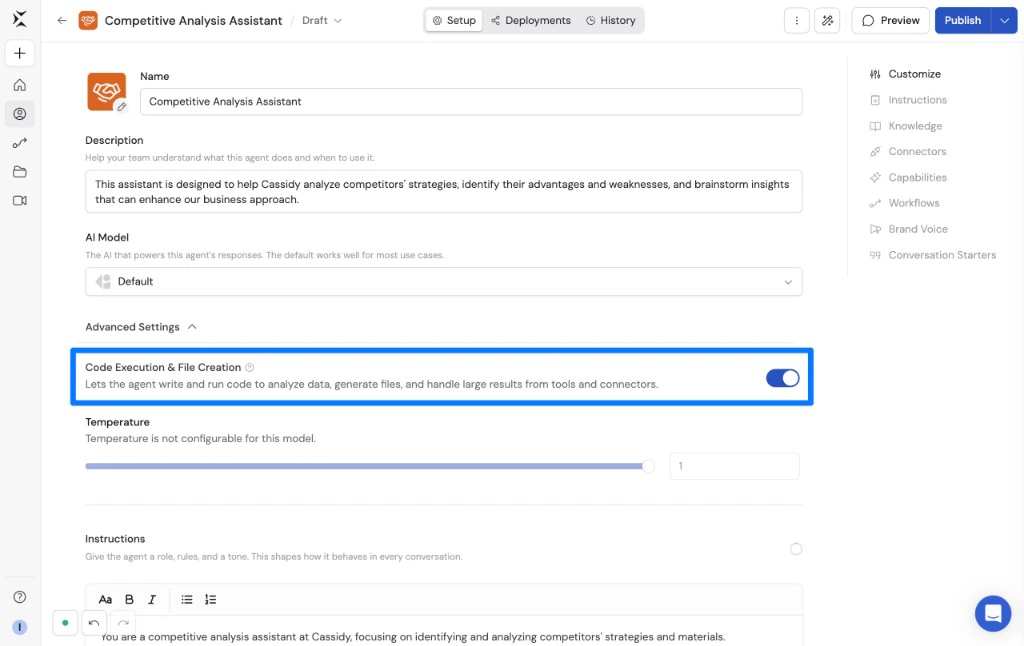 Click **Publish** to save the setting.
## Internet access
Organization admins can also control whether code execution can access the internet while processing files or installing packages. See [Control code execution and file creation internet access](/settings/code-sandbox).
## Related
Ask Agents to analyze spreadsheets, CSVs, and structured files.
Generate documents, spreadsheets, presentations, and reports.
Use Code Execution & File Creation inside Generate Text actions.
Click **Publish** to save the setting.
## Internet access
Organization admins can also control whether code execution can access the internet while processing files or installing packages. See [Control code execution and file creation internet access](/settings/code-sandbox).
## Related
Ask Agents to analyze spreadsheets, CSVs, and structured files.
Generate documents, spreadsheets, presentations, and reports.
Use Code Execution & File Creation inside Generate Text actions.