> ## Documentation Index
> Fetch the complete documentation index at: https://docs.cassidyai.com/llms.txt
> Use this file to discover all available pages before exploring further.
# Choose the right AI model
> Compare GPT, Claude, and Gemini models to pick the best one for each task in your Agents and Workflows.
Cassidy gives you access to all leading AI models and automatically recommends the best options for different scenarios. You can choose models per [Agent](/agents/overview), per chat, and per [Workflow](/workflows/overview) step — so you always use the right tool for the job.
## Where you choose models
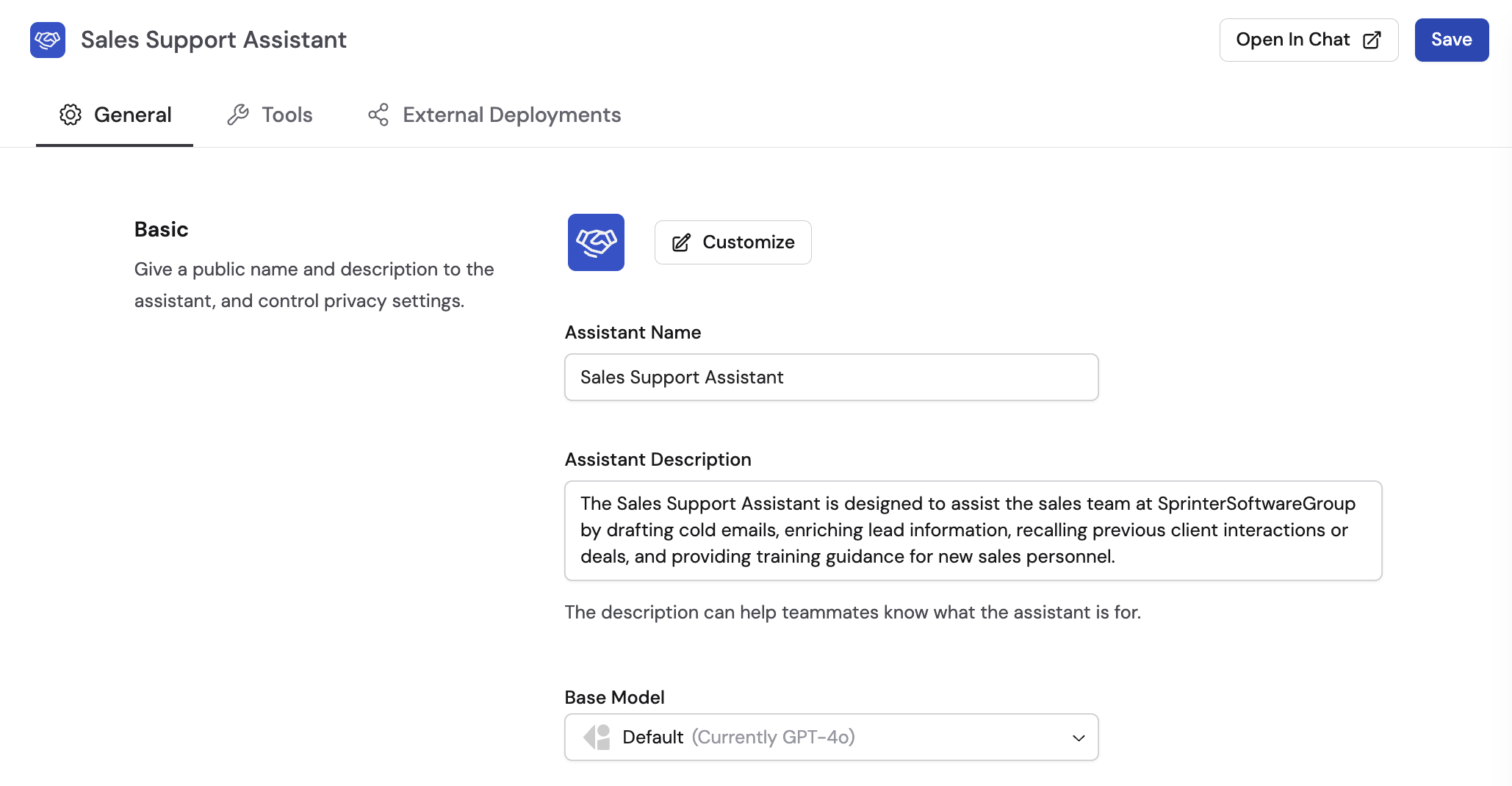
Choose any foundational model as the base for your custom Agents. You can also use default Agents that run on foundational models without your business context.
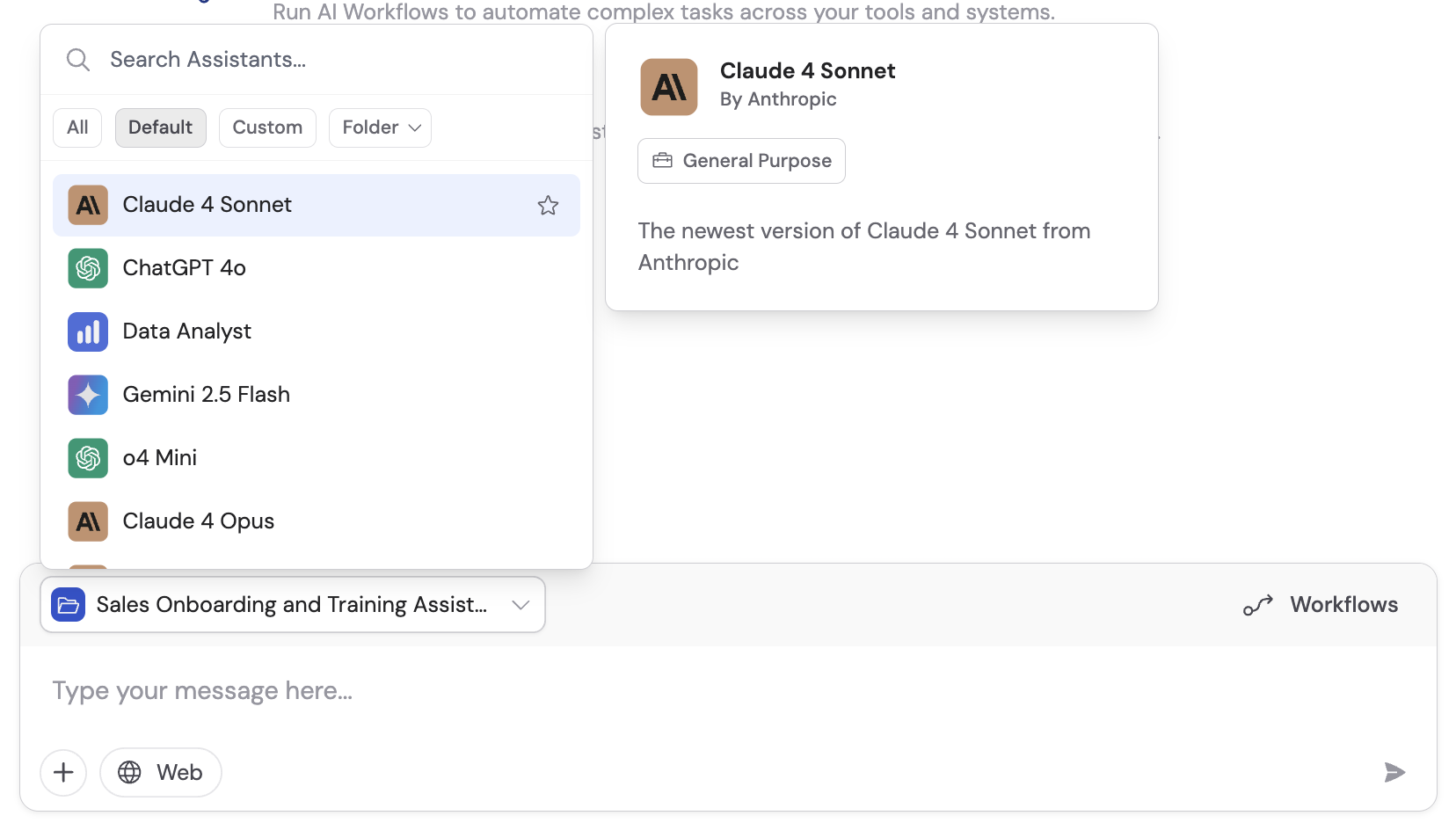
 Switch between models and Agents at any time during a conversation. This gives you flexibility to use the best model for each part of your chat.
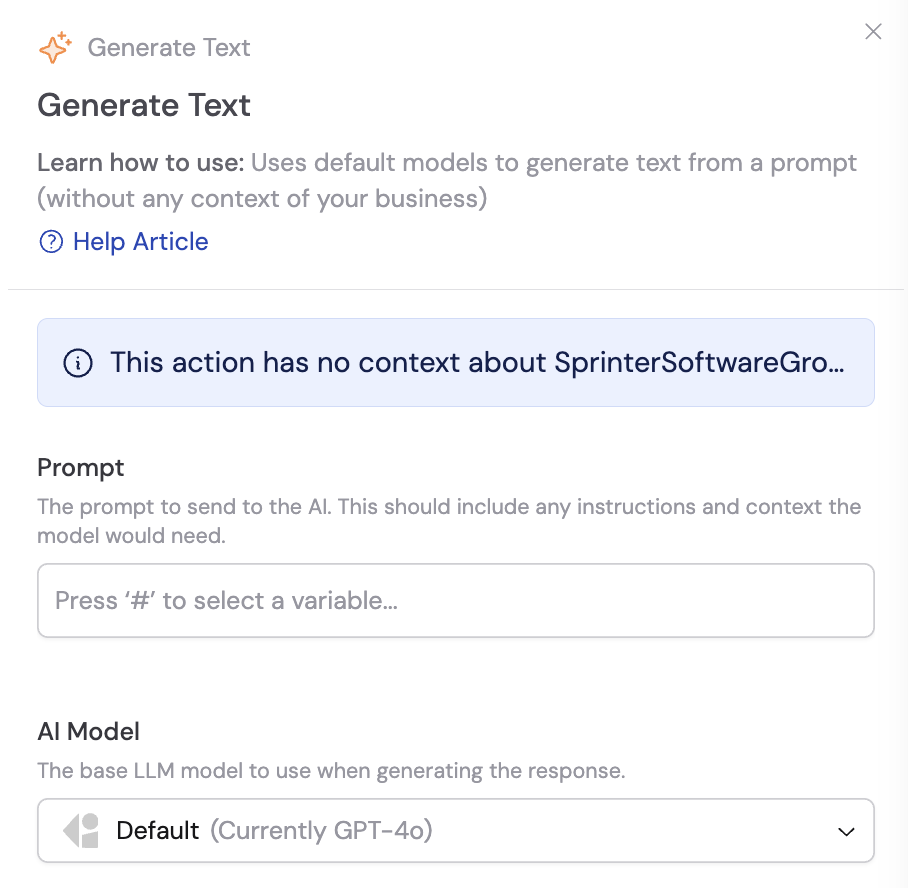
 Each [Workflow](/workflows/overview) step can use a different model. The **Generate Text** action lets you select the AI model that best fits each automation step.
 ## Recommended models
Cassidy's **Recommended Models** section is continuously updated as new models are released and evaluated. The platform surfaces the best-performing, most cost-effective models for your needs, and cost reductions from providers are automatically passed on to you.
## Recommended models
Cassidy's **Recommended Models** section is continuously updated as new models are released and evaluated. The platform surfaces the best-performing, most cost-effective models for your needs, and cost reductions from providers are automatically passed on to you.
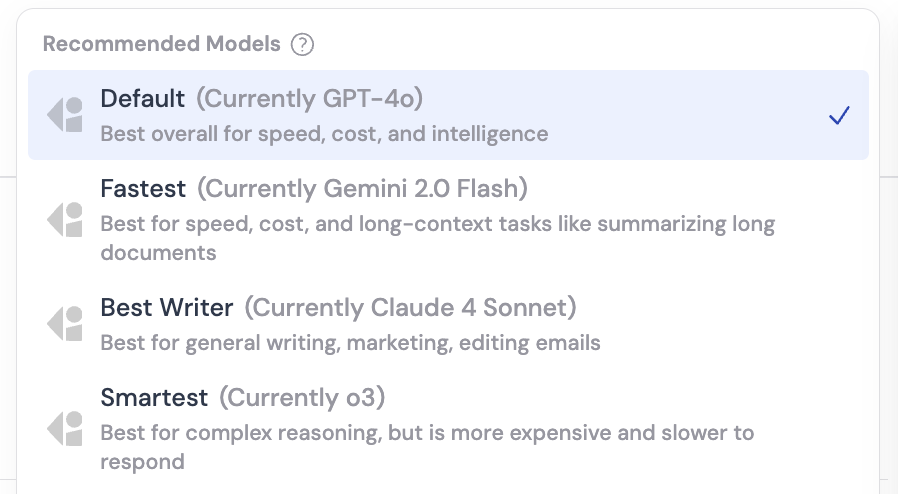 You do not need to track AI model releases manually — Cassidy keeps recommendations current as new models launch.
## Model providers and strengths
Each provider has distinct strengths. Use this as a starting point, then experiment to find what works best for your specific tasks.
Best for general Agent applications, everyday tasks, and Q\&A. Reliable for information retrieval and a wide range of business queries. Excels at automation and general knowledge tasks.
Preferred for creative writing, sales, and marketing content that needs a human-like touch. Ideal for drafting emails, marketing copy, and communication-heavy tasks that require natural-sounding language.
Ideal for processing large amounts of information or synthesizing data from multiple sources, thanks to its larger context window. Great for [deep research](/agents/deep-research), complex data analysis, and summarizing lengthy documents.
## Model categories
Not all models within a provider are created equal. They fall into three categories based on capability and cost.
| Category | Best for | Speed | Cost | Notes |
| -------------------------- | ---------------------------------------------------------------------------------- | -------- | -------- | ------------------------------------------------------------------------- |
| **Mini models** | High-volume, routine tasks like customer support triage, formatting, and summaries | Fast | Low | Latest mini models often match previous-generation full models in quality |
| **General-purpose models** | Everyday tasks — Q\&A, creative writing, moderate analysis | Moderate | Moderate | The best starting point for most use cases |
| **High-reasoning models** | Complex multi-step reasoning, legal analysis, financial workflows, STEM | Slow | High | "Think" longer before responding; break down problems step by step |
## Understanding credit consumption
Credit usage scales with prompt size and response length — complex tasks with lots of context consume proportionally more credits.
| Model tier | Relative cost | Examples |
| ---------------------------- | ------------- | -------------------------- |
| **Standard general-purpose** | 1x | GPT 5.2, Claude 4.6 Sonnet |
| **Premium general-purpose** | \~3x | Claude 4.6 Opus |
| **High-reasoning** | \~5x | o1 |
For most use cases, standard general-purpose models offer excellent performance at the best value. Start with these and switch to premium or high-reasoning models only when you need their specialized capabilities.
For more on managing credits, see [Manage credits](/settings/manage-credits).
## Best practices
### Match the model to the task
* Use **mini models** for summarization, formatting, and routine Workflow steps
* Use **general-purpose models** for everyday tasks that do not require deep reasoning
* Use **high-reasoning models** for complex analysis, planning, or when accuracy is critical
### Mix and match in Workflows
For optimal efficiency, combine different models within the same [Workflow](/workflows/overview):
* Mini models for straightforward steps like data formatting
* General-purpose models for generating final content
* High-reasoning models for multi-step analytical work or critical decision points
### Consider your specific use case
| Use case | Recommended provider |
| --------------------------------------------------------------- | -------------------- |
| Quick answers, document retrieval, general automation | **GPT** |
| Natural-sounding writing, emails, creative content | **Claude** |
| Large-scale data processing, research synthesis, long documents | **Gemini** |
## Next steps
Create a custom Agent and select the right model for its role.
Write effective prompts that get the most out of any model.
You do not need to track AI model releases manually — Cassidy keeps recommendations current as new models launch.
## Model providers and strengths
Each provider has distinct strengths. Use this as a starting point, then experiment to find what works best for your specific tasks.
Best for general Agent applications, everyday tasks, and Q\&A. Reliable for information retrieval and a wide range of business queries. Excels at automation and general knowledge tasks.
Preferred for creative writing, sales, and marketing content that needs a human-like touch. Ideal for drafting emails, marketing copy, and communication-heavy tasks that require natural-sounding language.
Ideal for processing large amounts of information or synthesizing data from multiple sources, thanks to its larger context window. Great for [deep research](/agents/deep-research), complex data analysis, and summarizing lengthy documents.
## Model categories
Not all models within a provider are created equal. They fall into three categories based on capability and cost.
| Category | Best for | Speed | Cost | Notes |
| -------------------------- | ---------------------------------------------------------------------------------- | -------- | -------- | ------------------------------------------------------------------------- |
| **Mini models** | High-volume, routine tasks like customer support triage, formatting, and summaries | Fast | Low | Latest mini models often match previous-generation full models in quality |
| **General-purpose models** | Everyday tasks — Q\&A, creative writing, moderate analysis | Moderate | Moderate | The best starting point for most use cases |
| **High-reasoning models** | Complex multi-step reasoning, legal analysis, financial workflows, STEM | Slow | High | "Think" longer before responding; break down problems step by step |
## Understanding credit consumption
Credit usage scales with prompt size and response length — complex tasks with lots of context consume proportionally more credits.
| Model tier | Relative cost | Examples |
| ---------------------------- | ------------- | -------------------------- |
| **Standard general-purpose** | 1x | GPT 5.2, Claude 4.6 Sonnet |
| **Premium general-purpose** | \~3x | Claude 4.6 Opus |
| **High-reasoning** | \~5x | o1 |
For most use cases, standard general-purpose models offer excellent performance at the best value. Start with these and switch to premium or high-reasoning models only when you need their specialized capabilities.
For more on managing credits, see [Manage credits](/settings/manage-credits).
## Best practices
### Match the model to the task
* Use **mini models** for summarization, formatting, and routine Workflow steps
* Use **general-purpose models** for everyday tasks that do not require deep reasoning
* Use **high-reasoning models** for complex analysis, planning, or when accuracy is critical
### Mix and match in Workflows
For optimal efficiency, combine different models within the same [Workflow](/workflows/overview):
* Mini models for straightforward steps like data formatting
* General-purpose models for generating final content
* High-reasoning models for multi-step analytical work or critical decision points
### Consider your specific use case
| Use case | Recommended provider |
| --------------------------------------------------------------- | -------------------- |
| Quick answers, document retrieval, general automation | **GPT** |
| Natural-sounding writing, emails, creative content | **Claude** |
| Large-scale data processing, research synthesis, long documents | **Gemini** |
## Next steps
Create a custom Agent and select the right model for its role.
Write effective prompts that get the most out of any model.