> ## Documentation Index
> Fetch the complete documentation index at: https://docs.cassidyai.com/llms.txt
> Use this file to discover all available pages before exploring further.
# Monday.com for Workflows
> Trigger Workflows from Monday.com board activity and automate board, item, group, column, and update management.
Use Monday.com as both a trigger and a destination in your [Workflows](/workflows/overview). Start a Workflow when items, subitems, or updates change on a board, then use Monday.com actions to create boards, manage structure, and update work automatically.
Monday.com Workflow actions and triggers require a paid Cassidy plan.
## Connect your account
Open a Monday.com trigger or action in the [Workflow builder](/workflows/overview).
Click **Connect**.
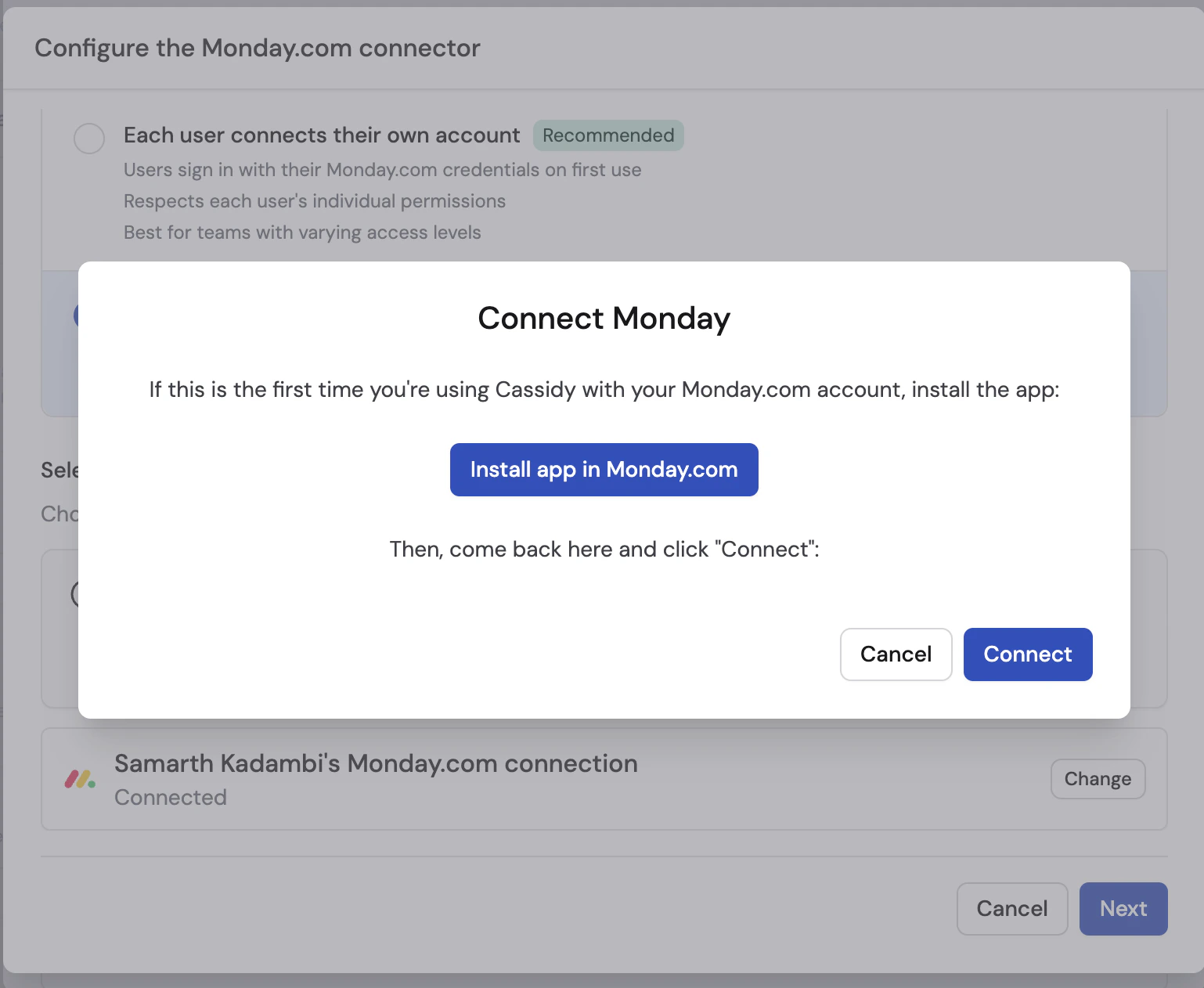
If this is your first Monday.com connection in Cassidy, click **Install app in Monday.com** and complete the install in Monday.com.
 On the Monday.com page, choose whether to install the app for **All Workspaces** or only **Specific Workspaces**, then click **Install**.
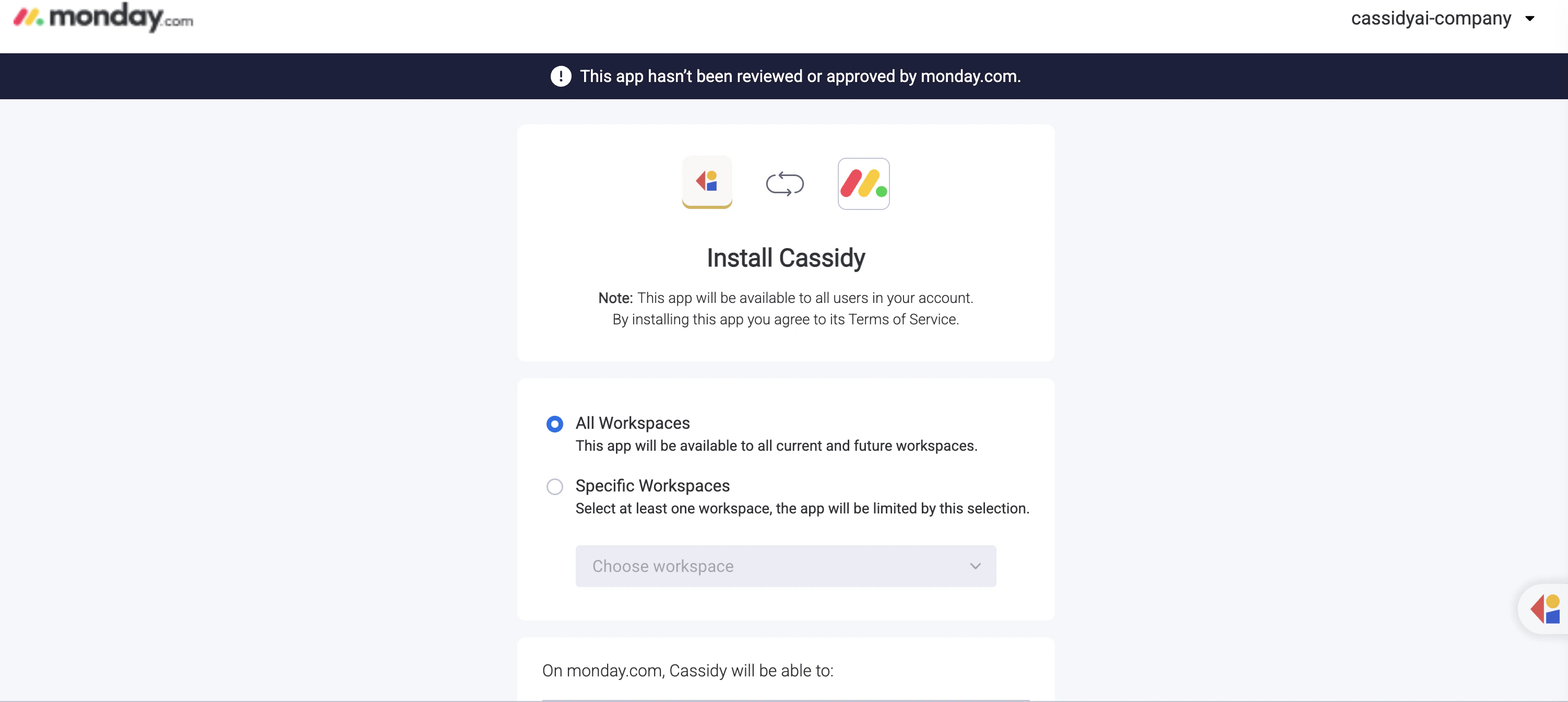 If Monday.com shows a banner saying the app has not been reviewed or approved by monday.com, that is expected during this setup flow.
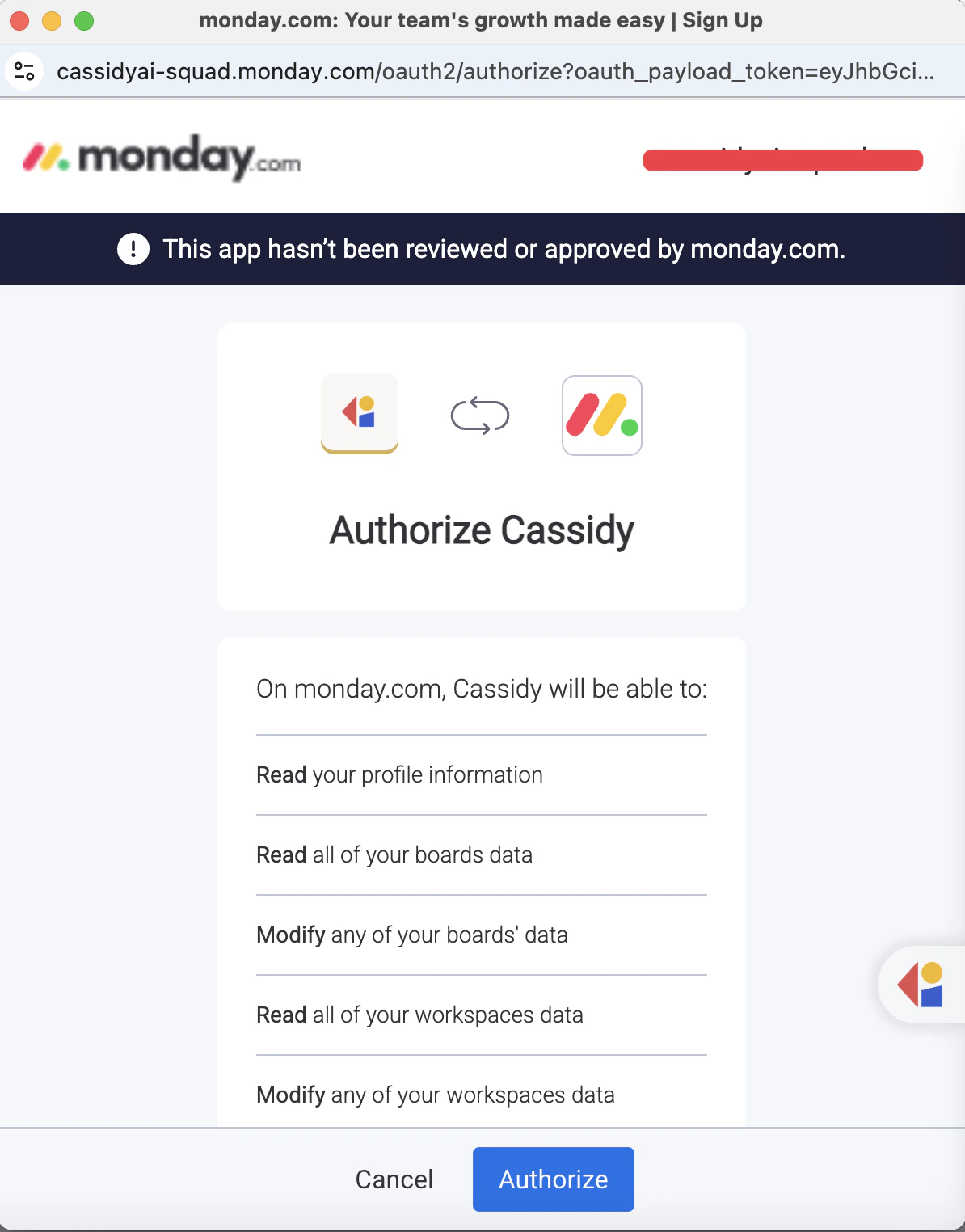
Return to Cassidy, click **Connect** in the modal, then review the requested permissions and click **Authorize**.
If Monday.com shows a banner saying the app has not been reviewed or approved by monday.com, that is expected during this setup flow.
Return to Cassidy, click **Connect** in the modal, then review the requested permissions and click **Authorize**.
 ## Triggers
### Item created
Starts a Workflow when a new item is created on a board.
**Configuration**
| Field | Description |
| --------- | ----------------------------- |
| **Board** | The Monday.com board to watch |
**Output variables**
| Variable | Description |
| -------------- | ----------------------------------------- |
| **Item ID** | The unique identifier of the created item |
| **Item Name** | The name of the created item |
| **Board ID** | The ID of the board containing the item |
| **User ID** | The ID of the user who created the item |
| **Group ID** | The ID of the group containing the item |
| **Group Name** | The name of the group containing the item |
| **Created At** | Timestamp when the item was created |
***
### Item updated
Starts a Workflow when a column value changes on an item.
**Configuration**
| Field | Description |
| ------------------- | --------------------------------------------------------------------------------------- |
| **Board** | The Monday.com board to watch |
| **Watched columns** | *(Optional)* One or more columns to watch. Leave empty to trigger on any column change. |
**Output variables**
| Variable | Description |
| ------------------ | ----------------------------------------- |
| **Item ID** | The unique identifier of the changed item |
| **Item Name** | The name of the changed item |
| **Board ID** | The ID of the board containing the item |
| **Column ID** | The ID of the changed column |
| **Column Title** | The display name of the changed column |
| **Column Type** | The type of the changed column |
| **New Value** | The updated value |
| **Previous Value** | The value before the change |
| **User ID** | The ID of the user who made the change |
| **Group ID** | The ID of the group containing the item |
| **Changed At** | Timestamp when the change happened |
***
### Item deleted
Starts a Workflow when an item is deleted from a board.
**Configuration**
| Field | Description |
| --------- | ----------------------------- |
| **Board** | The Monday.com board to watch |
**Output variables**
| Variable | Description |
| -------------- | ------------------------------------------- |
| **Item ID** | The unique identifier of the deleted item |
| **Item Name** | The name of the deleted item |
| **Board ID** | The ID of the board that contained the item |
| **User ID** | The ID of the user who deleted the item |
| **Group ID** | The ID of the group that contained the item |
| **Deleted At** | Timestamp when the item was deleted |
***
### Subitem created
Starts a Workflow when a new subitem is created on a board.
**Configuration**
| Field | Description |
| --------------- | --------------------------------------------------------------------------------- |
| **Board** | The Monday.com board to watch |
| **Parent item** | *(Optional)* Limit the trigger to subitems created under one specific parent item |
**Output variables**
| Variable | Description |
| ------------------------ | -------------------------------------------- |
| **Subitem ID** | The unique identifier of the created subitem |
| **Subitem Name** | The name of the created subitem |
| **Board ID** | The ID of the board containing the subitem |
| **User ID** | The ID of the user who created the subitem |
| **Group ID** | The ID of the group containing the subitem |
| **Group Name** | The name of the group containing the subitem |
| **Created At** | Timestamp when the subitem was created |
| **Parent Item ID** | The ID of the parent item |
| **Parent Item Board ID** | The ID of the parent item's board |
***
### Update created
Starts a Workflow when a new update or reply is posted on an item.
**Configuration**
| Field | Description |
| --------- | ----------------------------- |
| **Board** | The Monday.com board to watch |
**Output variables**
| Variable | Description |
| --------------- | ---------------------------------------------------- |
| **Update ID** | The unique identifier of the created update |
| **Update Body** | The plain-text body of the update |
| **Item ID** | The ID of the item the update was posted on |
| **Board ID** | The ID of the board containing the item |
| **User ID** | The ID of the user who created the update |
| **Reply ID** | The reply to ID, if the update was posted as a reply |
| **Created At** | Timestamp when the update was created |
## Actions
### Get items
Retrieves items from a board, including group details, attachments, and column values.
**Configuration**
| Field | Description |
| --------- | ---------------------------------------------- |
| **Board** | The board to retrieve items from |
| **Limit** | *(Optional)* Maximum number of items to return |
**Output variables**
| Variable | Description |
| --------------- | --------------------------------------------------------------- |
| **Items** | List of items with item details, attachments, and column values |
| **Total Count** | The number of items returned |
| **Board Name** | The name of the board |
***
### Get item
Retrieves one item by ID, including its board details, attachments, and column values.
**Configuration**
| Field | Description |
| ----------- | ------------------------------------------ |
| **Item ID** | The item to retrieve |
| **Board** | *(Optional)* The board containing the item |
**Output variables**
| Variable | Description |
| ----------------- | ----------------------------------------- |
| **Item ID** | The unique identifier of the item |
| **Item Name** | The name of the item |
| **Board ID** | The ID of the board containing the item |
| **Board Name** | The name of the board containing the item |
| **Group ID** | The ID of the group containing the item |
| **Group Name** | The name of the group containing the item |
| **Created At** | Timestamp when the item was created |
| **Updated At** | Timestamp when the item was last updated |
| **Item URL** | Direct link to the item in Monday.com |
| **Attachments** | Files attached to the item |
| **Column Values** | All column values on the item |
***
### Get groups
Retrieves all groups on a board.
**Configuration**
| Field | Description |
| --------- | --------------------------------- |
| **Board** | The board to retrieve groups from |
**Output variables**
| Variable | Description |
| ---------- | --------------------------------------------- |
| **Groups** | List of groups with each group's ID and title |
***
### Create board
Creates a new board in Monday.com.
**Configuration**
| Field | Description |
| ---------------- | ------------------------------------------------------------------ |
| **Board name** | The name for the new board |
| **Board kind** | The board visibility. Options are `public`, `private`, and `share` |
| **Workspace ID** | *(Optional)* The workspace where the board should be created |
| **Folder ID** | *(Optional)* The folder where the board should be created |
| **Template ID** | *(Optional)* A board template to copy |
**Output variables**
| Variable | Description |
| --------------- | ------------------------------------------ |
| **Board ID** | The unique identifier of the created board |
| **Board Name** | The name of the created board |
| **Board Kind** | The visibility type of the board |
| **State** | The current board state |
| **Permissions** | The board permission level |
***
### Create group
Creates a new group in a board.
**Configuration**
| Field | Description |
| -------------- | ------------------------------------------- |
| **Board** | The board where the group should be created |
| **Group name** | The name for the new group |
**Output variables**
| Variable | Description |
| -------------- | ------------------------------------------ |
| **Group ID** | The unique identifier of the created group |
| **Group Name** | The name of the created group |
***
### Delete group
Deletes a group from a board.
This action cannot be undone. Deleting a group removes it from the board in
Monday.com.
**Configuration**
| Field | Description |
| --------- | ------------------------------ |
| **Board** | The board containing the group |
| **Group** | The group to delete |
**Output variables**
| Variable | Description |
| ------------ | ------------------------------------------ |
| **Group ID** | The unique identifier of the deleted group |
***
### Create column
Creates a new column on a board.
**Configuration**
| Field | Description |
| ---------------- | --------------------------------------------------------------------- |
| **Board** | The board where the column should be created |
| **Column title** | The display name of the new column |
| **Column type** | The type of column to create, such as text, status, numbers, or date |
| **Description** | *(Optional)* A description for the column |
| **After column** | *(Optional)* The column after which the new column should be inserted |
**Output variables**
| Variable | Description |
| ---------------- | ------------------------------------------- |
| **Column ID** | The unique identifier of the created column |
| **Column Title** | The title of the created column |
| **Column Type** | The type of the created column |
| **Description** | The column description |
***
### Create item
Creates a new item on a board.
**Configuration**
| Field | Description |
| ----------------- | ------------------------------------------------------------------------------------------------ |
| **Board** | The board where the item should be created |
| **Item name** | The name of the new item |
| **Group** | *(Optional)* The group where the item should be created |
| **Column values** | *(Optional)* Values to set on the item. You can map individual columns or pass JSON dynamically. |
**Output variables**
| Variable | Description |
| -------------- | ----------------------------------------- |
| **Item ID** | The unique identifier of the created item |
| **Item Name** | The name of the created item |
| **Board ID** | The ID of the board containing the item |
| **Group ID** | The ID of the group containing the item |
| **Created At** | Timestamp when the item was created |
| **Item URL** | Direct link to the item in Monday.com |
***
### Update item
Updates one column value on an existing item.
**Configuration**
| Field | Description |
| ---------- | ----------------------------- |
| **Board** | The board containing the item |
| **Item** | The item to update |
| **Column** | The column to update |
| **Value** | The new value to set |
**Output variables**
| Variable | Description |
| ------------- | ----------------------------------------- |
| **Item ID** | The ID of the updated item |
| **Item Name** | The name of the updated item |
| **Success** | Whether the update completed successfully |
***
### Create update
Posts an update or reply on an item.
**Configuration**
| Field | Description |
| -------------------- | -------------------------------------------------------------- |
| **Board** | The board containing the item |
| **Item** | The item to post on |
| **Update body** | The message to post |
| **Parent update ID** | *(Optional)* If provided, Cassidy posts the message as a reply |
**Output variables**
| Variable | Description |
| ---------------- | ------------------------------------------- |
| **Update ID** | The unique identifier of the created update |
| **Update Body** | The content of the update |
| **Created At** | Timestamp when the update was created |
| **Creator ID** | The ID of the user who created the update |
| **Creator Name** | The name of the user who created the update |
***
### Delete item
Permanently deletes an item from a board.
This action cannot be undone. The item will be permanently deleted from
Monday.com.
**Configuration**
| Field | Description |
| --------- | ----------------------------- |
| **Board** | The board containing the item |
| **Item** | The item to delete |
**Output variables**
| Variable | Description |
| ----------- | ----------------------------------------- |
| **Item ID** | The unique identifier of the deleted item |
## Next steps
Learn how to build, test, and publish Workflows in Cassidy.
Let Agents read and manage boards, items, groups, and updates during
conversations.
## Triggers
### Item created
Starts a Workflow when a new item is created on a board.
**Configuration**
| Field | Description |
| --------- | ----------------------------- |
| **Board** | The Monday.com board to watch |
**Output variables**
| Variable | Description |
| -------------- | ----------------------------------------- |
| **Item ID** | The unique identifier of the created item |
| **Item Name** | The name of the created item |
| **Board ID** | The ID of the board containing the item |
| **User ID** | The ID of the user who created the item |
| **Group ID** | The ID of the group containing the item |
| **Group Name** | The name of the group containing the item |
| **Created At** | Timestamp when the item was created |
***
### Item updated
Starts a Workflow when a column value changes on an item.
**Configuration**
| Field | Description |
| ------------------- | --------------------------------------------------------------------------------------- |
| **Board** | The Monday.com board to watch |
| **Watched columns** | *(Optional)* One or more columns to watch. Leave empty to trigger on any column change. |
**Output variables**
| Variable | Description |
| ------------------ | ----------------------------------------- |
| **Item ID** | The unique identifier of the changed item |
| **Item Name** | The name of the changed item |
| **Board ID** | The ID of the board containing the item |
| **Column ID** | The ID of the changed column |
| **Column Title** | The display name of the changed column |
| **Column Type** | The type of the changed column |
| **New Value** | The updated value |
| **Previous Value** | The value before the change |
| **User ID** | The ID of the user who made the change |
| **Group ID** | The ID of the group containing the item |
| **Changed At** | Timestamp when the change happened |
***
### Item deleted
Starts a Workflow when an item is deleted from a board.
**Configuration**
| Field | Description |
| --------- | ----------------------------- |
| **Board** | The Monday.com board to watch |
**Output variables**
| Variable | Description |
| -------------- | ------------------------------------------- |
| **Item ID** | The unique identifier of the deleted item |
| **Item Name** | The name of the deleted item |
| **Board ID** | The ID of the board that contained the item |
| **User ID** | The ID of the user who deleted the item |
| **Group ID** | The ID of the group that contained the item |
| **Deleted At** | Timestamp when the item was deleted |
***
### Subitem created
Starts a Workflow when a new subitem is created on a board.
**Configuration**
| Field | Description |
| --------------- | --------------------------------------------------------------------------------- |
| **Board** | The Monday.com board to watch |
| **Parent item** | *(Optional)* Limit the trigger to subitems created under one specific parent item |
**Output variables**
| Variable | Description |
| ------------------------ | -------------------------------------------- |
| **Subitem ID** | The unique identifier of the created subitem |
| **Subitem Name** | The name of the created subitem |
| **Board ID** | The ID of the board containing the subitem |
| **User ID** | The ID of the user who created the subitem |
| **Group ID** | The ID of the group containing the subitem |
| **Group Name** | The name of the group containing the subitem |
| **Created At** | Timestamp when the subitem was created |
| **Parent Item ID** | The ID of the parent item |
| **Parent Item Board ID** | The ID of the parent item's board |
***
### Update created
Starts a Workflow when a new update or reply is posted on an item.
**Configuration**
| Field | Description |
| --------- | ----------------------------- |
| **Board** | The Monday.com board to watch |
**Output variables**
| Variable | Description |
| --------------- | ---------------------------------------------------- |
| **Update ID** | The unique identifier of the created update |
| **Update Body** | The plain-text body of the update |
| **Item ID** | The ID of the item the update was posted on |
| **Board ID** | The ID of the board containing the item |
| **User ID** | The ID of the user who created the update |
| **Reply ID** | The reply to ID, if the update was posted as a reply |
| **Created At** | Timestamp when the update was created |
## Actions
### Get items
Retrieves items from a board, including group details, attachments, and column values.
**Configuration**
| Field | Description |
| --------- | ---------------------------------------------- |
| **Board** | The board to retrieve items from |
| **Limit** | *(Optional)* Maximum number of items to return |
**Output variables**
| Variable | Description |
| --------------- | --------------------------------------------------------------- |
| **Items** | List of items with item details, attachments, and column values |
| **Total Count** | The number of items returned |
| **Board Name** | The name of the board |
***
### Get item
Retrieves one item by ID, including its board details, attachments, and column values.
**Configuration**
| Field | Description |
| ----------- | ------------------------------------------ |
| **Item ID** | The item to retrieve |
| **Board** | *(Optional)* The board containing the item |
**Output variables**
| Variable | Description |
| ----------------- | ----------------------------------------- |
| **Item ID** | The unique identifier of the item |
| **Item Name** | The name of the item |
| **Board ID** | The ID of the board containing the item |
| **Board Name** | The name of the board containing the item |
| **Group ID** | The ID of the group containing the item |
| **Group Name** | The name of the group containing the item |
| **Created At** | Timestamp when the item was created |
| **Updated At** | Timestamp when the item was last updated |
| **Item URL** | Direct link to the item in Monday.com |
| **Attachments** | Files attached to the item |
| **Column Values** | All column values on the item |
***
### Get groups
Retrieves all groups on a board.
**Configuration**
| Field | Description |
| --------- | --------------------------------- |
| **Board** | The board to retrieve groups from |
**Output variables**
| Variable | Description |
| ---------- | --------------------------------------------- |
| **Groups** | List of groups with each group's ID and title |
***
### Create board
Creates a new board in Monday.com.
**Configuration**
| Field | Description |
| ---------------- | ------------------------------------------------------------------ |
| **Board name** | The name for the new board |
| **Board kind** | The board visibility. Options are `public`, `private`, and `share` |
| **Workspace ID** | *(Optional)* The workspace where the board should be created |
| **Folder ID** | *(Optional)* The folder where the board should be created |
| **Template ID** | *(Optional)* A board template to copy |
**Output variables**
| Variable | Description |
| --------------- | ------------------------------------------ |
| **Board ID** | The unique identifier of the created board |
| **Board Name** | The name of the created board |
| **Board Kind** | The visibility type of the board |
| **State** | The current board state |
| **Permissions** | The board permission level |
***
### Create group
Creates a new group in a board.
**Configuration**
| Field | Description |
| -------------- | ------------------------------------------- |
| **Board** | The board where the group should be created |
| **Group name** | The name for the new group |
**Output variables**
| Variable | Description |
| -------------- | ------------------------------------------ |
| **Group ID** | The unique identifier of the created group |
| **Group Name** | The name of the created group |
***
### Delete group
Deletes a group from a board.
This action cannot be undone. Deleting a group removes it from the board in
Monday.com.
**Configuration**
| Field | Description |
| --------- | ------------------------------ |
| **Board** | The board containing the group |
| **Group** | The group to delete |
**Output variables**
| Variable | Description |
| ------------ | ------------------------------------------ |
| **Group ID** | The unique identifier of the deleted group |
***
### Create column
Creates a new column on a board.
**Configuration**
| Field | Description |
| ---------------- | --------------------------------------------------------------------- |
| **Board** | The board where the column should be created |
| **Column title** | The display name of the new column |
| **Column type** | The type of column to create, such as text, status, numbers, or date |
| **Description** | *(Optional)* A description for the column |
| **After column** | *(Optional)* The column after which the new column should be inserted |
**Output variables**
| Variable | Description |
| ---------------- | ------------------------------------------- |
| **Column ID** | The unique identifier of the created column |
| **Column Title** | The title of the created column |
| **Column Type** | The type of the created column |
| **Description** | The column description |
***
### Create item
Creates a new item on a board.
**Configuration**
| Field | Description |
| ----------------- | ------------------------------------------------------------------------------------------------ |
| **Board** | The board where the item should be created |
| **Item name** | The name of the new item |
| **Group** | *(Optional)* The group where the item should be created |
| **Column values** | *(Optional)* Values to set on the item. You can map individual columns or pass JSON dynamically. |
**Output variables**
| Variable | Description |
| -------------- | ----------------------------------------- |
| **Item ID** | The unique identifier of the created item |
| **Item Name** | The name of the created item |
| **Board ID** | The ID of the board containing the item |
| **Group ID** | The ID of the group containing the item |
| **Created At** | Timestamp when the item was created |
| **Item URL** | Direct link to the item in Monday.com |
***
### Update item
Updates one column value on an existing item.
**Configuration**
| Field | Description |
| ---------- | ----------------------------- |
| **Board** | The board containing the item |
| **Item** | The item to update |
| **Column** | The column to update |
| **Value** | The new value to set |
**Output variables**
| Variable | Description |
| ------------- | ----------------------------------------- |
| **Item ID** | The ID of the updated item |
| **Item Name** | The name of the updated item |
| **Success** | Whether the update completed successfully |
***
### Create update
Posts an update or reply on an item.
**Configuration**
| Field | Description |
| -------------------- | -------------------------------------------------------------- |
| **Board** | The board containing the item |
| **Item** | The item to post on |
| **Update body** | The message to post |
| **Parent update ID** | *(Optional)* If provided, Cassidy posts the message as a reply |
**Output variables**
| Variable | Description |
| ---------------- | ------------------------------------------- |
| **Update ID** | The unique identifier of the created update |
| **Update Body** | The content of the update |
| **Created At** | Timestamp when the update was created |
| **Creator ID** | The ID of the user who created the update |
| **Creator Name** | The name of the user who created the update |
***
### Delete item
Permanently deletes an item from a board.
This action cannot be undone. The item will be permanently deleted from
Monday.com.
**Configuration**
| Field | Description |
| --------- | ----------------------------- |
| **Board** | The board containing the item |
| **Item** | The item to delete |
**Output variables**
| Variable | Description |
| ----------- | ----------------------------------------- |
| **Item ID** | The unique identifier of the deleted item |
## Next steps
Learn how to build, test, and publish Workflows in Cassidy.
Let Agents read and manage boards, items, groups, and updates during
conversations.