> ## Documentation Index
> Fetch the complete documentation index at: https://docs.cassidyai.com/llms.txt
> Use this file to discover all available pages before exploring further.
# Smartsheet for Workflows
> Trigger Workflows from Smartsheet sheet activity and automate rows, sheets, workspaces, discussions, and attachments.
Use Smartsheet as both a trigger and a destination in your [Workflows](/workflows/overview). Start a Workflow when rows, comments, or attachments change on a sheet, then use Smartsheet actions to read sheet data, create and update rows, move work between sheets, and manage discussions and attachments automatically.
Smartsheet Workflow actions and triggers require a paid Cassidy plan.
## Connect your account
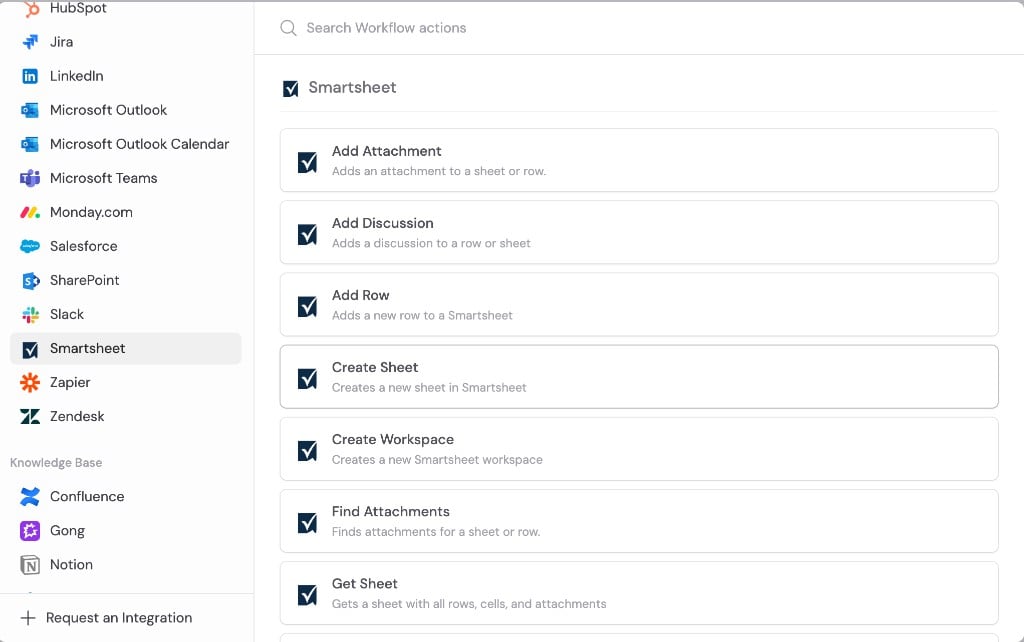
Open a Smartsheet trigger or action in the [Workflow builder](/workflows/overview).
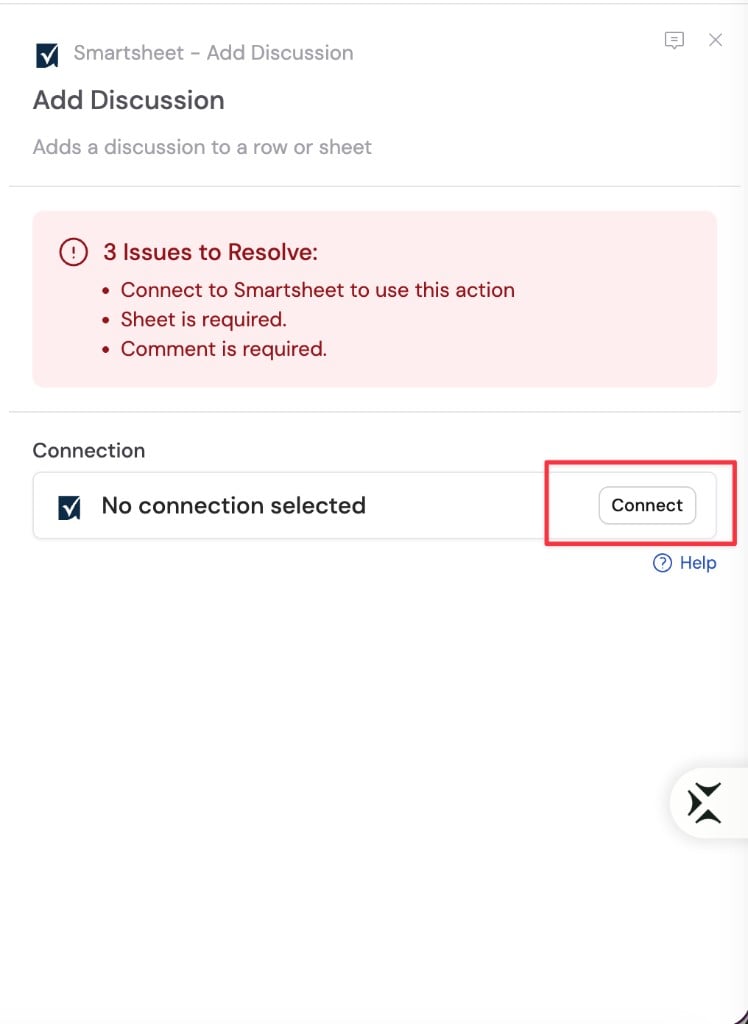
 Click **Connect**.
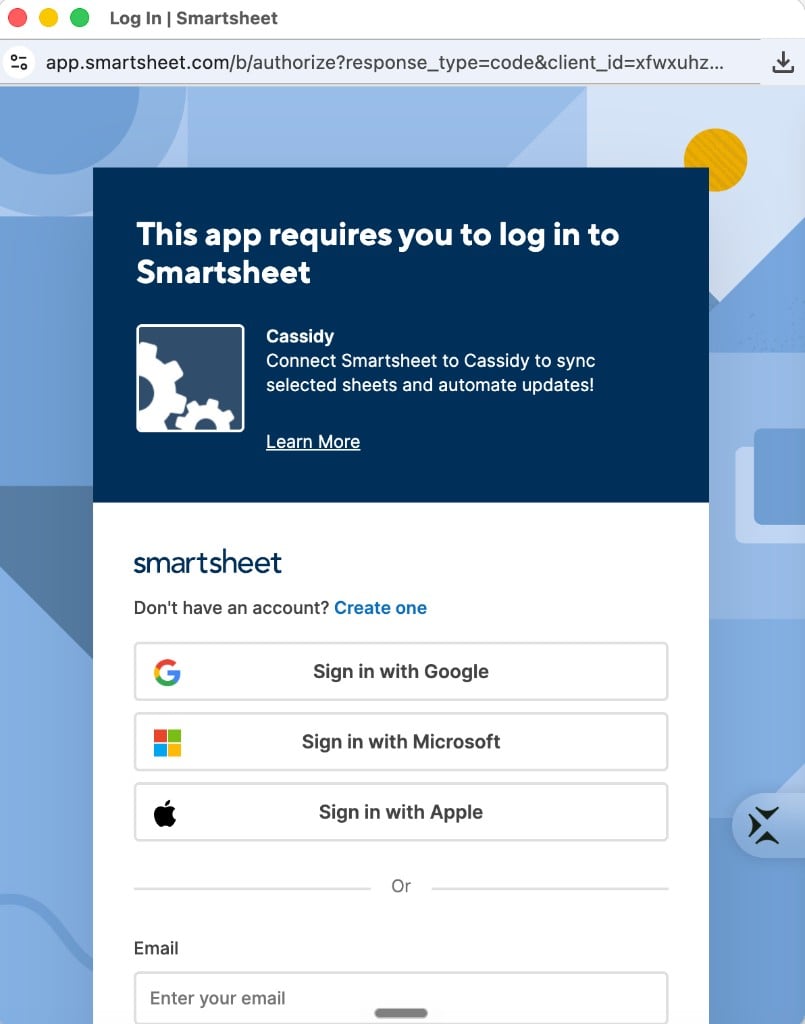
 Sign in with your Smartsheet account and review the requested permissions.
 Return to Cassidy and confirm your Smartsheet account is connected. You can now select sheets, rows, and columns in triggers and actions.
## Triggers
### New row
Starts a Workflow when a new row is added to a sheet.
**Configuration**
| Field | Description |
| --------- | ----------------------------- |
| **Sheet** | The Smartsheet sheet to watch |
**Output variables**
| Variable | Description |
| -------------- | ------------------------------------------------------ |
| **Sheet ID** | The unique identifier of the sheet containing the row |
| **Row ID** | The unique identifier of the new row |
| **Row Number** | The row number in the sheet |
| **Cells** | List of cells with Column ID, Value, and Display Value |
| **Created At** | Timestamp when the row was created |
| **User ID** | The ID of the user who created the row |
***
### Row updated
Starts a Workflow when a row is updated on a sheet.
**Configuration**
| Field | Description |
| --------- | ----------------------------- |
| **Sheet** | The Smartsheet sheet to watch |
**Output variables**
| Variable | Description |
| --------------------- | ------------------------------------------------------ |
| **Sheet ID** | The unique identifier of the sheet containing the row |
| **Row ID** | The unique identifier of the updated row |
| **Row Number** | The row number in the sheet |
| **Cells** | List of cells with Column ID, Value, and Display Value |
| **Modified At** | Timestamp when the row was modified |
| **User ID** | The ID of the user who modified the row |
| **Changed Column ID** | The ID of the column that changed, when available |
***
### New comment
Starts a Workflow when a new comment is added to a sheet.
**Configuration**
| Field | Description |
| --------- | ----------------------------- |
| **Sheet** | The Smartsheet sheet to watch |
**Output variables**
| Variable | Description |
| ------------------ | --------------------------------------------------------- |
| **Sheet ID** | The unique identifier of the sheet containing the comment |
| **Comment ID** | The unique identifier of the comment |
| **Comment Author** | The author of the comment |
| **Comment Text** | The content of the comment |
| **Created At** | Timestamp when the comment was created |
***
### New attachment
Starts a Workflow when a new attachment is added to a sheet or row.
**Configuration**
| Field | Description |
| --------- | ----------------------------- |
| **Sheet** | The Smartsheet sheet to watch |
**Output variables**
| Variable | Description |
| ----------------------- | ------------------------------------------------------------ |
| **Sheet ID** | The unique identifier of the sheet containing the attachment |
| **Row** | The unique identifier of the row the attachment is on |
| **Created At** | Timestamp when the attachment was added |
| **Attachment ID** | The unique identifier of the attachment |
| **Attachment** | The attachment as a file variable |
| **Attachment URL** | A temporary download URL for the attachment |
| **Attachment Mimetype** | The MIME type of the attachment |
| **Attachment Name** | The name of the attachment |
| **Created By User Id** | The ID of the user who added the attachment |
## Actions
### Get sheet
Retrieves a sheet by ID, including all rows with cell values and attachment metadata.
**Configuration**
| Field | Description |
| --------- | --------------------- |
| **Sheet** | The sheet to retrieve |
**Output variables**
| Variable | Description |
| --------------- | ------------------------------------------------------------------------------------------- |
| **Sheet ID** | The unique identifier of the sheet |
| **Name** | The name of the sheet |
| **Owner ID** | The unique identifier of the sheet owner |
| **Rows** | List of rows, each with Row ID, Row Number, Created At, Modified At, Cells, and Attachments |
| **Total Count** | Total number of rows returned |
Each row in **Rows** includes:
| Variable | Description |
| --------------- | ------------------------------------------------------------------------------------------------------- |
| **Row ID** | The unique identifier of the row |
| **Row Number** | The row's position in the sheet |
| **Created At** | When the row was created |
| **Modified At** | When the row was last modified |
| **Cells** | List of cells with Column ID and Value |
| **Attachments** | Files attached to the row, with Attachment ID, Name, MIME Type, Created At, and the attachment contents |
***
### Add row
Adds a new row to a sheet with the column values you specify.
**Configuration**
| Field | Description |
| ----------------- | ---------------------------------------------------------------------------------------------------- |
| **Sheet** | The sheet where the row should be added |
| **Column values** | Values to set on the new row. Select columns individually or pass JSON dynamically as an expression. |
**Output variables**
| Variable | Description |
| -------------- | ---------------------------------------- |
| **Row ID** | The unique identifier of the created row |
| **Row Number** | The row number in the sheet |
| **Sheet ID** | The ID of the sheet containing the row |
***
### Update row
Updates a single column value on an existing row.
**Configuration**
| Field | Description |
| ------------- | ------------------------------------------------------------------------------------------------------ |
| **Sheet** | The sheet containing the row |
| **Row** | The row to update |
| **Column** | The column to update |
| **New value** | The new value to set. Supports [variables](/workflows/advanced/utility-variables) from previous steps. |
**Output variables**
| Variable | Description |
| -------------- | ---------------------------------------- |
| **Row** | The unique identifier of the updated row |
| **Row Number** | The row number in the sheet |
| **Sheet ID** | The ID of the sheet containing the row |
***
### Move row
Moves a row from one sheet to another.
**Configuration**
| Field | Description |
| ---------------- | ------------------------------------ |
| **Source sheet** | The sheet containing the row to move |
| **Row** | The row to move |
| **Target sheet** | The sheet to move the row into |
**Output variables**
| Variable | Description |
| ------------------------ | --------------------------------------------------------- |
| **New Row** | The unique identifier of the row in the destination sheet |
| **Destination Sheet ID** | The unique identifier of the destination sheet |
***
### Create sheet
Creates a new sheet in Smartsheet.
**Configuration**
| Field | Description |
| -------------- | ------------------------------------------------------------ |
| **Sheet name** | The name for the new sheet |
| **Workspace** | *(Optional)* The workspace where the sheet should be created |
**Output variables**
| Variable | Description |
| -------------- | ------------------------------------------ |
| **Sheet ID** | The unique identifier of the created sheet |
| **Sheet Name** | The name of the created sheet |
| **Permalink** | The URL to access the sheet |
***
### Create workspace
Creates a new workspace in Smartsheet.
**Configuration**
| Field | Description |
| ------------------ | ------------------------------ |
| **Workspace name** | The name for the new workspace |
**Output variables**
| Variable | Description |
| ------------------ | ---------------------------------------------- |
| **Workspace ID** | The unique identifier of the created workspace |
| **Workspace Name** | The name of the created workspace |
| **Permalink** | The URL to access the workspace |
***
### Add discussion
Adds a discussion (comment) to a sheet or row.
**Configuration**
| Field | Description |
| ----------- | -------------------------------------------------------------------------------- |
| **Sheet** | The sheet where the discussion should be added |
| **Row** | *(Optional)* The row to add the discussion to. Leave empty to post on the sheet. |
| **Comment** | The text of the discussion to add |
**Output variables**
| Variable | Description |
| ----------------- | --------------------------------------------- |
| **Discussion ID** | The unique identifier of the discussion |
| **Comment ID** | The ID of the first comment in the discussion |
***
### Add attachment
Adds an attachment to a sheet or row. Attach a file from a previous step or link to a URL.
**Configuration**
| Field | Description |
| ------------------- | ------------------------------------------------------------------------------------------------------------- |
| **Sheet** | The sheet where the attachment should be added |
| **Row** | *(Optional)* The row to attach the file to. Leave empty to attach to the sheet. |
| **Attachment type** | Choose **File** to upload from a previous step, or **URL** to link to an external file |
| **File** | *(Required when attachment type is File)* The file to attach — reference a file variable from a previous step |
| **Attachment URL** | *(Required when attachment type is URL)* The URL of the file to attach |
| **Attachment name** | *(Required when attachment type is URL)* The display name for the attachment |
You only fill in fields for the attachment type you selected. Choose **File** and
provide a file variable, or choose **URL** and provide both an attachment URL
and attachment name.
**Output variables**
| Variable | Description |
| ------------------- | --------------------------------------- |
| **Attachment ID** | The unique identifier of the attachment |
| **Attachment Name** | The name of the attachment |
***
### Find attachments
Finds all attachments on a sheet or row.
**Configuration**
| Field | Description |
| --------- | ---------------------------------------------------------------------------- |
| **Sheet** | The sheet to search |
| **Row** | *(Optional)* The row to search. Leave empty to find sheet-level attachments. |
**Output variables**
| Variable | Description |
| --------------- | ------------------------------------------------------------------------------------------ |
| **Attachments** | List of attachments with Attachment ID, Name, URL, Created At, and the attachment contents |
| **Count** | Number of attachments found |
## Next steps
Learn how to build, test, and publish Workflows in Cassidy.
Load recent Smartsheet events to verify your trigger configuration before
publishing.
Learn what you can do with Smartsheet in Cassidy.
Return to Cassidy and confirm your Smartsheet account is connected. You can now select sheets, rows, and columns in triggers and actions.
## Triggers
### New row
Starts a Workflow when a new row is added to a sheet.
**Configuration**
| Field | Description |
| --------- | ----------------------------- |
| **Sheet** | The Smartsheet sheet to watch |
**Output variables**
| Variable | Description |
| -------------- | ------------------------------------------------------ |
| **Sheet ID** | The unique identifier of the sheet containing the row |
| **Row ID** | The unique identifier of the new row |
| **Row Number** | The row number in the sheet |
| **Cells** | List of cells with Column ID, Value, and Display Value |
| **Created At** | Timestamp when the row was created |
| **User ID** | The ID of the user who created the row |
***
### Row updated
Starts a Workflow when a row is updated on a sheet.
**Configuration**
| Field | Description |
| --------- | ----------------------------- |
| **Sheet** | The Smartsheet sheet to watch |
**Output variables**
| Variable | Description |
| --------------------- | ------------------------------------------------------ |
| **Sheet ID** | The unique identifier of the sheet containing the row |
| **Row ID** | The unique identifier of the updated row |
| **Row Number** | The row number in the sheet |
| **Cells** | List of cells with Column ID, Value, and Display Value |
| **Modified At** | Timestamp when the row was modified |
| **User ID** | The ID of the user who modified the row |
| **Changed Column ID** | The ID of the column that changed, when available |
***
### New comment
Starts a Workflow when a new comment is added to a sheet.
**Configuration**
| Field | Description |
| --------- | ----------------------------- |
| **Sheet** | The Smartsheet sheet to watch |
**Output variables**
| Variable | Description |
| ------------------ | --------------------------------------------------------- |
| **Sheet ID** | The unique identifier of the sheet containing the comment |
| **Comment ID** | The unique identifier of the comment |
| **Comment Author** | The author of the comment |
| **Comment Text** | The content of the comment |
| **Created At** | Timestamp when the comment was created |
***
### New attachment
Starts a Workflow when a new attachment is added to a sheet or row.
**Configuration**
| Field | Description |
| --------- | ----------------------------- |
| **Sheet** | The Smartsheet sheet to watch |
**Output variables**
| Variable | Description |
| ----------------------- | ------------------------------------------------------------ |
| **Sheet ID** | The unique identifier of the sheet containing the attachment |
| **Row** | The unique identifier of the row the attachment is on |
| **Created At** | Timestamp when the attachment was added |
| **Attachment ID** | The unique identifier of the attachment |
| **Attachment** | The attachment as a file variable |
| **Attachment URL** | A temporary download URL for the attachment |
| **Attachment Mimetype** | The MIME type of the attachment |
| **Attachment Name** | The name of the attachment |
| **Created By User Id** | The ID of the user who added the attachment |
## Actions
### Get sheet
Retrieves a sheet by ID, including all rows with cell values and attachment metadata.
**Configuration**
| Field | Description |
| --------- | --------------------- |
| **Sheet** | The sheet to retrieve |
**Output variables**
| Variable | Description |
| --------------- | ------------------------------------------------------------------------------------------- |
| **Sheet ID** | The unique identifier of the sheet |
| **Name** | The name of the sheet |
| **Owner ID** | The unique identifier of the sheet owner |
| **Rows** | List of rows, each with Row ID, Row Number, Created At, Modified At, Cells, and Attachments |
| **Total Count** | Total number of rows returned |
Each row in **Rows** includes:
| Variable | Description |
| --------------- | ------------------------------------------------------------------------------------------------------- |
| **Row ID** | The unique identifier of the row |
| **Row Number** | The row's position in the sheet |
| **Created At** | When the row was created |
| **Modified At** | When the row was last modified |
| **Cells** | List of cells with Column ID and Value |
| **Attachments** | Files attached to the row, with Attachment ID, Name, MIME Type, Created At, and the attachment contents |
***
### Add row
Adds a new row to a sheet with the column values you specify.
**Configuration**
| Field | Description |
| ----------------- | ---------------------------------------------------------------------------------------------------- |
| **Sheet** | The sheet where the row should be added |
| **Column values** | Values to set on the new row. Select columns individually or pass JSON dynamically as an expression. |
**Output variables**
| Variable | Description |
| -------------- | ---------------------------------------- |
| **Row ID** | The unique identifier of the created row |
| **Row Number** | The row number in the sheet |
| **Sheet ID** | The ID of the sheet containing the row |
***
### Update row
Updates a single column value on an existing row.
**Configuration**
| Field | Description |
| ------------- | ------------------------------------------------------------------------------------------------------ |
| **Sheet** | The sheet containing the row |
| **Row** | The row to update |
| **Column** | The column to update |
| **New value** | The new value to set. Supports [variables](/workflows/advanced/utility-variables) from previous steps. |
**Output variables**
| Variable | Description |
| -------------- | ---------------------------------------- |
| **Row** | The unique identifier of the updated row |
| **Row Number** | The row number in the sheet |
| **Sheet ID** | The ID of the sheet containing the row |
***
### Move row
Moves a row from one sheet to another.
**Configuration**
| Field | Description |
| ---------------- | ------------------------------------ |
| **Source sheet** | The sheet containing the row to move |
| **Row** | The row to move |
| **Target sheet** | The sheet to move the row into |
**Output variables**
| Variable | Description |
| ------------------------ | --------------------------------------------------------- |
| **New Row** | The unique identifier of the row in the destination sheet |
| **Destination Sheet ID** | The unique identifier of the destination sheet |
***
### Create sheet
Creates a new sheet in Smartsheet.
**Configuration**
| Field | Description |
| -------------- | ------------------------------------------------------------ |
| **Sheet name** | The name for the new sheet |
| **Workspace** | *(Optional)* The workspace where the sheet should be created |
**Output variables**
| Variable | Description |
| -------------- | ------------------------------------------ |
| **Sheet ID** | The unique identifier of the created sheet |
| **Sheet Name** | The name of the created sheet |
| **Permalink** | The URL to access the sheet |
***
### Create workspace
Creates a new workspace in Smartsheet.
**Configuration**
| Field | Description |
| ------------------ | ------------------------------ |
| **Workspace name** | The name for the new workspace |
**Output variables**
| Variable | Description |
| ------------------ | ---------------------------------------------- |
| **Workspace ID** | The unique identifier of the created workspace |
| **Workspace Name** | The name of the created workspace |
| **Permalink** | The URL to access the workspace |
***
### Add discussion
Adds a discussion (comment) to a sheet or row.
**Configuration**
| Field | Description |
| ----------- | -------------------------------------------------------------------------------- |
| **Sheet** | The sheet where the discussion should be added |
| **Row** | *(Optional)* The row to add the discussion to. Leave empty to post on the sheet. |
| **Comment** | The text of the discussion to add |
**Output variables**
| Variable | Description |
| ----------------- | --------------------------------------------- |
| **Discussion ID** | The unique identifier of the discussion |
| **Comment ID** | The ID of the first comment in the discussion |
***
### Add attachment
Adds an attachment to a sheet or row. Attach a file from a previous step or link to a URL.
**Configuration**
| Field | Description |
| ------------------- | ------------------------------------------------------------------------------------------------------------- |
| **Sheet** | The sheet where the attachment should be added |
| **Row** | *(Optional)* The row to attach the file to. Leave empty to attach to the sheet. |
| **Attachment type** | Choose **File** to upload from a previous step, or **URL** to link to an external file |
| **File** | *(Required when attachment type is File)* The file to attach — reference a file variable from a previous step |
| **Attachment URL** | *(Required when attachment type is URL)* The URL of the file to attach |
| **Attachment name** | *(Required when attachment type is URL)* The display name for the attachment |
You only fill in fields for the attachment type you selected. Choose **File** and
provide a file variable, or choose **URL** and provide both an attachment URL
and attachment name.
**Output variables**
| Variable | Description |
| ------------------- | --------------------------------------- |
| **Attachment ID** | The unique identifier of the attachment |
| **Attachment Name** | The name of the attachment |
***
### Find attachments
Finds all attachments on a sheet or row.
**Configuration**
| Field | Description |
| --------- | ---------------------------------------------------------------------------- |
| **Sheet** | The sheet to search |
| **Row** | *(Optional)* The row to search. Leave empty to find sheet-level attachments. |
**Output variables**
| Variable | Description |
| --------------- | ------------------------------------------------------------------------------------------ |
| **Attachments** | List of attachments with Attachment ID, Name, URL, Created At, and the attachment contents |
| **Count** | Number of attachments found |
## Next steps
Learn how to build, test, and publish Workflows in Cassidy.
Load recent Smartsheet events to verify your trigger configuration before
publishing.
Learn what you can do with Smartsheet in Cassidy.