> ## Documentation Index
> Fetch the complete documentation index at: https://docs.cassidyai.com/llms.txt
> Use this file to discover all available pages before exploring further.
# Only continue if
> Stop a Workflow if specified conditions are not met — use it to filter, gate, or conditionally halt execution.
Stop a [Workflow](/workflows/overview) from continuing if one or more conditions are not met. Use this to gate execution — for example, only proceed if a support ticket is marked as high priority, or if a sentiment analysis returned "Negative."
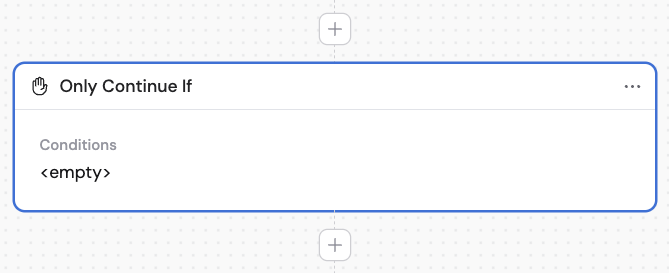
In the Workflow builder, click **+** between blocks and select **Only Continue If** from the action library.
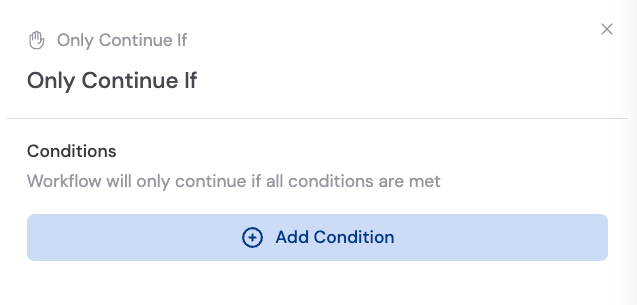 Click **Add Condition** and configure:
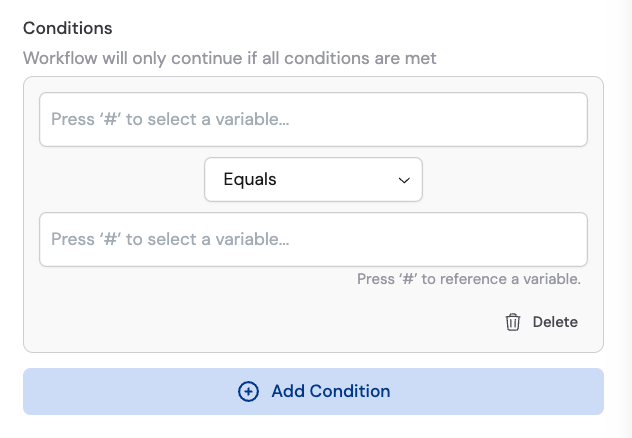
1. **Field** — The variable to evaluate (from a previous step or the trigger)
2. **Operator** — The comparison type (Equals, Contains, etc.)
3. **Value** — The value to compare against
Click **Add Condition** and configure:
1. **Field** — The variable to evaluate (from a previous step or the trigger)
2. **Operator** — The comparison type (Equals, Contains, etc.)
3. **Value** — The value to compare against
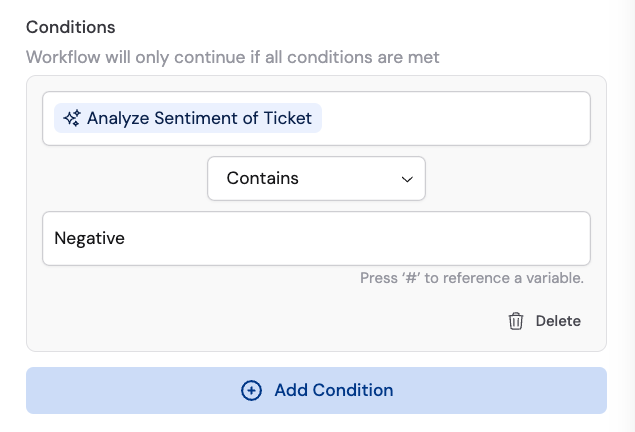 For example: If `#Analyze Sentiment of Ticket` contains `Negative`, continue.
Click **Add Condition** to add additional conditions. **All** conditions must be met for the Workflow to continue. If any condition fails, the Workflow stops.
Need different branches instead of just stop/continue? Use [Paths](/reference/actions/paths) to route your Workflow down different paths based on conditions.
## Related
* [Paths](/reference/actions/paths)
* [Build and configure Workflows](/workflows/building)
For example: If `#Analyze Sentiment of Ticket` contains `Negative`, continue.
Click **Add Condition** to add additional conditions. **All** conditions must be met for the Workflow to continue. If any condition fails, the Workflow stops.
Need different branches instead of just stop/continue? Use [Paths](/reference/actions/paths) to route your Workflow down different paths based on conditions.
## Related
* [Paths](/reference/actions/paths)
* [Build and configure Workflows](/workflows/building)