> ## Documentation Index
> Fetch the complete documentation index at: https://docs.cassidyai.com/llms.txt
> Use this file to discover all available pages before exploring further.
# Client Health Tracker Alerts
> Monitors a centralized client health tracker and summarizes changes.
 ## What does this mean?
Keeps customer success and leadership teams instantly informed of health shifts and account risk, enabling faster follow-up, clearer prioritization, and proactive account management without digging through spreadsheets or manual reports.
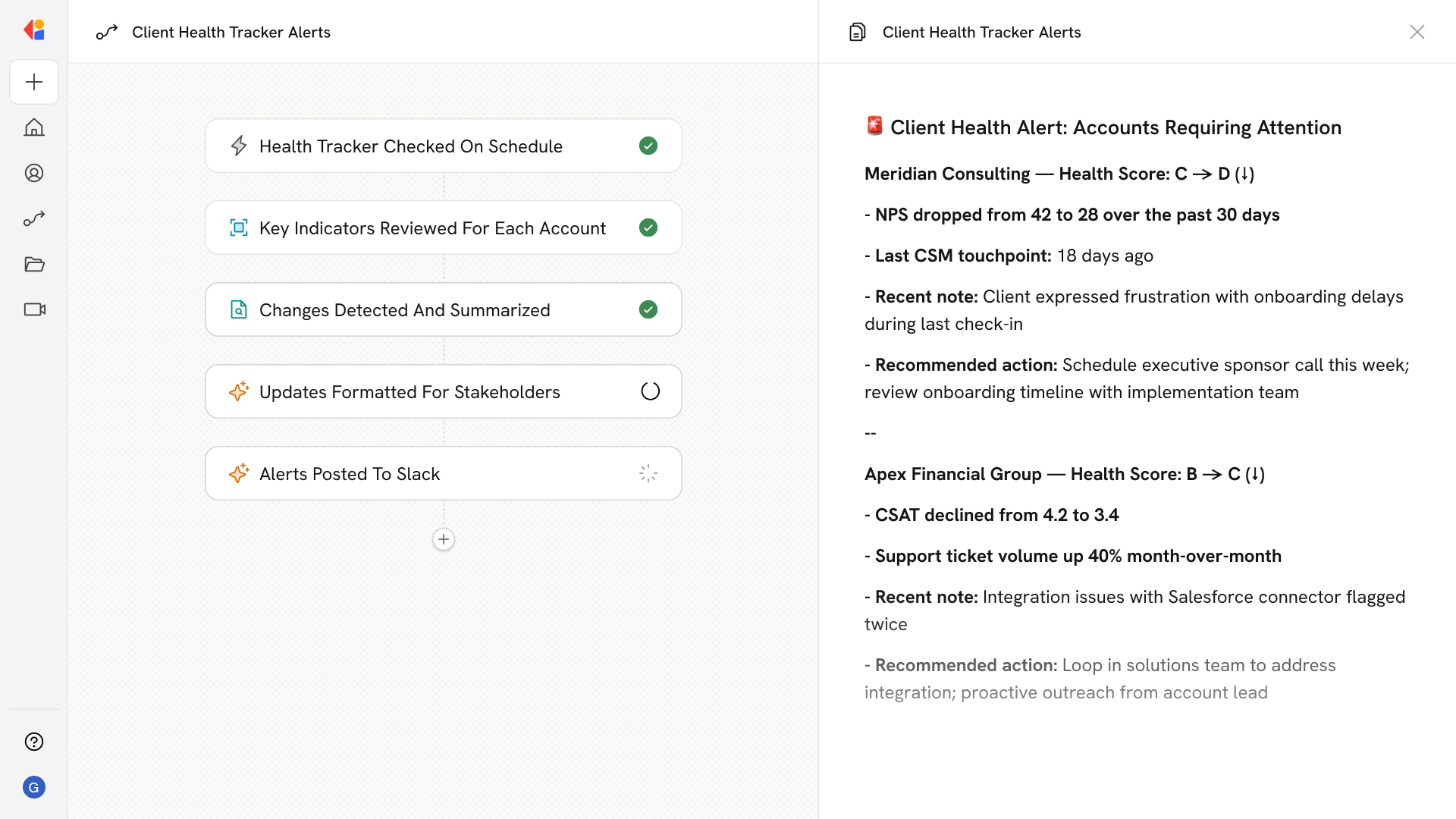
Monitors a centralized client health tracker, reviewing key factors like letter-grade health scores, CSAT or NPS, and notes for each account; then automatically summarizes changes in client health—such as shifts in score, new action items, or updated notes—and posts concise updates to designated Slack channels for account teams and executive sponsors.
## Workflow steps
The Workflow activates on a scheduled trigger, automatically checking your centralized client health tracker—whether it's a Google Sheet, spreadsheet, or connected data source—at regular intervals.
Cassidy pulls the latest data for each account, reviewing critical factors like letter-grade health scores, CSAT or NPS ratings, recent notes, and any flagged action items.
Cassidy compares current data against previous snapshots to identify meaningful shifts—score changes, new risk signals, updated notes, or emerging trends across your client portfolio.
The Workflow structures concise, scannable summaries tailored for account teams and executive sponsors—highlighting what changed, which accounts need attention, and recommended next steps.
Cassidy automatically sends the summarized updates to designated Slack channels, ensuring customer success managers and leadership see health shifts in real time—no spreadsheet digging required.
## Related
Create a custom Agent with tailored instructions and Knowledge Base access.
Add your company documents so Agents can reference them.
## What does this mean?
Keeps customer success and leadership teams instantly informed of health shifts and account risk, enabling faster follow-up, clearer prioritization, and proactive account management without digging through spreadsheets or manual reports.
Monitors a centralized client health tracker, reviewing key factors like letter-grade health scores, CSAT or NPS, and notes for each account; then automatically summarizes changes in client health—such as shifts in score, new action items, or updated notes—and posts concise updates to designated Slack channels for account teams and executive sponsors.
## Workflow steps
The Workflow activates on a scheduled trigger, automatically checking your centralized client health tracker—whether it's a Google Sheet, spreadsheet, or connected data source—at regular intervals.
Cassidy pulls the latest data for each account, reviewing critical factors like letter-grade health scores, CSAT or NPS ratings, recent notes, and any flagged action items.
Cassidy compares current data against previous snapshots to identify meaningful shifts—score changes, new risk signals, updated notes, or emerging trends across your client portfolio.
The Workflow structures concise, scannable summaries tailored for account teams and executive sponsors—highlighting what changed, which accounts need attention, and recommended next steps.
Cassidy automatically sends the summarized updates to designated Slack channels, ensuring customer success managers and leadership see health shifts in real time—no spreadsheet digging required.
## Related
Create a custom Agent with tailored instructions and Knowledge Base access.
Add your company documents so Agents can reference them.