> ## Documentation Index
> Fetch the complete documentation index at: https://docs.cassidyai.com/llms.txt
> Use this file to discover all available pages before exploring further.
# Customer Contact Transition Monitor
> Protects revenue and reduces churn by closing stakeholder gaps quickly, preserving momentum on renewals and expansions with timely, guided follow-up.
 ## What does this mean?
Protects revenue and reduces churn by closing stakeholder gaps quickly, preserving momentum on renewals and expansions with timely, guided follow-up.
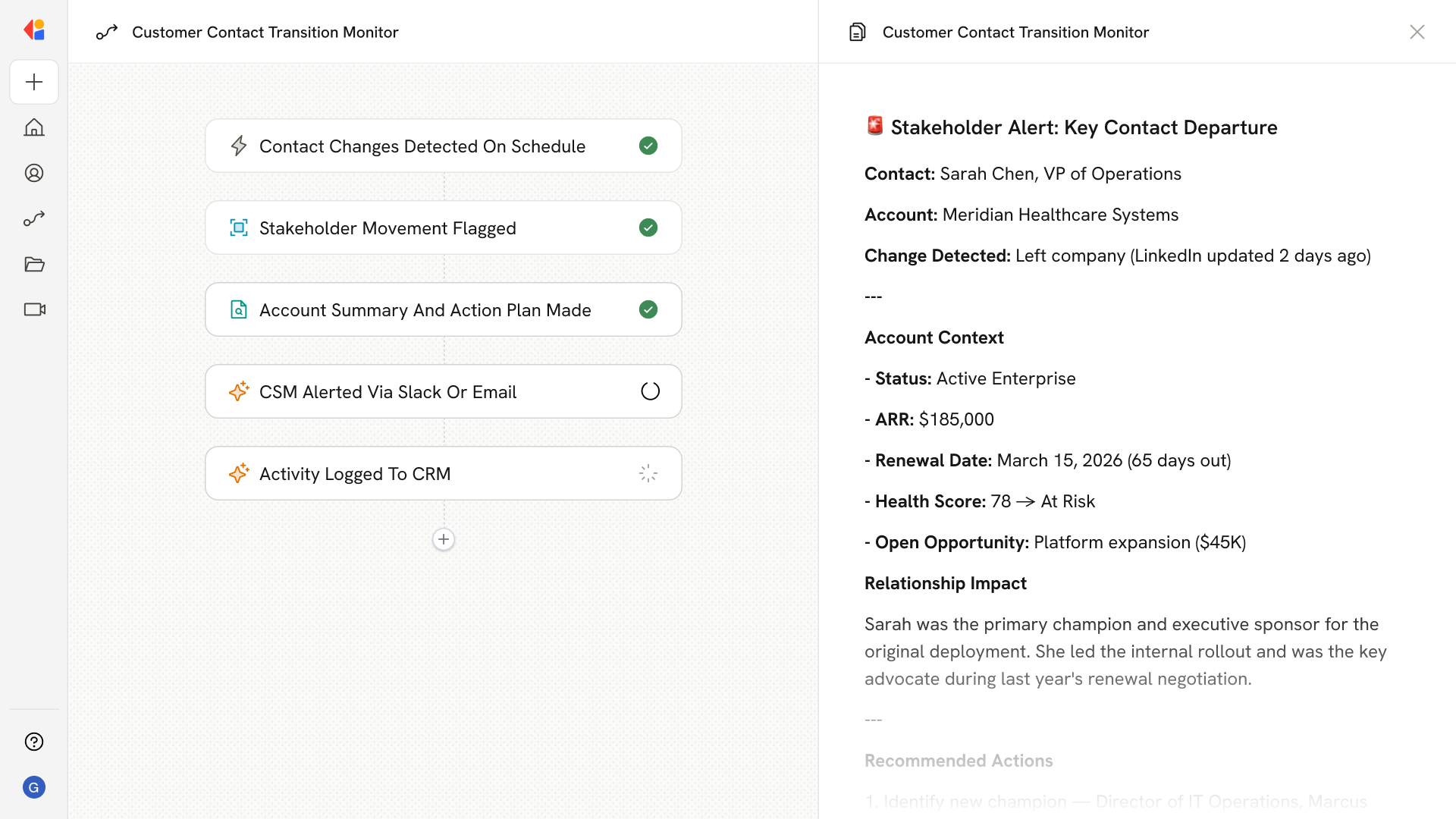
Watches key contacts on active accounts in your CRM for role or company changes, then alerts the CSM with a summary of account status, renewal dates, open risks, and a recommended plan to secure coverage and onboard the new stakeholder.
## Workflow steps
The Workflow runs on a scheduled trigger, regularly scanning key contacts on active accounts in your CRM for role or company changes—catching departures, promotions, or moves before they create coverage gaps.
When a change is identified, Cassidy flags the affected contact and pulls relevant account context from your CRM, including account status, renewal timeline, and any open risks or opportunities.
Cassidy compiles a summary of the account's current health and drafts a recommended plan to secure coverage—whether that means identifying a new champion, accelerating introductions, or adjusting the renewal strategy.
The Workflow sends a notification to the assigned CSM via Slack or email with the full context: who changed, what the account looks like now, and specific next steps to onboard the new stakeholder and protect the relationship.
All alerts and recommended actions are logged back to the CRM, ensuring full visibility for the broader team and a clear audit trail for account history.
## Related
Create a custom Agent with tailored instructions and Knowledge Base access.
Add your company documents so Agents can reference them.
## What does this mean?
Protects revenue and reduces churn by closing stakeholder gaps quickly, preserving momentum on renewals and expansions with timely, guided follow-up.
Watches key contacts on active accounts in your CRM for role or company changes, then alerts the CSM with a summary of account status, renewal dates, open risks, and a recommended plan to secure coverage and onboard the new stakeholder.
## Workflow steps
The Workflow runs on a scheduled trigger, regularly scanning key contacts on active accounts in your CRM for role or company changes—catching departures, promotions, or moves before they create coverage gaps.
When a change is identified, Cassidy flags the affected contact and pulls relevant account context from your CRM, including account status, renewal timeline, and any open risks or opportunities.
Cassidy compiles a summary of the account's current health and drafts a recommended plan to secure coverage—whether that means identifying a new champion, accelerating introductions, or adjusting the renewal strategy.
The Workflow sends a notification to the assigned CSM via Slack or email with the full context: who changed, what the account looks like now, and specific next steps to onboard the new stakeholder and protect the relationship.
All alerts and recommended actions are logged back to the CRM, ensuring full visibility for the broader team and a clear audit trail for account history.
## Related
Create a custom Agent with tailored instructions and Knowledge Base access.
Add your company documents so Agents can reference them.