> ## Documentation Index
> Fetch the complete documentation index at: https://docs.cassidyai.com/llms.txt
> Use this file to discover all available pages before exploring further.
# Customer Conversation Memory
> Streamline follow-up and detect risks earlier, all without manual notes.
 ## What does this mean?
Demonstrates attentive, personalized account management that strengthens trust and loyalty while enabling faster follow-up, cleaner handoffs, and earlier risk detection without rewatching recordings or chasing notes.
Transcribes customer calls, extracts success plans, risks, and action items, and makes every conversation searchable with citations and timestamps for instant retrieval of stakeholder context and commitments.
## Workflow steps
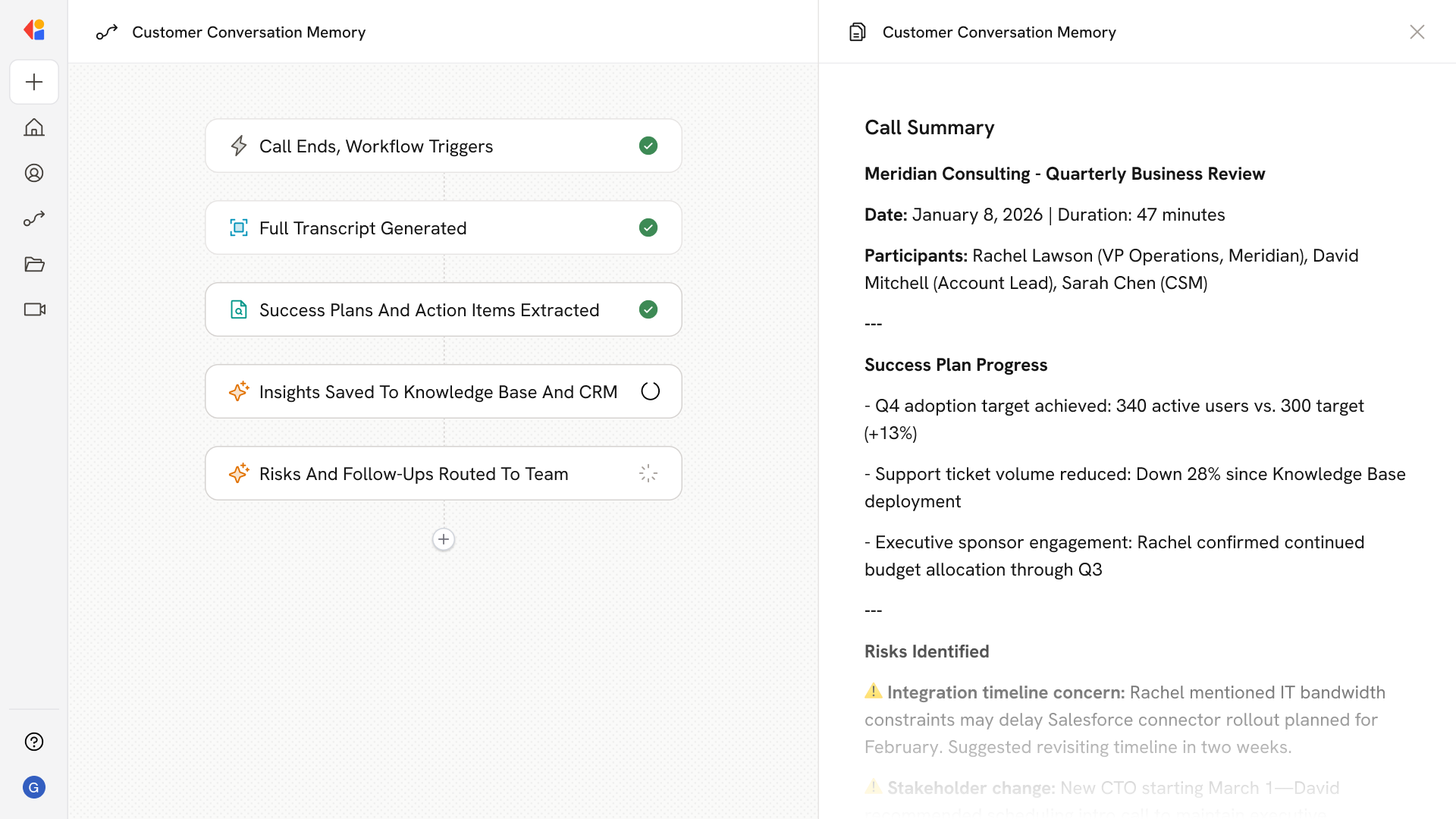
The Workflow activates automatically when a customer call ends—whether captured via the Meeting ended trigger or synced from a platform like Gong.
Cassidy processes the recording and generates a full transcript, complete with timestamps and speaker identification, so every word is captured and searchable.
Cassidy analyzes the transcript to pull out success plans, risks, action items, and stakeholder commitments—drawing on your Knowledge Base for context on accounts and history.
The extracted insights are formatted and saved to your Knowledge Base or CRM, tagged with citations and timestamps for instant retrieval later.
The Workflow flags any risks or time-sensitive action items, routing them to the appropriate team member via Slack or email so nothing slips through the cracks.
Team members can now search past conversations by stakeholder, topic, or commitment—getting the context they need for follow-ups, handoffs, or renewals without rewatching recordings or chasing notes.
## Related
Create a custom Agent with tailored instructions and Knowledge Base access.
Add your company documents so Agents can reference them.
## What does this mean?
Demonstrates attentive, personalized account management that strengthens trust and loyalty while enabling faster follow-up, cleaner handoffs, and earlier risk detection without rewatching recordings or chasing notes.
Transcribes customer calls, extracts success plans, risks, and action items, and makes every conversation searchable with citations and timestamps for instant retrieval of stakeholder context and commitments.
## Workflow steps
The Workflow activates automatically when a customer call ends—whether captured via the Meeting ended trigger or synced from a platform like Gong.
Cassidy processes the recording and generates a full transcript, complete with timestamps and speaker identification, so every word is captured and searchable.
Cassidy analyzes the transcript to pull out success plans, risks, action items, and stakeholder commitments—drawing on your Knowledge Base for context on accounts and history.
The extracted insights are formatted and saved to your Knowledge Base or CRM, tagged with citations and timestamps for instant retrieval later.
The Workflow flags any risks or time-sensitive action items, routing them to the appropriate team member via Slack or email so nothing slips through the cracks.
Team members can now search past conversations by stakeholder, topic, or commitment—getting the context they need for follow-ups, handoffs, or renewals without rewatching recordings or chasing notes.
## Related
Create a custom Agent with tailored instructions and Knowledge Base access.
Add your company documents so Agents can reference them.