> ## Documentation Index
> Fetch the complete documentation index at: https://docs.cassidyai.com/llms.txt
> Use this file to discover all available pages before exploring further.
# Expansion Opportunity Finder
> Researches customer businesses and usage to recommend tailored cross-sell and upsell opportunities.
 ## What does this mean?
Equips customer success and account managers to surface the most relevant, high-impact expansion plays—driven by context-rich qualitative intelligence and product familiarity—so they can drive upsell effectiveness and revenue growth without wasted effort or generic pitches.
Researches each customer’s business, reviews current and past usage, and draws on a deep understanding of every available product and service offering—along with internal success stories and industry best practices—to recommend tailored cross-sell and upsell opportunities based on adoption gaps, fit, and business goals.
## Workflow steps
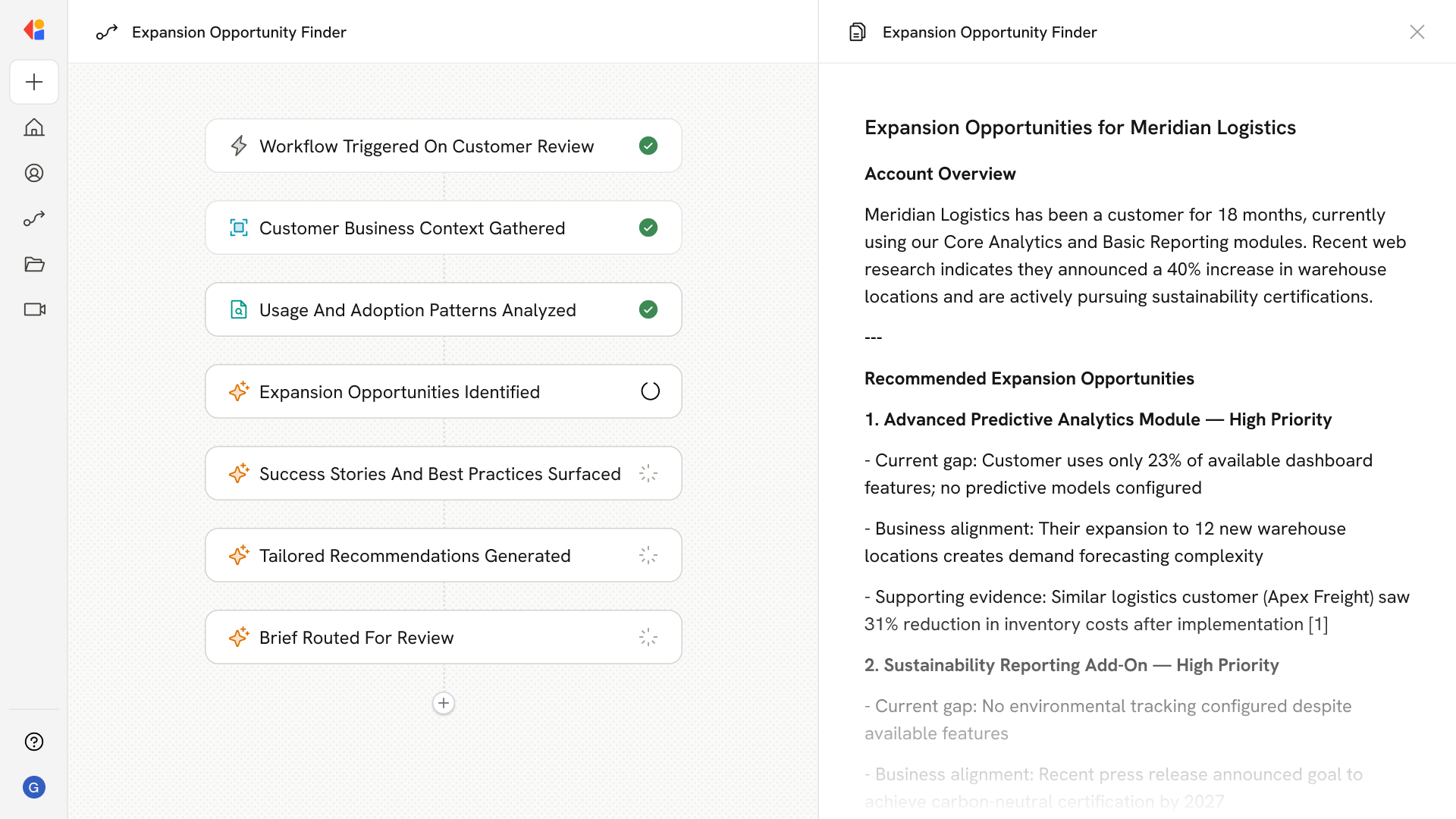
The Workflow activates via a manual trigger, Salesforce trigger, or scheduled trigger when it's time to assess expansion opportunities for a specific customer account.
Cassidy's Research Agent searches the web to gather current information about the customer's company—recent news, strategic initiatives, industry trends, and business goals that could signal expansion readiness.
The Workflow reviews the customer's current product usage, adoption patterns, and engagement history to identify gaps or underutilized features.
The Workflow draws on your Knowledge Base—containing every available product, service, and feature—to identify cross-sell and upsell opportunities that align with the customer's adoption gaps and business context.
Cassidy searches your Knowledge Base for relevant internal case studies, success stories, and industry best practices that support each recommended expansion play.
The Workflow compiles the research, usage analysis, and product fit into a context-rich expansion brief with specific, prioritized upsell and cross-sell recommendations—complete with supporting rationale.
The expansion brief is delivered to the account manager or CSM via email, Slack, or logged directly to Salesforce—ready for human review before customer outreach.
## Related
Create a custom Agent with tailored instructions and Knowledge Base access.
Add your company documents so Agents can reference them.
## What does this mean?
Equips customer success and account managers to surface the most relevant, high-impact expansion plays—driven by context-rich qualitative intelligence and product familiarity—so they can drive upsell effectiveness and revenue growth without wasted effort or generic pitches.
Researches each customer’s business, reviews current and past usage, and draws on a deep understanding of every available product and service offering—along with internal success stories and industry best practices—to recommend tailored cross-sell and upsell opportunities based on adoption gaps, fit, and business goals.
## Workflow steps
The Workflow activates via a manual trigger, Salesforce trigger, or scheduled trigger when it's time to assess expansion opportunities for a specific customer account.
Cassidy's Research Agent searches the web to gather current information about the customer's company—recent news, strategic initiatives, industry trends, and business goals that could signal expansion readiness.
The Workflow reviews the customer's current product usage, adoption patterns, and engagement history to identify gaps or underutilized features.
The Workflow draws on your Knowledge Base—containing every available product, service, and feature—to identify cross-sell and upsell opportunities that align with the customer's adoption gaps and business context.
Cassidy searches your Knowledge Base for relevant internal case studies, success stories, and industry best practices that support each recommended expansion play.
The Workflow compiles the research, usage analysis, and product fit into a context-rich expansion brief with specific, prioritized upsell and cross-sell recommendations—complete with supporting rationale.
The expansion brief is delivered to the account manager or CSM via email, Slack, or logged directly to Salesforce—ready for human review before customer outreach.
## Related
Create a custom Agent with tailored instructions and Knowledge Base access.
Add your company documents so Agents can reference them.