> ## Documentation Index
> Fetch the complete documentation index at: https://docs.cassidyai.com/llms.txt
> Use this file to discover all available pages before exploring further.
# Bug Handling Formatter
> Formats bug reports from customer tickets into clear, actionable items with essential details for support teams to address.
 ## What does this mean?
Streamlines understanding and processing of customer issues, reducing time to resolution and enhancing cooperation between support and engineering teams to resolve problems efficiently.
Formats bug reports from customer tickets into clear, actionable items with essential details for support teams to address.
## Workflow steps
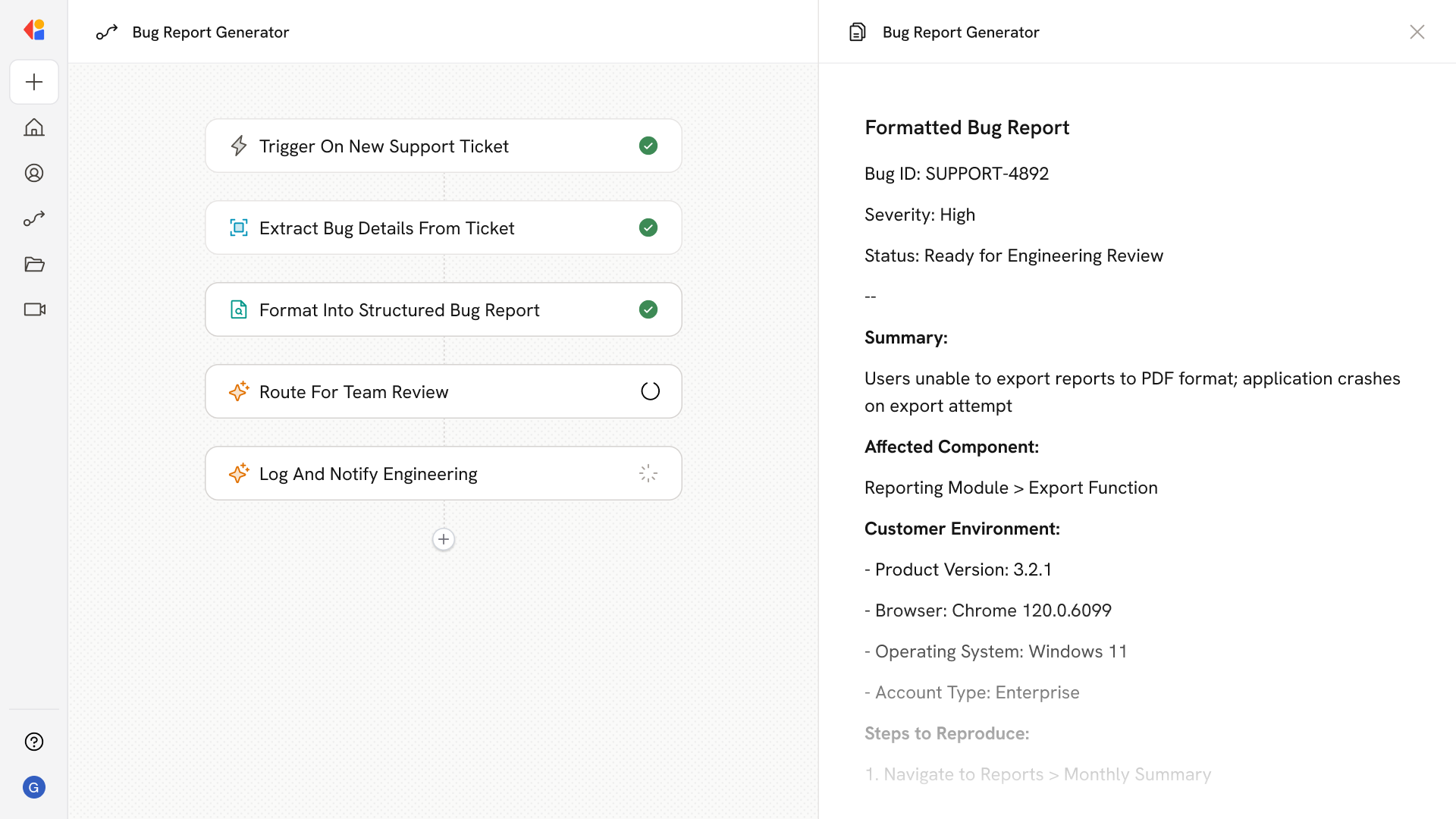
The Workflow activates when a new support ticket arrives from your helpdesk system, flagging a potential bug report for processing.
Cassidy parses the incoming ticket to identify key information: the reported issue, steps to reproduce, affected features, customer environment details, and any error messages or screenshots provided.
Using your company's Knowledge Base and context, Cassidy transforms raw ticket content into a structured, standardized bug report—complete with severity assessment, affected components, and clear reproduction steps that engineering teams can act on immediately.
The formatted bug report is sent to the appropriate support or engineering team member via email or Slack for quick validation before handoff.
Once confirmed, the Workflow logs the formatted report back to your ticketing system and notifies the relevant engineering team, creating a clear paper trail and ensuring nothing falls through the cracks.
## Related
Create a custom Agent with tailored instructions and Knowledge Base access.
Add your company documents so Agents can reference them.
## What does this mean?
Streamlines understanding and processing of customer issues, reducing time to resolution and enhancing cooperation between support and engineering teams to resolve problems efficiently.
Formats bug reports from customer tickets into clear, actionable items with essential details for support teams to address.
## Workflow steps
The Workflow activates when a new support ticket arrives from your helpdesk system, flagging a potential bug report for processing.
Cassidy parses the incoming ticket to identify key information: the reported issue, steps to reproduce, affected features, customer environment details, and any error messages or screenshots provided.
Using your company's Knowledge Base and context, Cassidy transforms raw ticket content into a structured, standardized bug report—complete with severity assessment, affected components, and clear reproduction steps that engineering teams can act on immediately.
The formatted bug report is sent to the appropriate support or engineering team member via email or Slack for quick validation before handoff.
Once confirmed, the Workflow logs the formatted report back to your ticketing system and notifies the relevant engineering team, creating a clear paper trail and ensuring nothing falls through the cracks.
## Related
Create a custom Agent with tailored instructions and Knowledge Base access.
Add your company documents so Agents can reference them.