> ## Documentation Index
> Fetch the complete documentation index at: https://docs.cassidyai.com/llms.txt
> Use this file to discover all available pages before exploring further.
# Ticket Context Enricher
> Enhances ticket resolution by providing agents with concise, source-linked summaries of requester profiles, conversation history, and account details.
 ## What does this mean?
Agents resolve issues faster and with consistent tone and prioritization by seeing who the customer is, what matters to their account, and relevant history at a glance.
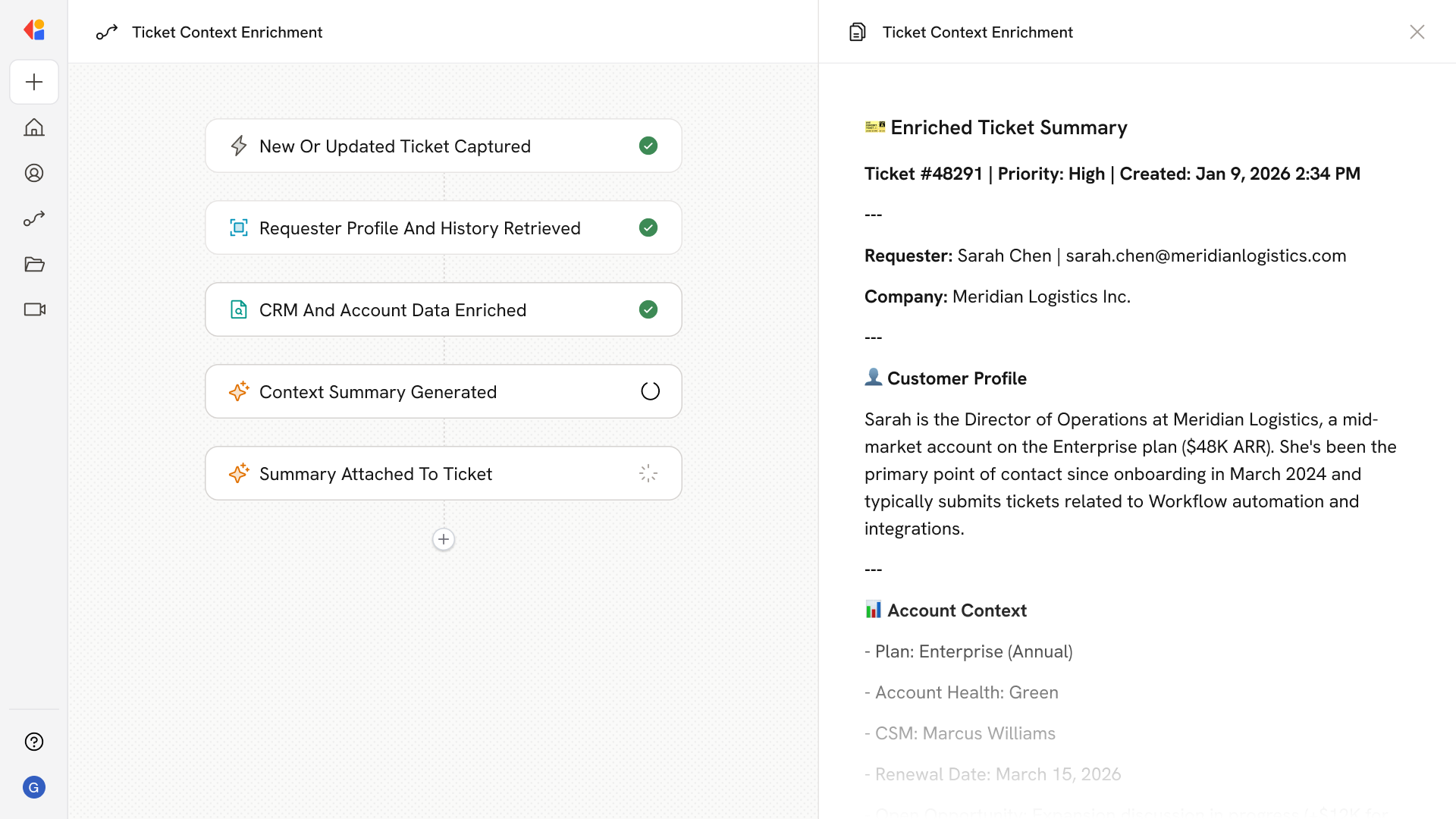
Pulls the requester’s profile, prior conversations, account details, plan, and company info from the help desk, CRM, and external enrichment sources, then attaches a concise, source-linked summary to each ticket.
## Workflow steps
The Workflow activates automatically when a new ticket is created or updated in your help desk, capturing the requester's information and ticket details.
Cassidy retrieves the requester's profile from your help desk, including prior conversations, ticket history, and any notes or tags associated with their account.
The Workflow pulls additional context from your CRM—account details, plan type, company information, and any relevant flags like VIP status or open opportunities.
Cassidy synthesizes all gathered information into a concise, source-linked summary that highlights who the customer is, what matters to their account, and relevant history.
The enriched context summary is automatically added to the ticket as an internal note or sidebar, giving agents instant visibility without switching between systems.
## Related
Create a custom Agent with tailored instructions and Knowledge Base access.
Add your company documents so Agents can reference them.
## What does this mean?
Agents resolve issues faster and with consistent tone and prioritization by seeing who the customer is, what matters to their account, and relevant history at a glance.
Pulls the requester’s profile, prior conversations, account details, plan, and company info from the help desk, CRM, and external enrichment sources, then attaches a concise, source-linked summary to each ticket.
## Workflow steps
The Workflow activates automatically when a new ticket is created or updated in your help desk, capturing the requester's information and ticket details.
Cassidy retrieves the requester's profile from your help desk, including prior conversations, ticket history, and any notes or tags associated with their account.
The Workflow pulls additional context from your CRM—account details, plan type, company information, and any relevant flags like VIP status or open opportunities.
Cassidy synthesizes all gathered information into a concise, source-linked summary that highlights who the customer is, what matters to their account, and relevant history.
The enriched context summary is automatically added to the ticket as an internal note or sidebar, giving agents instant visibility without switching between systems.
## Related
Create a custom Agent with tailored instructions and Knowledge Base access.
Add your company documents so Agents can reference them.