> ## Documentation Index
> Fetch the complete documentation index at: https://docs.cassidyai.com/llms.txt
> Use this file to discover all available pages before exploring further.
# DPA Clause Reviewer
> Flags gaps and suggests edits to ensure consistent clause coverage, reduce negotiation cycles, and manage risk.
 ## What does this mean?
Legal reviews DPAs faster with consistent clause coverage, reducing negotiation cycles and risk while keeping contract standards intact.
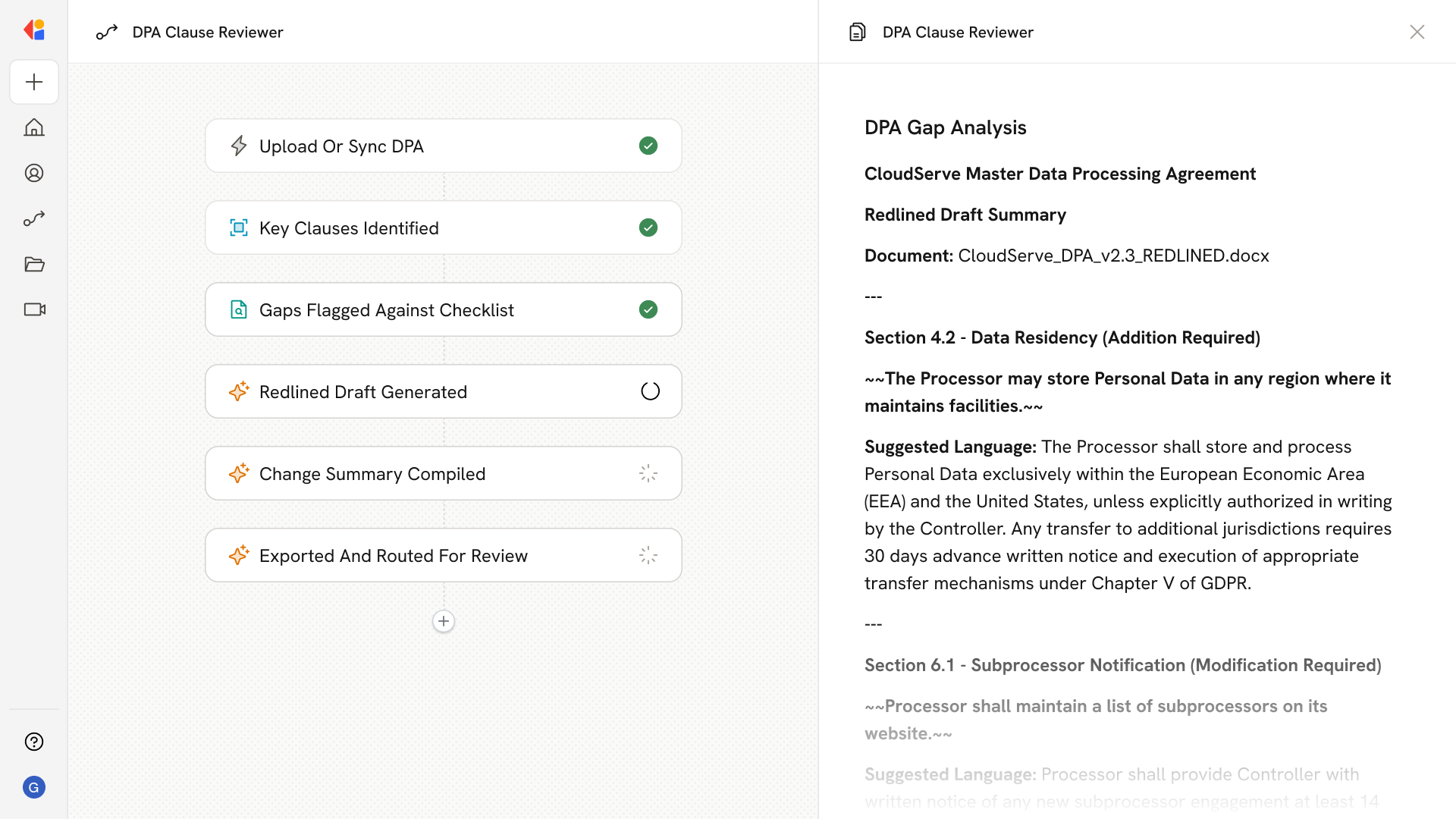
Ingests data processing agreements from uploaded files or contract repositories, scans for data residency, subprocessor, and audit clauses, flags gaps against a standard checklist, and outputs a redlined draft with suggested edits and a summary of required changes for Legal.
## Workflow steps
The Workflow begins when a data processing agreement is uploaded manually or synced from your contract repository, making the document available for analysis.
Cassidy parses the agreement and identifies critical sections—data residency terms, subprocessor provisions, audit rights, and other standard DPA clauses.
The Workflow compares the identified clauses against your organization's standard DPA checklist and flags any missing or incomplete coverage.
For each flagged gap, Cassidy drafts recommended language and produces a redlined version of the agreement showing proposed additions and modifications.
The Workflow compiles a clear summary of all flagged issues and suggested edits, giving Legal a quick-reference list of what needs attention before signing.
The redlined draft and change summary are exported as a Microsoft Word document and sent to the appropriate team member for final review and negotiation.
## Related
Create a custom Agent with tailored instructions and Knowledge Base access.
Add your company documents so Agents can reference them.
## What does this mean?
Legal reviews DPAs faster with consistent clause coverage, reducing negotiation cycles and risk while keeping contract standards intact.
Ingests data processing agreements from uploaded files or contract repositories, scans for data residency, subprocessor, and audit clauses, flags gaps against a standard checklist, and outputs a redlined draft with suggested edits and a summary of required changes for Legal.
## Workflow steps
The Workflow begins when a data processing agreement is uploaded manually or synced from your contract repository, making the document available for analysis.
Cassidy parses the agreement and identifies critical sections—data residency terms, subprocessor provisions, audit rights, and other standard DPA clauses.
The Workflow compares the identified clauses against your organization's standard DPA checklist and flags any missing or incomplete coverage.
For each flagged gap, Cassidy drafts recommended language and produces a redlined version of the agreement showing proposed additions and modifications.
The Workflow compiles a clear summary of all flagged issues and suggested edits, giving Legal a quick-reference list of what needs attention before signing.
The redlined draft and change summary are exported as a Microsoft Word document and sent to the appropriate team member for final review and negotiation.
## Related
Create a custom Agent with tailored instructions and Knowledge Base access.
Add your company documents so Agents can reference them.