> ## Documentation Index
> Fetch the complete documentation index at: https://docs.cassidyai.com/llms.txt
> Use this file to discover all available pages before exploring further.
# Asset Finder for Articles
> Editors and marketers can quickly attach the right assets without manual searching, enhancing content quality and speeding up publication.
 ## What does this mean?
Ensures commitments are tracked and delivered on time, improving accountability, follow-through, and customer confidence after every review.
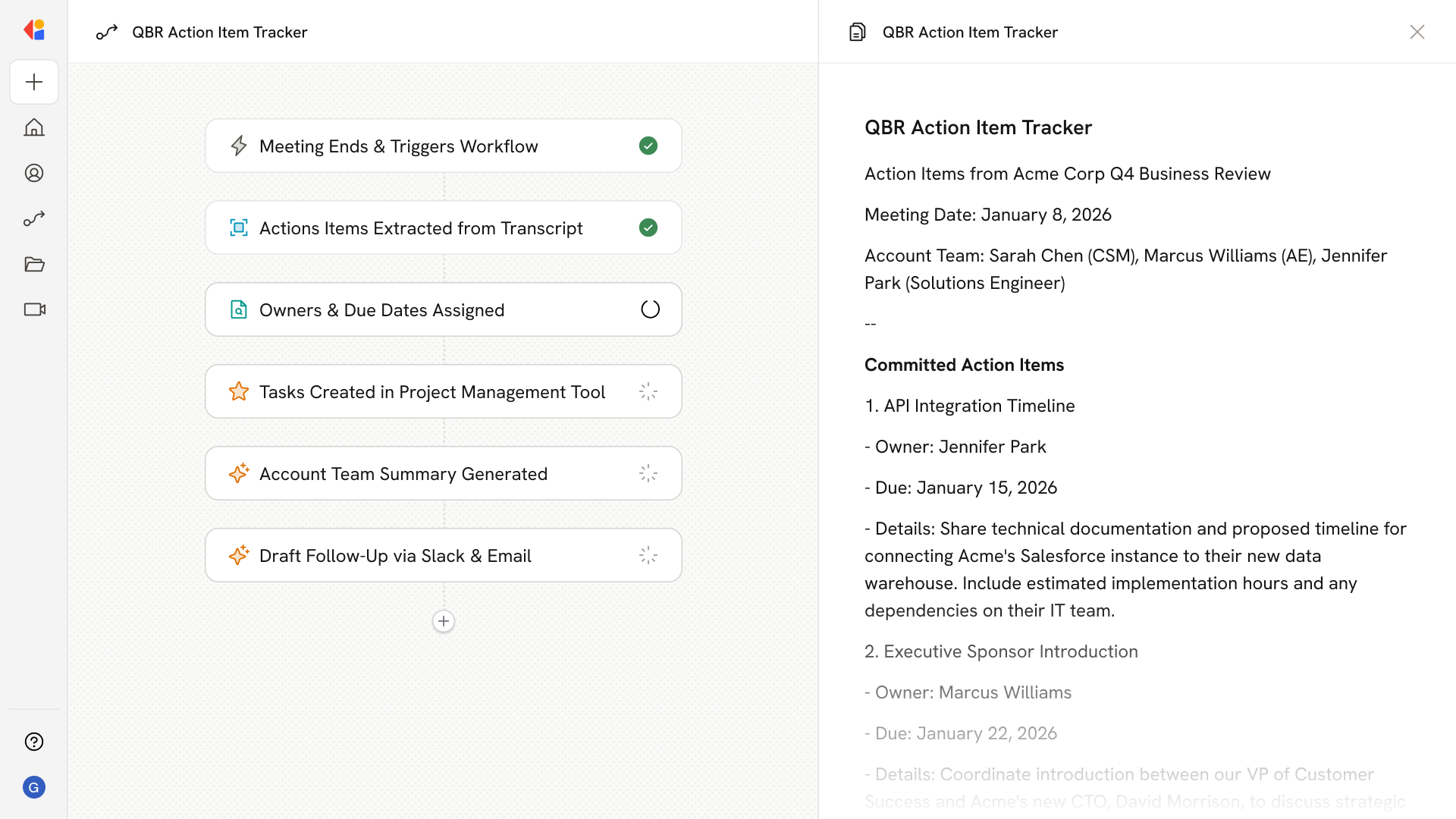
Captures next steps from EBRs and QBRs directly from meeting notes and transcripts, then assigns owners and due dates in your task system with a summarized follow-up sent to the account team.
## Workflow steps
The Workflow activates automatically when an EBR or QBR concludes, pulling in the meeting notes and transcript directly from your connected meeting tool.
Cassidy analyzes the transcript and notes, identifying commitments, next steps, and follow-up items discussed during the review.
The Workflow parses each action item and assigns responsible owners and realistic due dates based on the context of the conversation and your team structure.
Using an API request or native integration, Cassidy automatically creates tasks in your project management tool (like Jira or Asana) with the assigned owners, due dates, and relevant context from the call.
The Workflow drafts a concise follow-up summary highlighting key commitments, owners, and timelines—formatted for easy scanning by the account team.
The summary is delivered via email or Slack to the account team, ensuring everyone has visibility into what was promised and who's responsible for delivery.
## Related
Create a custom Agent with tailored instructions and Knowledge Base access.
Add your company documents so Agents can reference them.
## What does this mean?
Ensures commitments are tracked and delivered on time, improving accountability, follow-through, and customer confidence after every review.
Captures next steps from EBRs and QBRs directly from meeting notes and transcripts, then assigns owners and due dates in your task system with a summarized follow-up sent to the account team.
## Workflow steps
The Workflow activates automatically when an EBR or QBR concludes, pulling in the meeting notes and transcript directly from your connected meeting tool.
Cassidy analyzes the transcript and notes, identifying commitments, next steps, and follow-up items discussed during the review.
The Workflow parses each action item and assigns responsible owners and realistic due dates based on the context of the conversation and your team structure.
Using an API request or native integration, Cassidy automatically creates tasks in your project management tool (like Jira or Asana) with the assigned owners, due dates, and relevant context from the call.
The Workflow drafts a concise follow-up summary highlighting key commitments, owners, and timelines—formatted for easy scanning by the account team.
The summary is delivered via email or Slack to the account team, ensuring everyone has visibility into what was promised and who's responsible for delivery.
## Related
Create a custom Agent with tailored instructions and Knowledge Base access.
Add your company documents so Agents can reference them.