> ## Documentation Index
> Fetch the complete documentation index at: https://docs.cassidyai.com/llms.txt
> Use this file to discover all available pages before exploring further.
# Company Profile Dossier
> Automate research by pulling firmographics, leadership, and news to highlight target segments and outreach angles.
 ## What does this mean?
Marketing teams launch targeted campaigns faster with consistent profiles that improve segmentation, message relevance, and conversion without manual research.
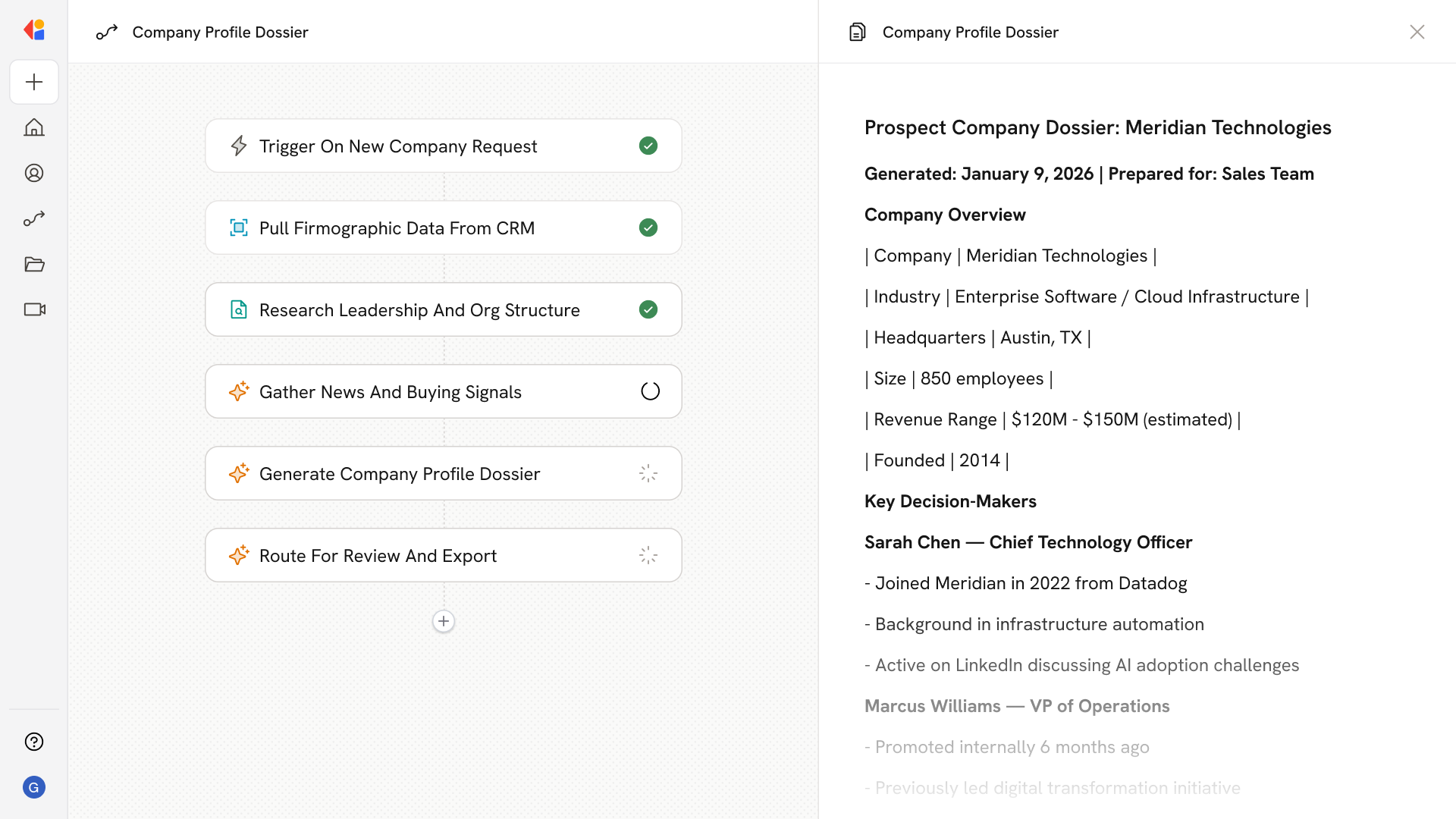
Builds concise, source-linked company profiles by pulling firmographics from CRMs, leadership from LinkedIn, and recent news from public sources, then highlights target segments, buying signals, and outreach angles.
## Workflow steps
The Workflow activates when a team member submits a company name for research—either through a manual trigger, a CRM update in Salesforce or HubSpot, or a scheduled batch run.
Cassidy queries your connected CRM to retrieve existing company information—industry, size, location, revenue range, and any historical engagement data already on file.
The Research Agent searches LinkedIn and public sources to identify key decision-makers, their roles, and recent career moves that could signal openings for outreach.
Cassidy scans public news sources, press releases, and industry publications to surface recent funding rounds, product launches, expansions, or leadership changes that indicate active buying intent.
The Workflow synthesizes all gathered data into a concise, source-linked company profile—complete with target segment classification, key talking points, and recommended outreach angles.
The completed dossier is sent to the marketing team for human-in-the-loop approval. Once approved, it can be exported as a Microsoft Word document or logged directly back to your CRM for campaign use.
## Related
Create a custom Agent with tailored instructions and Knowledge Base access.
Add your company documents so Agents can reference them.
## What does this mean?
Marketing teams launch targeted campaigns faster with consistent profiles that improve segmentation, message relevance, and conversion without manual research.
Builds concise, source-linked company profiles by pulling firmographics from CRMs, leadership from LinkedIn, and recent news from public sources, then highlights target segments, buying signals, and outreach angles.
## Workflow steps
The Workflow activates when a team member submits a company name for research—either through a manual trigger, a CRM update in Salesforce or HubSpot, or a scheduled batch run.
Cassidy queries your connected CRM to retrieve existing company information—industry, size, location, revenue range, and any historical engagement data already on file.
The Research Agent searches LinkedIn and public sources to identify key decision-makers, their roles, and recent career moves that could signal openings for outreach.
Cassidy scans public news sources, press releases, and industry publications to surface recent funding rounds, product launches, expansions, or leadership changes that indicate active buying intent.
The Workflow synthesizes all gathered data into a concise, source-linked company profile—complete with target segment classification, key talking points, and recommended outreach angles.
The completed dossier is sent to the marketing team for human-in-the-loop approval. Once approved, it can be exported as a Microsoft Word document or logged directly back to your CRM for campaign use.
## Related
Create a custom Agent with tailored instructions and Knowledge Base access.
Add your company documents so Agents can reference them.