> ## Documentation Index
> Fetch the complete documentation index at: https://docs.cassidyai.com/llms.txt
> Use this file to discover all available pages before exploring further.
# Display Ad Placement Review
> Optimize your media spend and protect your brand integrity with automated ad placement review.
 ## What does this mean?
Cuts manual review and improves media ROI by automatically triaging placements into blocklists and optimization lists, protecting brand integrity while focusing spend where it works.
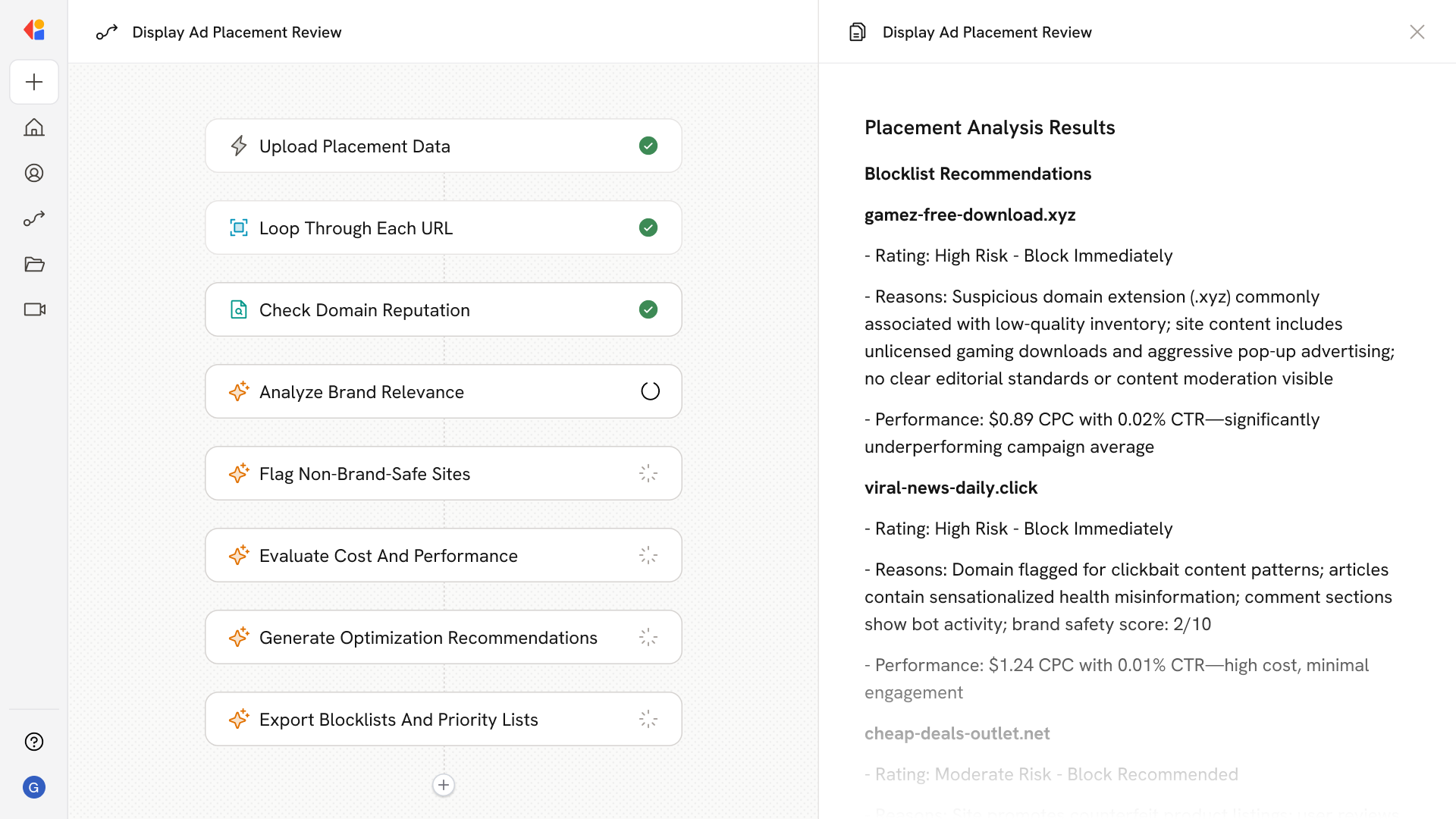
Screens thousands of monthly display ad placements by checking domain reputation signals (e.g., extension patterns) and site content for brand relevance, then flags non brand safe sites and analyzes cost/click data to identify high cost, low performance placements.
## Workflow steps
The Workflow begins when your team uploads a list of display ad placements—typically thousands of URLs from your monthly media buy.
Cassidy processes each placement individually, ensuring every site in your list gets reviewed systematically.
For each placement, the Workflow analyzes domain reputation signals—flagging suspicious extension patterns (.xyz, .click, etc.) and other indicators that suggest low-quality or risky inventory.
Cassidy evaluates each site's content against your brand guidelines and target audience to determine whether it's a suitable environment for your ads.
Sites that fail reputation or relevance checks are automatically flagged and added to a blocklist, protecting your brand from appearing alongside inappropriate content.
The Workflow cross-references placement data with cost-per-click and performance metrics to identify high-cost, low-performing sites draining your budget.
Based on the analysis, Cassidy categorizes placements into blocklists (sites to exclude) and optimization lists (high-performers to prioritize), with clear rationale for each decision.
The final output is delivered to your team as actionable lists you can use to update your media buying platform and improve ROI.
## Related
Create a custom Agent with tailored instructions and Knowledge Base access.
Add your company documents so Agents can reference them.
## What does this mean?
Cuts manual review and improves media ROI by automatically triaging placements into blocklists and optimization lists, protecting brand integrity while focusing spend where it works.
Screens thousands of monthly display ad placements by checking domain reputation signals (e.g., extension patterns) and site content for brand relevance, then flags non brand safe sites and analyzes cost/click data to identify high cost, low performance placements.
## Workflow steps
The Workflow begins when your team uploads a list of display ad placements—typically thousands of URLs from your monthly media buy.
Cassidy processes each placement individually, ensuring every site in your list gets reviewed systematically.
For each placement, the Workflow analyzes domain reputation signals—flagging suspicious extension patterns (.xyz, .click, etc.) and other indicators that suggest low-quality or risky inventory.
Cassidy evaluates each site's content against your brand guidelines and target audience to determine whether it's a suitable environment for your ads.
Sites that fail reputation or relevance checks are automatically flagged and added to a blocklist, protecting your brand from appearing alongside inappropriate content.
The Workflow cross-references placement data with cost-per-click and performance metrics to identify high-cost, low-performing sites draining your budget.
Based on the analysis, Cassidy categorizes placements into blocklists (sites to exclude) and optimization lists (high-performers to prioritize), with clear rationale for each decision.
The final output is delivered to your team as actionable lists you can use to update your media buying platform and improve ROI.
## Related
Create a custom Agent with tailored instructions and Knowledge Base access.
Add your company documents so Agents can reference them.