> ## Documentation Index
> Fetch the complete documentation index at: https://docs.cassidyai.com/llms.txt
> Use this file to discover all available pages before exploring further.
# LinkedIn Content Planner
> Get weekly suggestions with topics, hooks, captions, and optimal publish times based on performance.
 ## What does this mean?
Helps marketers post consistently with data-backed, high-quality ideas that increase reach and engagement—without manual research or guesswork.
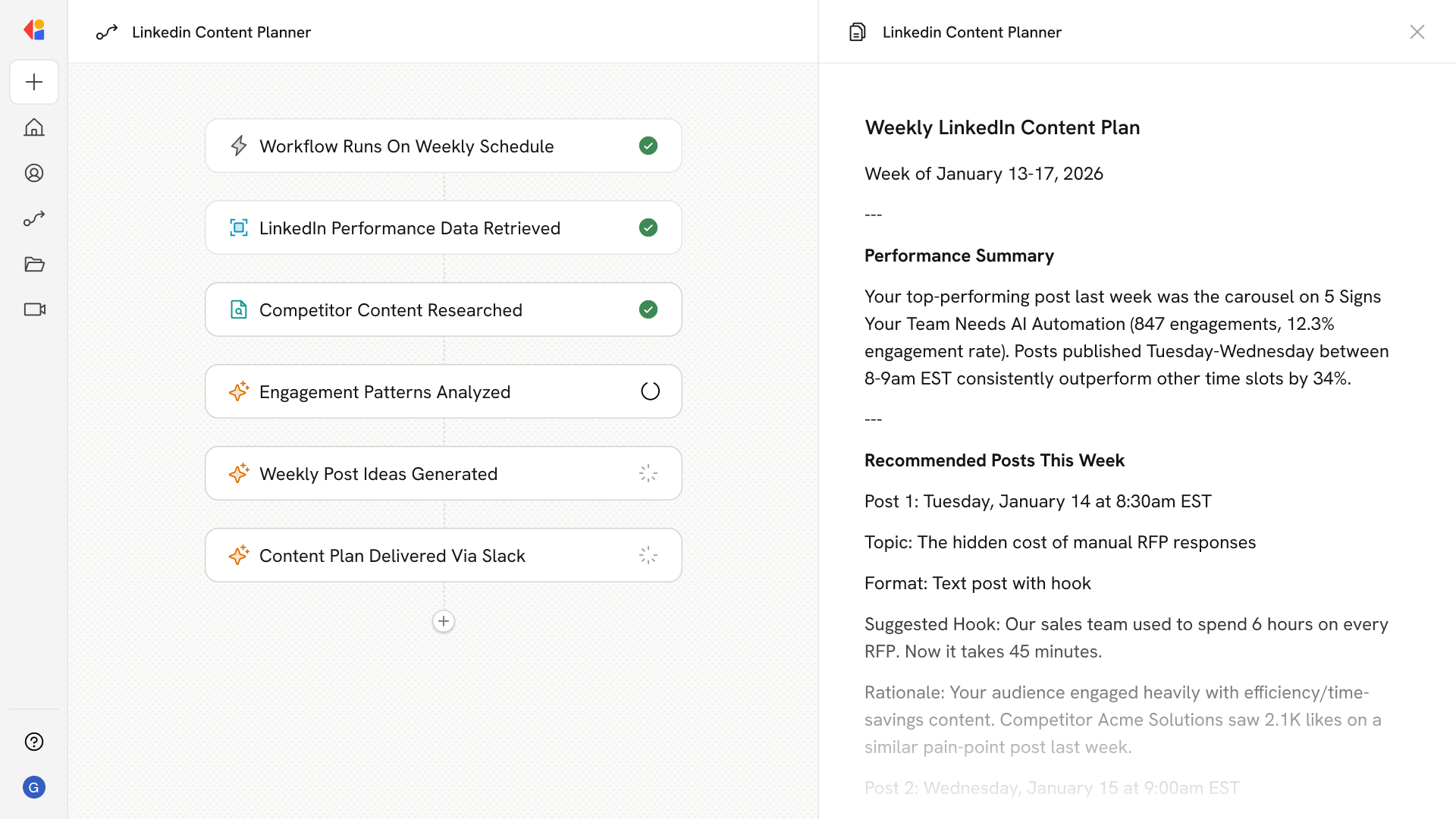
Pulls recent LinkedIn post performance and competitor content with basic stats, then suggests weekly post ideas with topics, example hooks, captions, and recommended publish times based on what’s working.
## Workflow steps
The Workflow activates automatically on a set schedule—weekly or at your preferred cadence—so content planning happens consistently without manual effort.
Cassidy connects to your LinkedIn account and retrieves engagement metrics from your recent posts, identifying which topics, formats, and publish times are driving the best results.
Cassidy scans competitor LinkedIn profiles to surface trending topics, high-performing post formats, and engagement patterns in your space.
The Workflow analyzes your performance data alongside competitor insights to identify content themes and timing strategies that resonate with your audience.
Based on the analysis, Cassidy produces a set of post recommendations—complete with topics, example hooks, draft captions, and optimal publish times tailored to your audience's engagement patterns.
The Workflow sends your weekly content suggestions via email or Slack, giving you a ready-to-use posting calendar with data-backed ideas you can publish or refine.
## Related
Create a custom Agent with tailored instructions and Knowledge Base access.
Add your company documents so Agents can reference them.
## What does this mean?
Helps marketers post consistently with data-backed, high-quality ideas that increase reach and engagement—without manual research or guesswork.
Pulls recent LinkedIn post performance and competitor content with basic stats, then suggests weekly post ideas with topics, example hooks, captions, and recommended publish times based on what’s working.
## Workflow steps
The Workflow activates automatically on a set schedule—weekly or at your preferred cadence—so content planning happens consistently without manual effort.
Cassidy connects to your LinkedIn account and retrieves engagement metrics from your recent posts, identifying which topics, formats, and publish times are driving the best results.
Cassidy scans competitor LinkedIn profiles to surface trending topics, high-performing post formats, and engagement patterns in your space.
The Workflow analyzes your performance data alongside competitor insights to identify content themes and timing strategies that resonate with your audience.
Based on the analysis, Cassidy produces a set of post recommendations—complete with topics, example hooks, draft captions, and optimal publish times tailored to your audience's engagement patterns.
The Workflow sends your weekly content suggestions via email or Slack, giving you a ready-to-use posting calendar with data-backed ideas you can publish or refine.
## Related
Create a custom Agent with tailored instructions and Knowledge Base access.
Add your company documents so Agents can reference them.