> ## Documentation Index
> Fetch the complete documentation index at: https://docs.cassidyai.com/llms.txt
> Use this file to discover all available pages before exploring further.
# Multilingual Content Localizer
> Scales global content delivery with consistent terminology and voice, cutting turnaround time while improving in-region relevance and quality by ingesting approved source content.
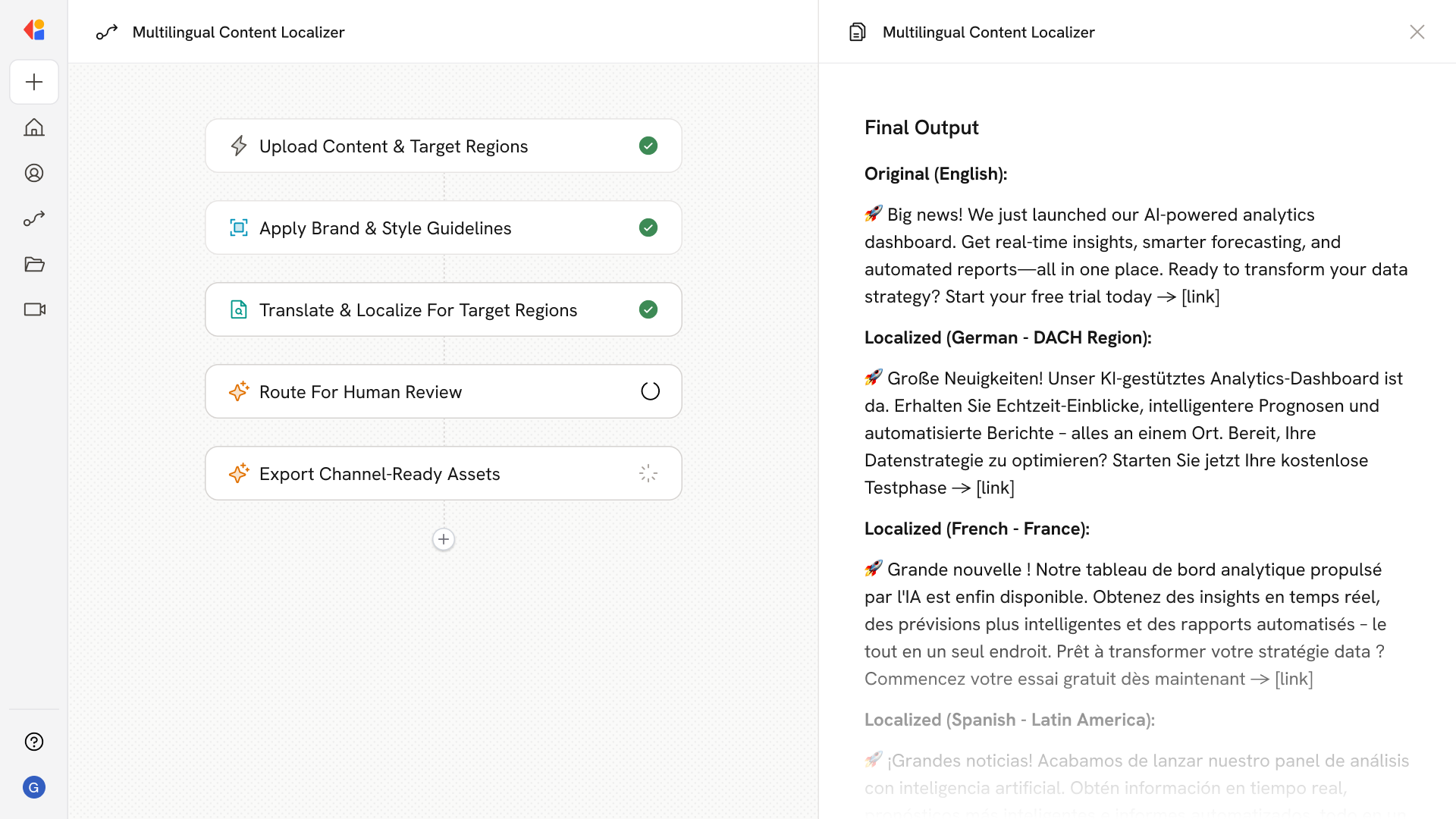 ## What does this mean?
Scales global content delivery with consistent terminology and voice, cutting turnaround time while improving in‑region relevance and quality.
Ingests approved source content and applies translation plus in‑market localization with brand glossary control, style guides, and regional variants (terms, tone, compliance notes), then outputs channel‑ready assets across web, email, product, and social.
## Workflow steps
The Workflow begins when approved source content is uploaded or synced—whether manually or from Google Drive or SharePoint. Cassidy pulls in the original assets ready for localization.
Cassidy references your Knowledge Base to retrieve brand glossaries, terminology standards, and style guides. This ensures every translation maintains consistent voice and approved terminology.
Cassidy translates the content into the target language while applying in-market localization—adjusting tone, regional terms, and compliance notes specific to each locale. Multiple language variants are handled in a single run.
The localized drafts are sent to regional reviewers or marketing leads for human-in-the-loop approval. This validates cultural nuance, accuracy, and brand alignment before publishing.
Once approved, the Workflow formats and exports finalized content for each destination—web pages, email campaigns, product copy, or social posts—and pushes directly to your CMS or marketing platform.
## Related
Create a custom Agent with tailored instructions and Knowledge Base access.
Add your company documents so Agents can reference them.
## What does this mean?
Scales global content delivery with consistent terminology and voice, cutting turnaround time while improving in‑region relevance and quality.
Ingests approved source content and applies translation plus in‑market localization with brand glossary control, style guides, and regional variants (terms, tone, compliance notes), then outputs channel‑ready assets across web, email, product, and social.
## Workflow steps
The Workflow begins when approved source content is uploaded or synced—whether manually or from Google Drive or SharePoint. Cassidy pulls in the original assets ready for localization.
Cassidy references your Knowledge Base to retrieve brand glossaries, terminology standards, and style guides. This ensures every translation maintains consistent voice and approved terminology.
Cassidy translates the content into the target language while applying in-market localization—adjusting tone, regional terms, and compliance notes specific to each locale. Multiple language variants are handled in a single run.
The localized drafts are sent to regional reviewers or marketing leads for human-in-the-loop approval. This validates cultural nuance, accuracy, and brand alignment before publishing.
Once approved, the Workflow formats and exports finalized content for each destination—web pages, email campaigns, product copy, or social posts—and pushes directly to your CMS or marketing platform.
## Related
Create a custom Agent with tailored instructions and Knowledge Base access.
Add your company documents so Agents can reference them.