> ## Documentation Index
> Fetch the complete documentation index at: https://docs.cassidyai.com/llms.txt
> Use this file to discover all available pages before exploring further.
# Daily Meeting Prep Briefs
> Pulls today’s calendar meetings, recent CRM updates, emails, and past meeting notes to compile concise briefs for each meeting, highlighting attendee details, open tasks, and outcomes from previous interactions.
 ## What does this mean?
Teams prepare efficiently with complete context, leading to smoother coordination, clearer actions, and reduced time spent gathering information across the organization.
Pulls today’s calendar meetings, recent CRM updates, emails, and past meeting notes to compile concise briefs for each meeting, highlighting attendee details, open tasks, and outcomes from previous interactions.
## Workflow steps
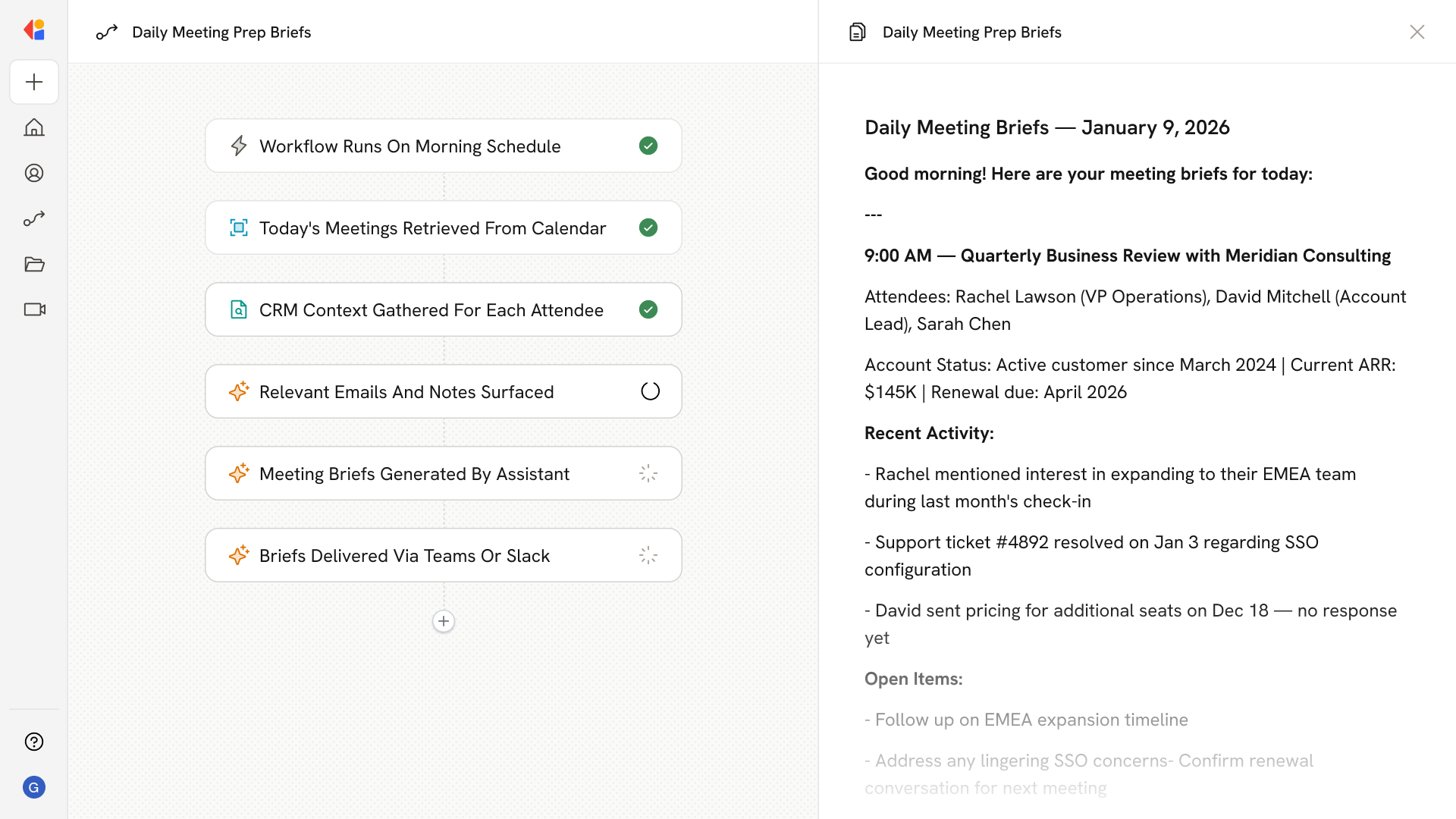
The Workflow runs automatically each morning on a set schedule, ensuring your team starts every day with fresh meeting briefs ready to go.
Cassidy connects to your calendar to retrieve all meetings scheduled for the day, capturing attendee lists, meeting titles, and timing details.
For each meeting, the Workflow pulls recent CRM updates related to the attendees—deal status, account history, open opportunities, and any logged activities.
Cassidy searches your email threads and previous meeting notes involving the attendees, surfacing relevant conversations, commitments made, and outstanding questions.
Cassidy compiles everything into concise briefs for each meeting—highlighting attendee details, open tasks, and outcomes from previous interactions.
The completed briefs are sent via email or Slack, so everyone walks into their meetings with complete context and clear priorities.
## Related
Create a custom Agent with tailored instructions and Knowledge Base access.
Add your company documents so Agents can reference them.
## What does this mean?
Teams prepare efficiently with complete context, leading to smoother coordination, clearer actions, and reduced time spent gathering information across the organization.
Pulls today’s calendar meetings, recent CRM updates, emails, and past meeting notes to compile concise briefs for each meeting, highlighting attendee details, open tasks, and outcomes from previous interactions.
## Workflow steps
The Workflow runs automatically each morning on a set schedule, ensuring your team starts every day with fresh meeting briefs ready to go.
Cassidy connects to your calendar to retrieve all meetings scheduled for the day, capturing attendee lists, meeting titles, and timing details.
For each meeting, the Workflow pulls recent CRM updates related to the attendees—deal status, account history, open opportunities, and any logged activities.
Cassidy searches your email threads and previous meeting notes involving the attendees, surfacing relevant conversations, commitments made, and outstanding questions.
Cassidy compiles everything into concise briefs for each meeting—highlighting attendee details, open tasks, and outcomes from previous interactions.
The completed briefs are sent via email or Slack, so everyone walks into their meetings with complete context and clear priorities.
## Related
Create a custom Agent with tailored instructions and Knowledge Base access.
Add your company documents so Agents can reference them.