> ## Documentation Index
> Fetch the complete documentation index at: https://docs.cassidyai.com/llms.txt
> Use this file to discover all available pages before exploring further.
# Project Status and Risk Summaries
> Automatically generates weekly briefs that consolidate project risks, dependencies, and key decisions, drawing from meeting notes and project management tools.
 ## What does this mean?
Provides clear and concise visibility into project progress and potential challenges, enabling informed decision-making and proactive risk management.
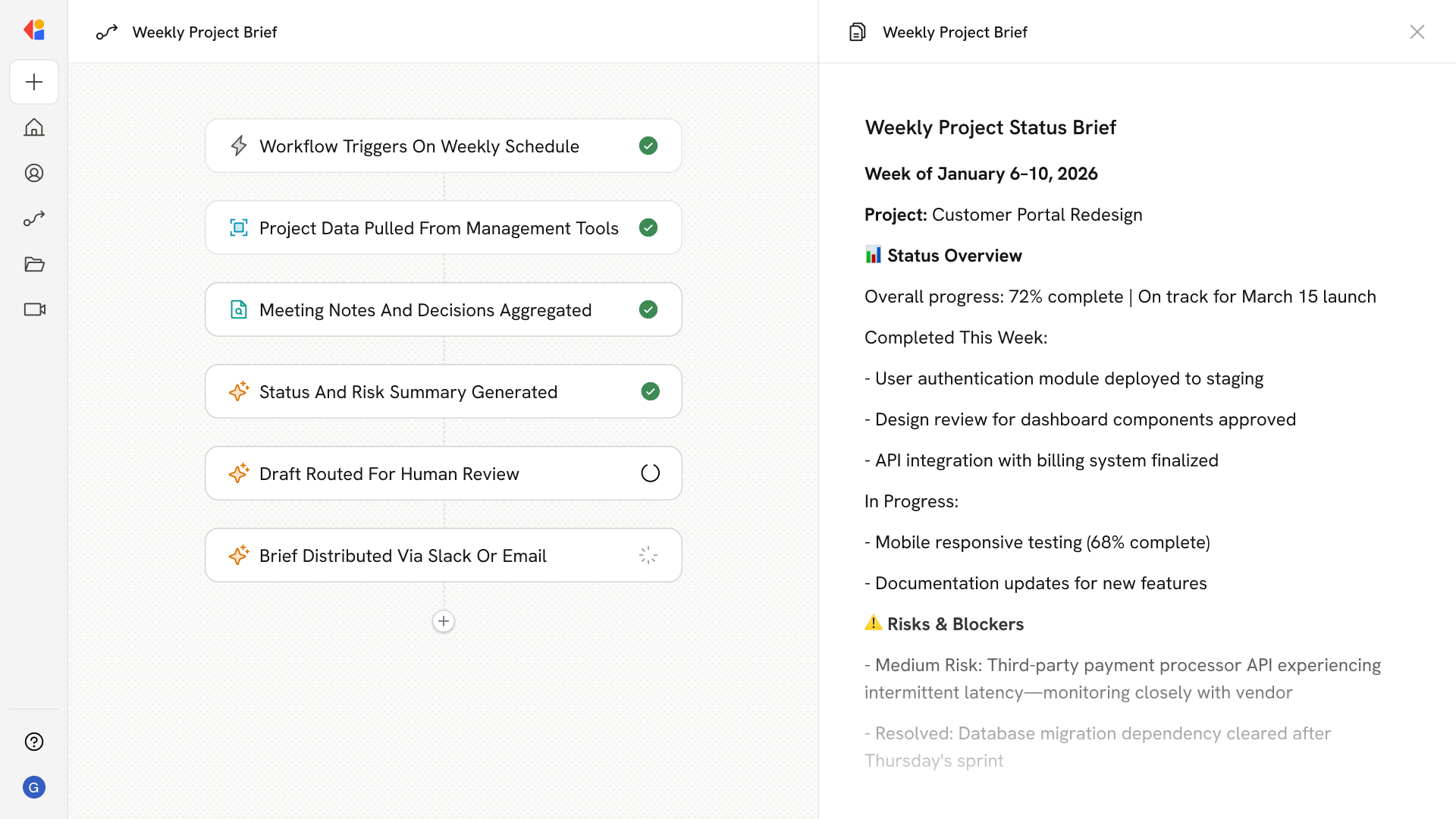
Automatically generates weekly briefs that consolidate project risks, dependencies, and key decisions, drawing from meeting notes and project management tools.
## Workflow steps
The Workflow activates automatically on a weekly schedule, ensuring project status briefs are generated consistently without manual intervention.
Cassidy connects to your project management tools—like Jira, Asana, or Monday—to gather current project statuses, task progress, dependencies, and flagged blockers.
The Workflow pulls relevant meeting notes from your Knowledge Base, extracting key decisions, action items, and risk discussions from the past week.
Cassidy analyzes the aggregated data to identify project risks, dependencies, and critical decisions—then consolidates everything into a clear, concise weekly brief.
The draft summary is sent to a project lead or stakeholder for quick review, allowing them to add context or flag anything that needs attention before distribution.
Once approved, the Workflow sends the finalized project status brief via email or Slack, keeping leadership and cross-functional teams aligned on progress and potential challenges.
## Related
Create a custom Agent with tailored instructions and Knowledge Base access.
Add your company documents so Agents can reference them.
## What does this mean?
Provides clear and concise visibility into project progress and potential challenges, enabling informed decision-making and proactive risk management.
Automatically generates weekly briefs that consolidate project risks, dependencies, and key decisions, drawing from meeting notes and project management tools.
## Workflow steps
The Workflow activates automatically on a weekly schedule, ensuring project status briefs are generated consistently without manual intervention.
Cassidy connects to your project management tools—like Jira, Asana, or Monday—to gather current project statuses, task progress, dependencies, and flagged blockers.
The Workflow pulls relevant meeting notes from your Knowledge Base, extracting key decisions, action items, and risk discussions from the past week.
Cassidy analyzes the aggregated data to identify project risks, dependencies, and critical decisions—then consolidates everything into a clear, concise weekly brief.
The draft summary is sent to a project lead or stakeholder for quick review, allowing them to add context or flag anything that needs attention before distribution.
Once approved, the Workflow sends the finalized project status brief via email or Slack, keeping leadership and cross-functional teams aligned on progress and potential challenges.
## Related
Create a custom Agent with tailored instructions and Knowledge Base access.
Add your company documents so Agents can reference them.