> ## Documentation Index
> Fetch the complete documentation index at: https://docs.cassidyai.com/llms.txt
> Use this file to discover all available pages before exploring further.
# Standardized Meeting Minutes Writer
> Facilitates consistent follow-through and alignment, ensuring all stakeholders are informed and accountable without manual effort by automatically generating clear, standardized meeting minutes.
 ## What does this mean?
Facilitates consistent follow-through and alignment, ensuring all stakeholders are informed and accountable without manual effort.
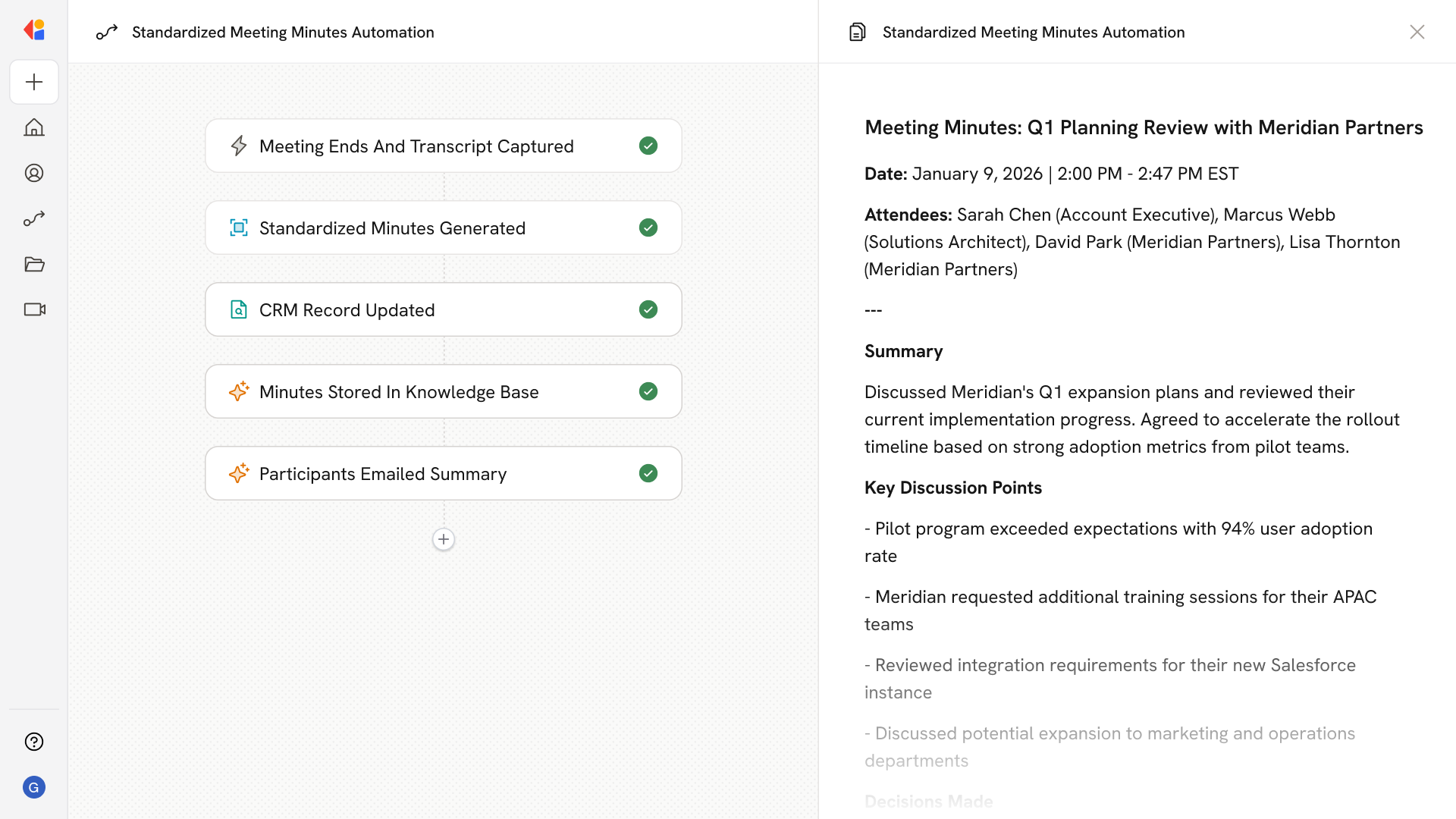
Records and transcribes calls to automatically generate clear, standardized meeting minutes with designated owners and due dates, added to your CRM, stored in the Knowledge Base, and emailed to participants.
## Workflow steps
The Workflow activates automatically when a call concludes, capturing the full recording and transcript without any manual intervention.
Cassidy analyzes the transcript to extract key discussion points, decisions made, action items with designated owners, and due dates—all formatted to your organization's standard template.
The Workflow automatically logs the meeting minutes to the relevant record in your CRM, keeping your customer data current and accessible to the entire team.
A copy of the meeting minutes is added to your Knowledge Base, making it searchable and available for future reference across your organization.
The Workflow sends the finalized meeting minutes to all attendees, ensuring everyone leaves with the same understanding of outcomes, ownership, and next steps.
## Related
Create a custom Agent with tailored instructions and Knowledge Base access.
Add your company documents so Agents can reference them.
## What does this mean?
Facilitates consistent follow-through and alignment, ensuring all stakeholders are informed and accountable without manual effort.
Records and transcribes calls to automatically generate clear, standardized meeting minutes with designated owners and due dates, added to your CRM, stored in the Knowledge Base, and emailed to participants.
## Workflow steps
The Workflow activates automatically when a call concludes, capturing the full recording and transcript without any manual intervention.
Cassidy analyzes the transcript to extract key discussion points, decisions made, action items with designated owners, and due dates—all formatted to your organization's standard template.
The Workflow automatically logs the meeting minutes to the relevant record in your CRM, keeping your customer data current and accessible to the entire team.
A copy of the meeting minutes is added to your Knowledge Base, making it searchable and available for future reference across your organization.
The Workflow sends the finalized meeting minutes to all attendees, ensuring everyone leaves with the same understanding of outcomes, ownership, and next steps.
## Related
Create a custom Agent with tailored instructions and Knowledge Base access.
Add your company documents so Agents can reference them.