> ## Documentation Index
> Fetch the complete documentation index at: https://docs.cassidyai.com/llms.txt
> Use this file to discover all available pages before exploring further.
# Bug Report Structurer
> Streamlines bug reporting for clearer, faster resolutions, enhancing team collaboration and reducing engineering effort.
 ## What does this mean?
Improves clarity and consistency of reports, reducing the time engineers spend deciphering issues and accelerating resolution, while enhancing collaboration between product managers and development teams.
Converts raw bug reports into standardized, detailed formats suitable for Jira, preserving context, involved systems, and necessary technical details for engineers.
## Workflow steps
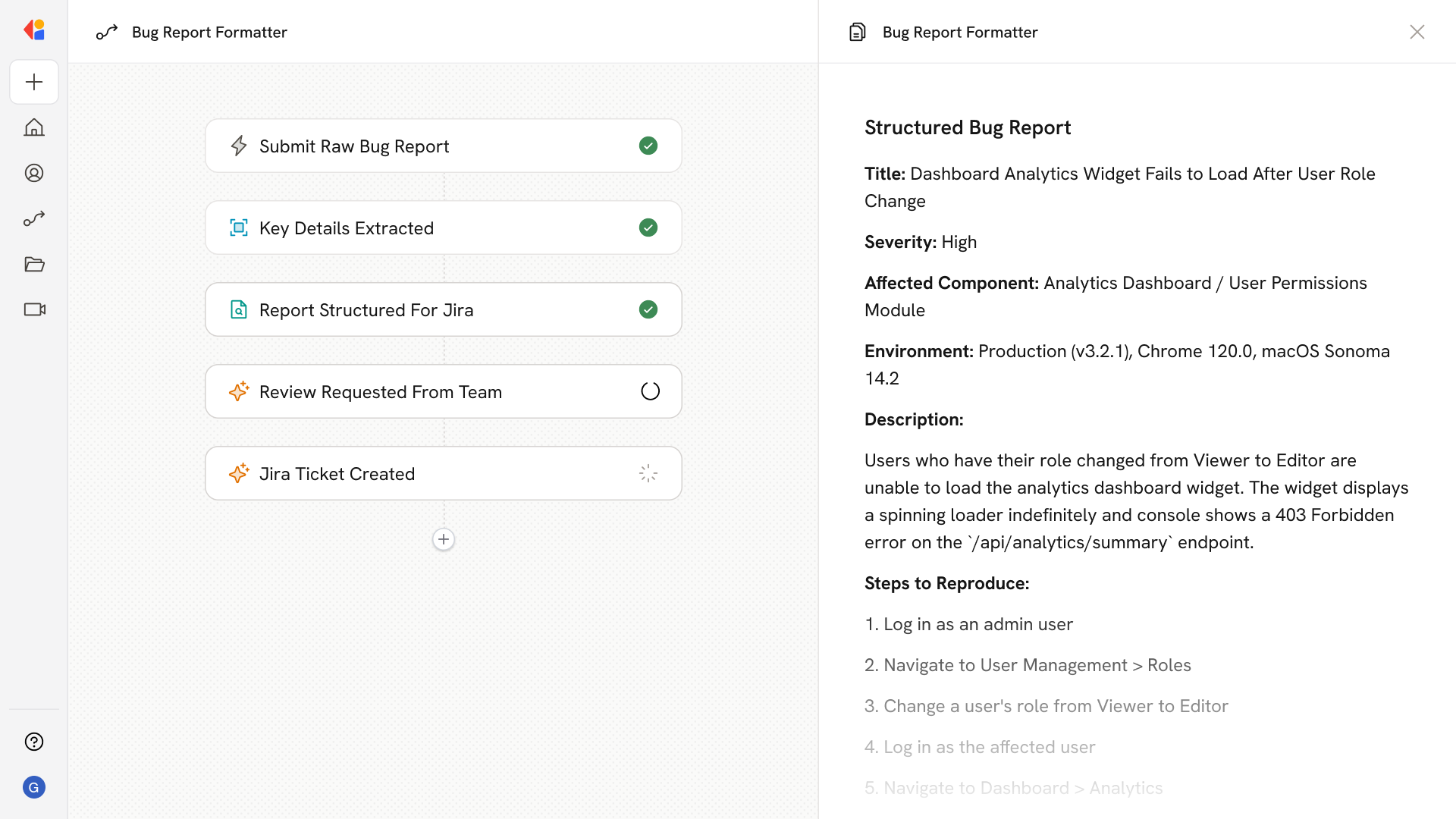
The Workflow activates via a Manual trigger when a team member submits a raw bug report—whether it's a quick Slack message, an email from a customer, or notes jotted down during testing.
Cassidy analyzes the unstructured report to identify critical information: the issue description, steps to reproduce, affected systems, environment details, and any error messages or screenshots referenced.
Using the Generate Text with Cassidy Agent action, the Workflow transforms the extracted details into a standardized bug report template—complete with severity level, affected components, reproduction steps, and technical context engineers need to diagnose the issue.
The structured report is sent to the product manager or reporter via Request Input from Team for a quick review, ensuring accuracy before it reaches engineering.
Once approved, the Workflow sends the formatted bug report directly to Jira via API request, creating a ticket with all fields populated and proper labels applied—ready for engineering to pick up without back-and-forth clarification.
## Related
Create a custom Agent with tailored instructions and Knowledge Base access.
Add your company documents so Agents can reference them.
## What does this mean?
Improves clarity and consistency of reports, reducing the time engineers spend deciphering issues and accelerating resolution, while enhancing collaboration between product managers and development teams.
Converts raw bug reports into standardized, detailed formats suitable for Jira, preserving context, involved systems, and necessary technical details for engineers.
## Workflow steps
The Workflow activates via a Manual trigger when a team member submits a raw bug report—whether it's a quick Slack message, an email from a customer, or notes jotted down during testing.
Cassidy analyzes the unstructured report to identify critical information: the issue description, steps to reproduce, affected systems, environment details, and any error messages or screenshots referenced.
Using the Generate Text with Cassidy Agent action, the Workflow transforms the extracted details into a standardized bug report template—complete with severity level, affected components, reproduction steps, and technical context engineers need to diagnose the issue.
The structured report is sent to the product manager or reporter via Request Input from Team for a quick review, ensuring accuracy before it reaches engineering.
Once approved, the Workflow sends the formatted bug report directly to Jira via API request, creating a ticket with all fields populated and proper labels applied—ready for engineering to pick up without back-and-forth clarification.
## Related
Create a custom Agent with tailored instructions and Knowledge Base access.
Add your company documents so Agents can reference them.