> ## Documentation Index
> Fetch the complete documentation index at: https://docs.cassidyai.com/llms.txt
> Use this file to discover all available pages before exploring further.
# Feature Requests from Calls
> Seamlessly integrate customer feedback into product plans, ensuring efficient prioritization and comprehensive context preservation through transcribed call analysis and backlog routing.
 ## What does this mean?
Facilitates the seamless incorporation of feedback into product plans, ensuring requests are efficiently prioritized with comprehensive context preserved.
Transcribes customer calls to detect, de-duplicate, and route feature requests into the product backlog, keeping context intact for tagging customer specifics, motivations, and scenarios.
## Workflow steps
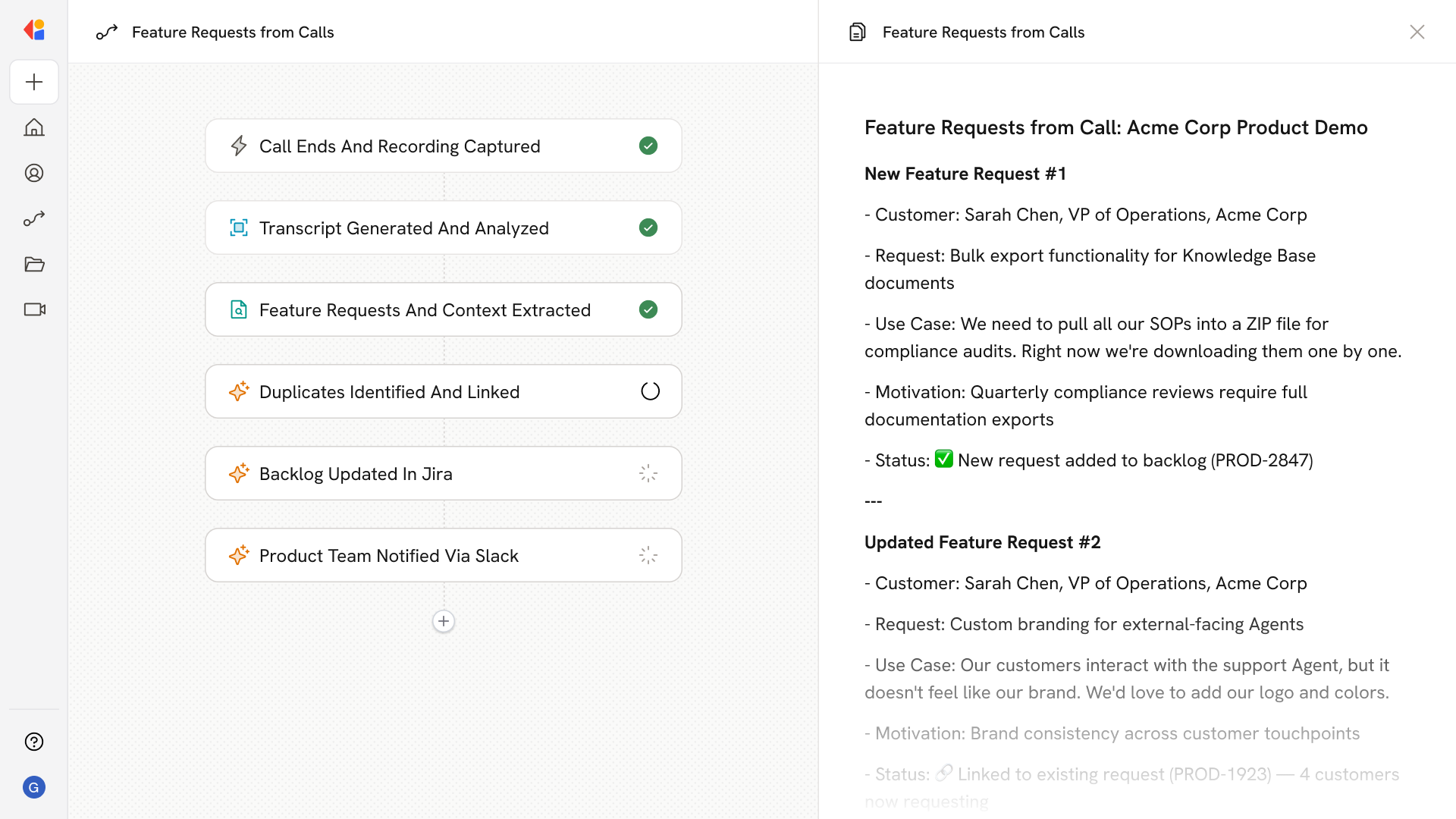
The Workflow activates automatically when a customer call ends, using a Meeting Ended trigger or integration with your call recording platform (such as Gong) to capture the conversation.
Cassidy processes the call recording to generate a full transcript, then identifies any feature requests mentioned during the conversation.
The Workflow pulls out key information for each feature request—including the customer's name, company, use case, motivation, and specific scenarios—preserving the full context behind the ask.
Cassidy checks the extracted requests against your product backlog to identify duplicates, linking new mentions to existing items or flagging truly new requests for addition.
The Workflow creates or updates backlog items in your project management tool (such as Jira) with the feature request details, customer tags, and relevant context for prioritization.
A notification is sent via Slack or email to alert the product team of new or updated feature requests, giving them immediate visibility into customer feedback without manual effort.
## Related
Create a custom Agent with tailored instructions and Knowledge Base access.
Add your company documents so Agents can reference them.
## What does this mean?
Facilitates the seamless incorporation of feedback into product plans, ensuring requests are efficiently prioritized with comprehensive context preserved.
Transcribes customer calls to detect, de-duplicate, and route feature requests into the product backlog, keeping context intact for tagging customer specifics, motivations, and scenarios.
## Workflow steps
The Workflow activates automatically when a customer call ends, using a Meeting Ended trigger or integration with your call recording platform (such as Gong) to capture the conversation.
Cassidy processes the call recording to generate a full transcript, then identifies any feature requests mentioned during the conversation.
The Workflow pulls out key information for each feature request—including the customer's name, company, use case, motivation, and specific scenarios—preserving the full context behind the ask.
Cassidy checks the extracted requests against your product backlog to identify duplicates, linking new mentions to existing items or flagging truly new requests for addition.
The Workflow creates or updates backlog items in your project management tool (such as Jira) with the feature request details, customer tags, and relevant context for prioritization.
A notification is sent via Slack or email to alert the product team of new or updated feature requests, giving them immediate visibility into customer feedback without manual effort.
## Related
Create a custom Agent with tailored instructions and Knowledge Base access.
Add your company documents so Agents can reference them.