> ## Documentation Index
> Fetch the complete documentation index at: https://docs.cassidyai.com/llms.txt
> Use this file to discover all available pages before exploring further.
# Pain Point Miner
> Aggregates and analyzes recurring customer pain points from support tickets and meeting transcripts.
 ## What does this mean?
Drives strategic roadmap decisions by revealing customer challenges with complete contextual understanding, reducing manual interpretation.
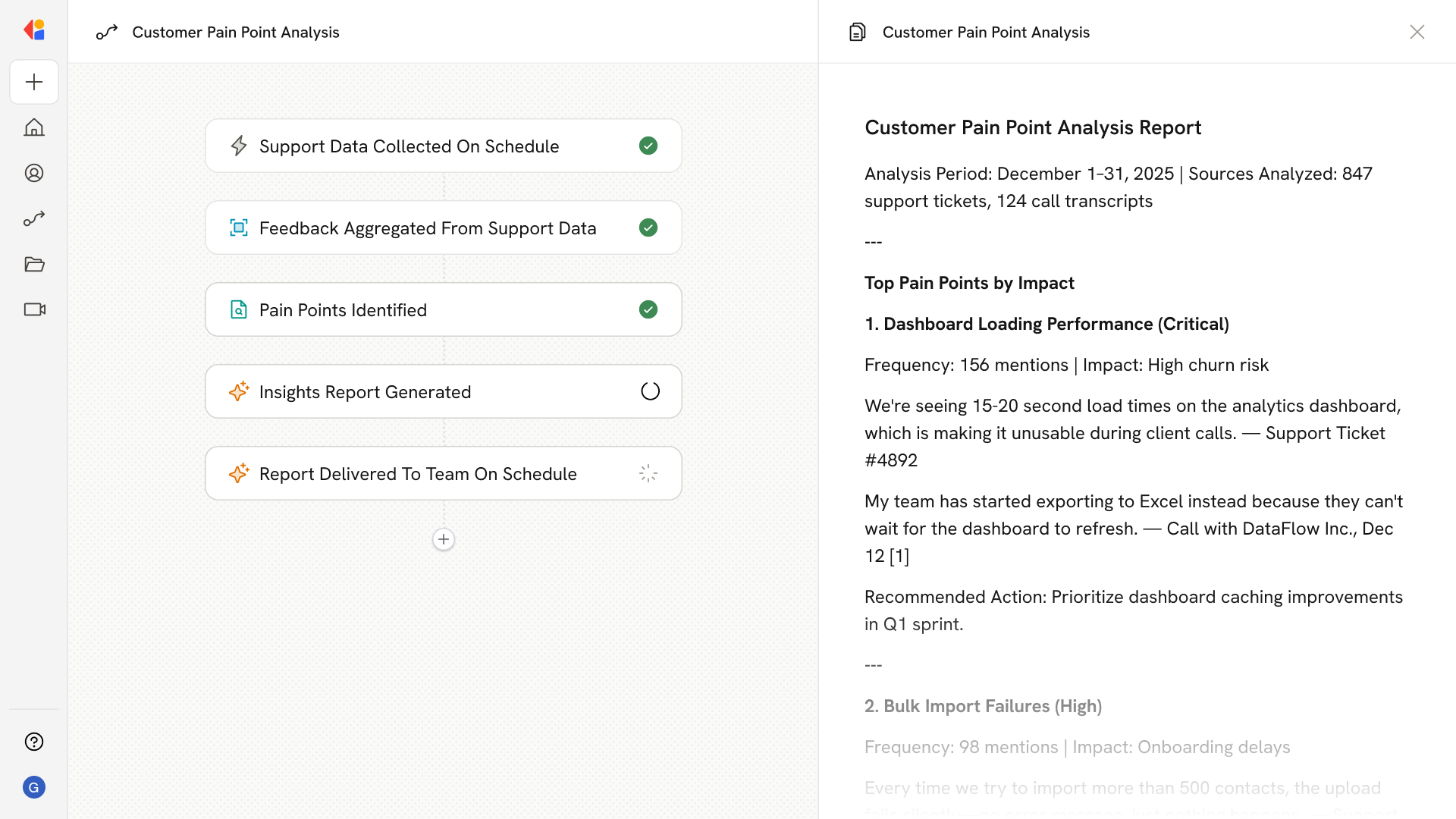
Aggregates and analyzes recurring customer pain points from support tickets and meeting transcripts, preserving context to tag details, motivations, and relevant use cases.
## Workflow steps
The Workflow activates on a scheduled basis or when new support tickets and meeting transcripts are added—pulling from sources like Zendesk, Gong, or your helpdesk.
Cassidy gathers support tickets and meeting transcripts from connected sources, compiling them into a unified dataset ready for analysis.
Using your Knowledge Base, the Workflow identifies recurring customer challenges—tagging each with relevant details, motivations, and use cases while preserving the original context.
The Workflow organizes pain points by theme, frequency, and business impact, surfacing the issues that matter most for product and strategy decisions.
Cassidy compiles the analysis into a clear summary—highlighting top pain points, supporting quotes, and recommended actions for your roadmap.
The report is sent via email, Slack, or Microsoft Teams, giving stakeholders immediate visibility into customer challenges without manual interpretation.
## Related
Create a custom Agent with tailored instructions and Knowledge Base access.
Add your company documents so Agents can reference them.
## What does this mean?
Drives strategic roadmap decisions by revealing customer challenges with complete contextual understanding, reducing manual interpretation.
Aggregates and analyzes recurring customer pain points from support tickets and meeting transcripts, preserving context to tag details, motivations, and relevant use cases.
## Workflow steps
The Workflow activates on a scheduled basis or when new support tickets and meeting transcripts are added—pulling from sources like Zendesk, Gong, or your helpdesk.
Cassidy gathers support tickets and meeting transcripts from connected sources, compiling them into a unified dataset ready for analysis.
Using your Knowledge Base, the Workflow identifies recurring customer challenges—tagging each with relevant details, motivations, and use cases while preserving the original context.
The Workflow organizes pain points by theme, frequency, and business impact, surfacing the issues that matter most for product and strategy decisions.
Cassidy compiles the analysis into a clear summary—highlighting top pain points, supporting quotes, and recommended actions for your roadmap.
The report is sent via email, Slack, or Microsoft Teams, giving stakeholders immediate visibility into customer challenges without manual interpretation.
## Related
Create a custom Agent with tailored instructions and Knowledge Base access.
Add your company documents so Agents can reference them.