> ## Documentation Index
> Fetch the complete documentation index at: https://docs.cassidyai.com/llms.txt
> Use this file to discover all available pages before exploring further.
# User Interview Synthesizer
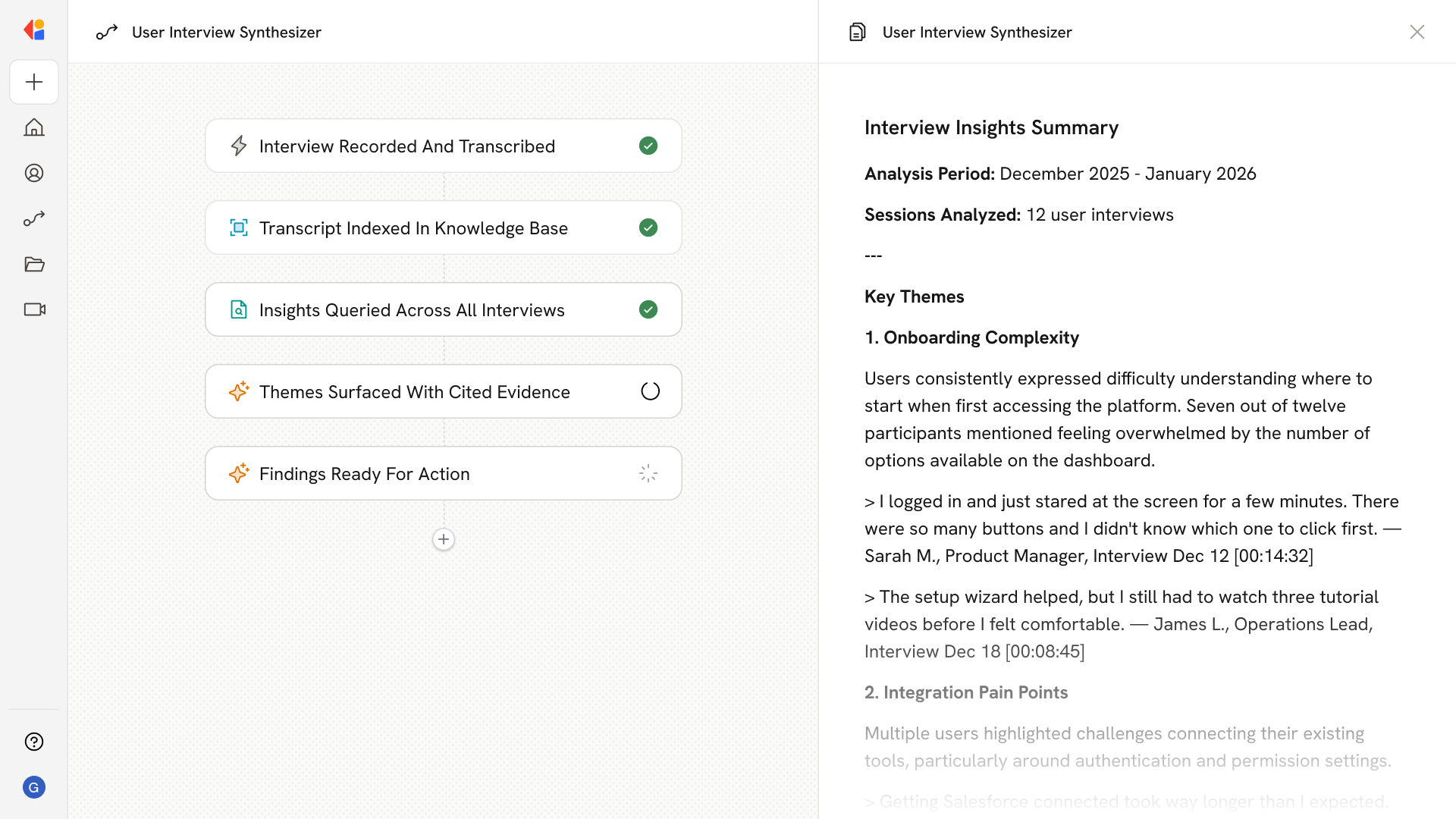
> Records and transcribes calls, indexes them in a knowledge base, and lets teams query across sessions to surface recurring themes, insights, and personas with cited clips and notes.
 ## What does this mean?
Replaces manual note-sifting with instant, cross-interview analysis—speeding synthesis, strengthening evidence for decisions, and turning voice-of-customer signals into clear product, design, and GTM actions.
Records and transcribes user interview calls via Meetings, indexes them in a unified Knowledge Base, and lets teams query across many sessions to surface recurring themes, insights, and personas with cited clips and notes.
## Workflow steps
When a user interview call ends, Cassidy Meetings automatically captures the recording and generates a full transcript of the conversation.
The transcript, along with any notes or metadata, is added to a unified Knowledge Base collection dedicated to user interviews. This makes every session searchable alongside past conversations.
Team members can ask questions across all indexed sessions using a Cassidy Agent. Whether looking for feedback on a specific feature, common pain points, or persona patterns, the Agent searches the full library of interviews to surface relevant insights.
The Agent returns recurring themes, user quotes, and actionable insights—each linked back to the original transcript and timestamp. Product, design, and GTM teams get the evidence they need without manually sifting through hours of recordings.
With clear, cited findings in hand, teams can confidently prioritize roadmap decisions, refine messaging, or validate design directions—all grounded in real voice-of-customer data.
## Related
Create a custom Agent with tailored instructions and Knowledge Base access.
Add your company documents so Agents can reference them.
## What does this mean?
Replaces manual note-sifting with instant, cross-interview analysis—speeding synthesis, strengthening evidence for decisions, and turning voice-of-customer signals into clear product, design, and GTM actions.
Records and transcribes user interview calls via Meetings, indexes them in a unified Knowledge Base, and lets teams query across many sessions to surface recurring themes, insights, and personas with cited clips and notes.
## Workflow steps
When a user interview call ends, Cassidy Meetings automatically captures the recording and generates a full transcript of the conversation.
The transcript, along with any notes or metadata, is added to a unified Knowledge Base collection dedicated to user interviews. This makes every session searchable alongside past conversations.
Team members can ask questions across all indexed sessions using a Cassidy Agent. Whether looking for feedback on a specific feature, common pain points, or persona patterns, the Agent searches the full library of interviews to surface relevant insights.
The Agent returns recurring themes, user quotes, and actionable insights—each linked back to the original transcript and timestamp. Product, design, and GTM teams get the evidence they need without manually sifting through hours of recordings.
With clear, cited findings in hand, teams can confidently prioritize roadmap decisions, refine messaging, or validate design directions—all grounded in real voice-of-customer data.
## Related
Create a custom Agent with tailored instructions and Knowledge Base access.
Add your company documents so Agents can reference them.