> ## Documentation Index
> Fetch the complete documentation index at: https://docs.cassidyai.com/llms.txt
> Use this file to discover all available pages before exploring further.
# Candidate Resume Screening and Scoring
> Optimize your hiring process with AI-powered resume screening.
 ## What does this mean?
Recruiters screen faster with consistent criteria, surface qualified candidates sooner, and improve hiring quality while reducing manual review time.
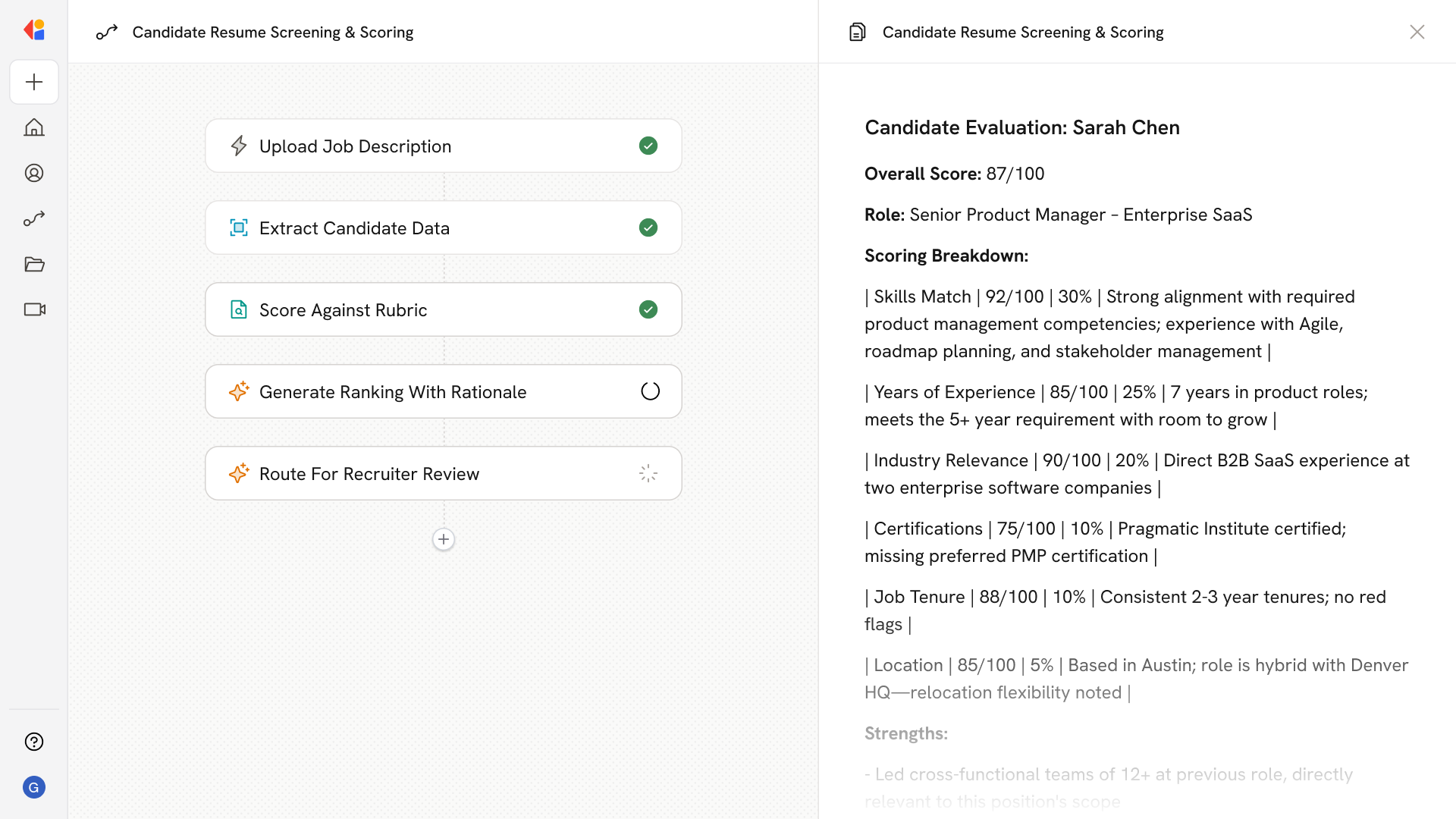
Ingests job descriptions and parses incoming resumes, then compares candidates to the JD using a structured, weighted rubric (skills, experience, certifications, tenure, and location fit) to produce ranked shortlists with transparent rationale.
## Workflow steps
The Workflow begins when a new job description is added—via a manual trigger, Google Drive, or SharePoint. Cassidy parses the JD to extract key requirements: required skills, experience levels, certifications, location preferences, and other hiring criteria.
As candidates apply, resumes flow into the Workflow automatically through email, file uploads, or directly from your ATS or cloud storage.
Cassidy analyzes each resume, pulling out structured information: work history, skills, certifications, tenure at previous roles, and location.
The Workflow compares each candidate's profile to the job description using a structured, weighted rubric. Cassidy evaluates skills match, years of experience, relevant certifications, job tenure patterns, and location fit—assigning scores to each dimension.
For every candidate, Cassidy produces a transparent explanation of their score—highlighting strengths, gaps, and how they stack up against the role's requirements.
The Workflow assembles a ranked list of top candidates with their scores and rationale, formatted for easy review.
The shortlist is delivered to your recruiting team via email or Slack, keeping a human in the loop before any candidate moves forward in the process.
## Related
Create a custom Agent with tailored instructions and Knowledge Base access.
Add your company documents so Agents can reference them.
## What does this mean?
Recruiters screen faster with consistent criteria, surface qualified candidates sooner, and improve hiring quality while reducing manual review time.
Ingests job descriptions and parses incoming resumes, then compares candidates to the JD using a structured, weighted rubric (skills, experience, certifications, tenure, and location fit) to produce ranked shortlists with transparent rationale.
## Workflow steps
The Workflow begins when a new job description is added—via a manual trigger, Google Drive, or SharePoint. Cassidy parses the JD to extract key requirements: required skills, experience levels, certifications, location preferences, and other hiring criteria.
As candidates apply, resumes flow into the Workflow automatically through email, file uploads, or directly from your ATS or cloud storage.
Cassidy analyzes each resume, pulling out structured information: work history, skills, certifications, tenure at previous roles, and location.
The Workflow compares each candidate's profile to the job description using a structured, weighted rubric. Cassidy evaluates skills match, years of experience, relevant certifications, job tenure patterns, and location fit—assigning scores to each dimension.
For every candidate, Cassidy produces a transparent explanation of their score—highlighting strengths, gaps, and how they stack up against the role's requirements.
The Workflow assembles a ranked list of top candidates with their scores and rationale, formatted for easy review.
The shortlist is delivered to your recruiting team via email or Slack, keeping a human in the loop before any candidate moves forward in the process.
## Related
Create a custom Agent with tailored instructions and Knowledge Base access.
Add your company documents so Agents can reference them.