> ## Documentation Index
> Fetch the complete documentation index at: https://docs.cassidyai.com/llms.txt
> Use this file to discover all available pages before exploring further.
# Interview Scorecard Summarizer
> Transforms interview conversations and notes into structured scorecards, providing consistent, evidence-based evaluations faster, reducing bias and manual administration.
 ## What does this mean?
Hiring teams get consistent, evidence based evaluations faster, reduce bias and manual admin, and speed decisions with clear next steps and flagged follow ups.
Transforms interview conversations and notes into structured scorecards by recording the meeting, summarizing key signals, mapping evidence to the job’s rubric, and generating clear ratings plus a hire/no‑hire recommendation with rationale.
## Workflow steps
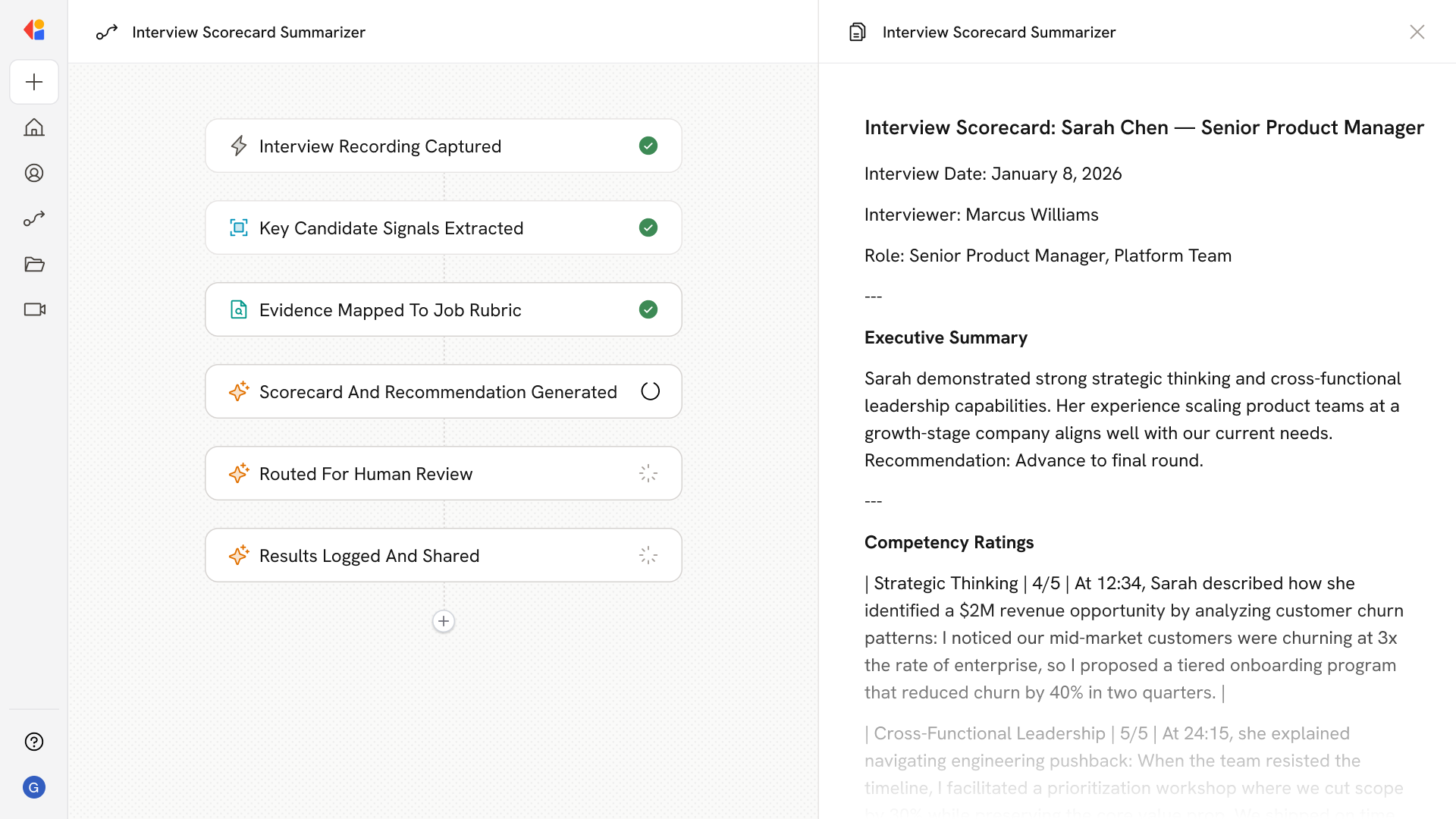
The Workflow activates when an interview meeting ends, automatically capturing the full conversation recording and any notes from the session.
Cassidy analyzes the interview transcript and notes, extracting the candidate's responses, behavioral examples, and standout moments that matter most for evaluation.
Cassidy matches extracted signals against the role's specific competencies and scoring criteria, grounding every rating in concrete evidence from the conversation.
The Workflow produces a structured scorecard with clear ratings per competency, a hire/no-hire recommendation, supporting rationale, and any flagged follow-ups for the hiring team.
The completed scorecard is sent to the interviewer or hiring manager for quick review, keeping a human in the loop before the evaluation is finalized.
Once approved, the scorecard is logged to your ATS or shared via Slack or email, giving the hiring team instant visibility and clear next steps.
## Related
Create a custom Agent with tailored instructions and Knowledge Base access.
Add your company documents so Agents can reference them.
## What does this mean?
Hiring teams get consistent, evidence based evaluations faster, reduce bias and manual admin, and speed decisions with clear next steps and flagged follow ups.
Transforms interview conversations and notes into structured scorecards by recording the meeting, summarizing key signals, mapping evidence to the job’s rubric, and generating clear ratings plus a hire/no‑hire recommendation with rationale.
## Workflow steps
The Workflow activates when an interview meeting ends, automatically capturing the full conversation recording and any notes from the session.
Cassidy analyzes the interview transcript and notes, extracting the candidate's responses, behavioral examples, and standout moments that matter most for evaluation.
Cassidy matches extracted signals against the role's specific competencies and scoring criteria, grounding every rating in concrete evidence from the conversation.
The Workflow produces a structured scorecard with clear ratings per competency, a hire/no-hire recommendation, supporting rationale, and any flagged follow-ups for the hiring team.
The completed scorecard is sent to the interviewer or hiring manager for quick review, keeping a human in the loop before the evaluation is finalized.
Once approved, the scorecard is logged to your ATS or shared via Slack or email, giving the hiring team instant visibility and clear next steps.
## Related
Create a custom Agent with tailored instructions and Knowledge Base access.
Add your company documents so Agents can reference them.