> ## Documentation Index
> Fetch the complete documentation index at: https://docs.cassidyai.com/llms.txt
> Use this file to discover all available pages before exploring further.
# Company Deep‑Dive Dossier
> Get an authoritative, ready-to-use view of a target company, compiled autonomously from credible sources to speed up your strategic decisions.
 ## What does this mean?
Gives teams an authoritative, ready‑to‑use view of a target company—speeding account planning, partner evaluation, and strategic decisions without manual digging.
Autonomously compiles a current company profile by researching credible news, investor materials, regulatory filings, and the company’s site to surface customers, executives, product lines, go‑to‑market motions, partnerships, and competitive positioning—returned as a structured dossier with inline citations.
## Workflow steps
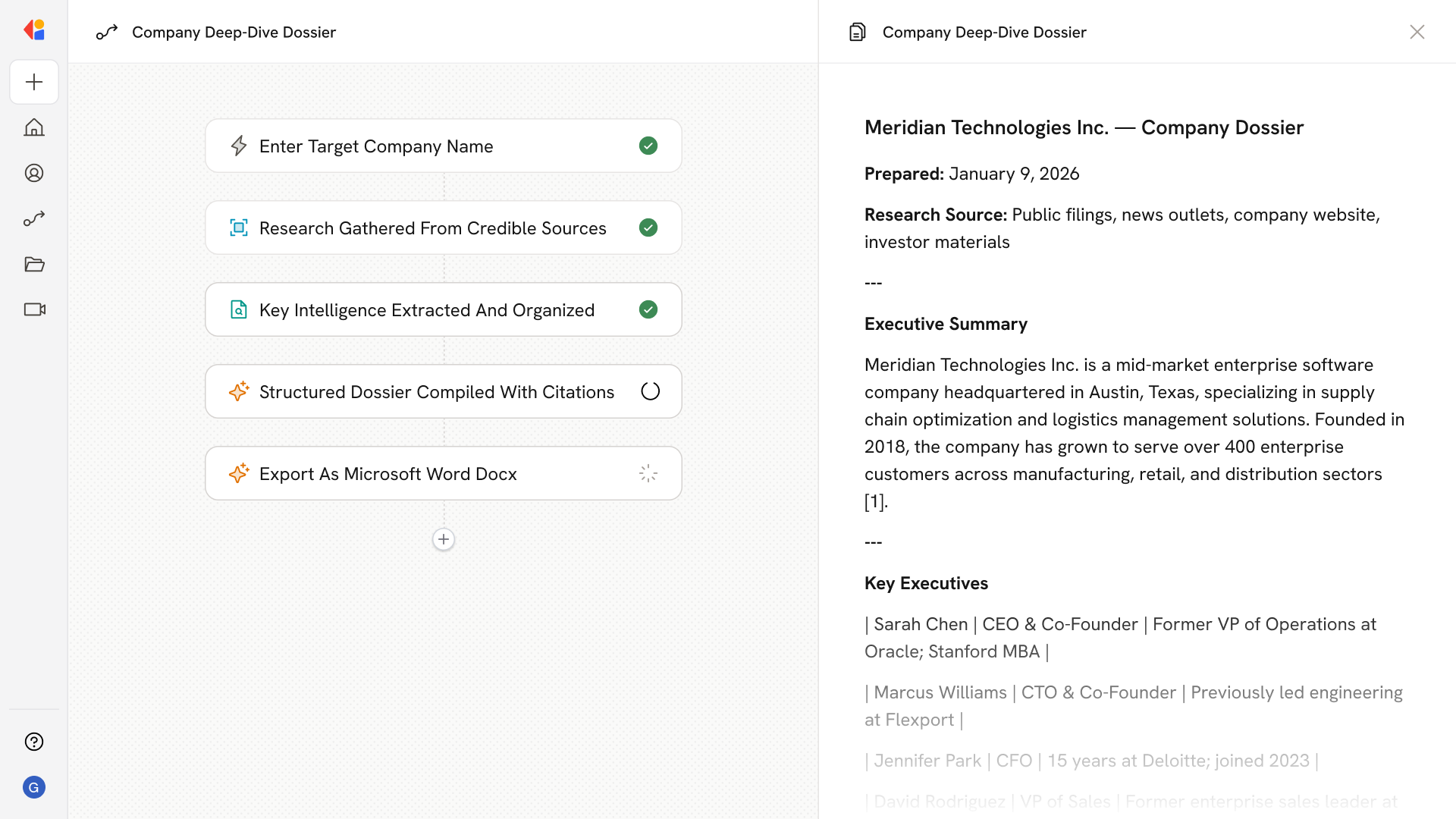
The Workflow starts via a manual trigger when a team member enters the target company name—kicking off research for account planning, partner evaluation, or competitive analysis.
Cassidy's Research Agent searches and navigates the web to gather current information from news outlets, investor materials, regulatory filings, and the company's own website.
Using the research findings, the Workflow identifies and organizes critical details: key executives, customer base, product lines, go-to-market motions, partnerships, and competitive positioning.
Cassidy combines all gathered intelligence into a comprehensive, structured dossier—complete with inline citations so every data point traces back to its source.
The finished dossier is exported as a Microsoft Word document or sent directly to the requesting team member, ready for immediate use in strategic decisions.
## Related
Create a custom Agent with tailored instructions and Knowledge Base access.
Add your company documents so Agents can reference them.
## What does this mean?
Gives teams an authoritative, ready‑to‑use view of a target company—speeding account planning, partner evaluation, and strategic decisions without manual digging.
Autonomously compiles a current company profile by researching credible news, investor materials, regulatory filings, and the company’s site to surface customers, executives, product lines, go‑to‑market motions, partnerships, and competitive positioning—returned as a structured dossier with inline citations.
## Workflow steps
The Workflow starts via a manual trigger when a team member enters the target company name—kicking off research for account planning, partner evaluation, or competitive analysis.
Cassidy's Research Agent searches and navigates the web to gather current information from news outlets, investor materials, regulatory filings, and the company's own website.
Using the research findings, the Workflow identifies and organizes critical details: key executives, customer base, product lines, go-to-market motions, partnerships, and competitive positioning.
Cassidy combines all gathered intelligence into a comprehensive, structured dossier—complete with inline citations so every data point traces back to its source.
The finished dossier is exported as a Microsoft Word document or sent directly to the requesting team member, ready for immediate use in strategic decisions.
## Related
Create a custom Agent with tailored instructions and Knowledge Base access.
Add your company documents so Agents can reference them.