> ## Documentation Index
> Fetch the complete documentation index at: https://docs.cassidyai.com/llms.txt
> Use this file to discover all available pages before exploring further.
# Competitor Positioning Analyzer
> Understand competitor strategies and weaknesses.
 ## What does this mean?
Gives teams a current view of how rivals position and win, supporting sharper messaging, better win‑loss preparation, and focused strategy adjustments.
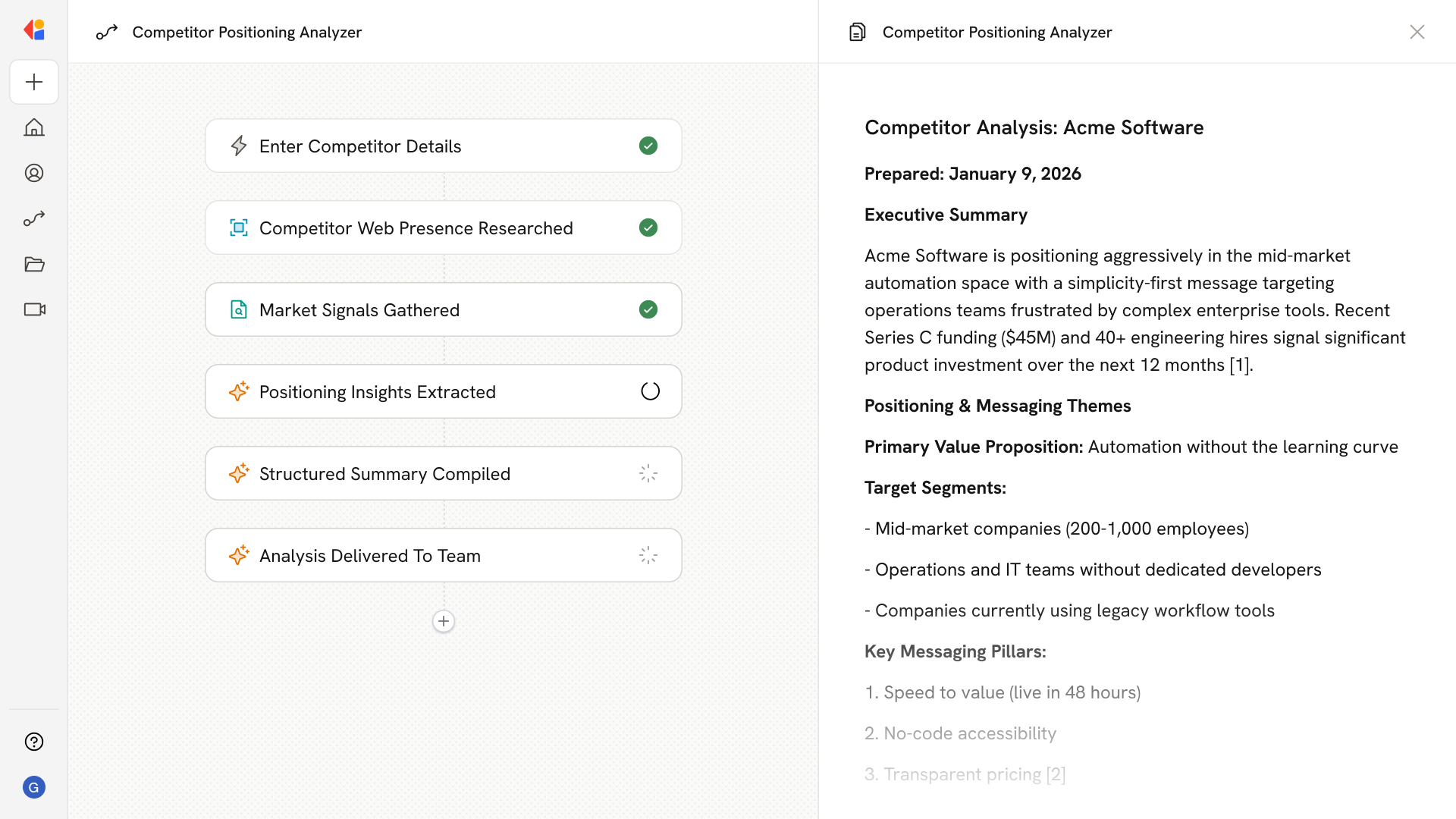
Runs an in‑depth analysis of competitor websites, product pages, pricing, reviews, support forums, funding and hiring news, and public messaging to extract positioning pillars, target segments, differentiators, and perceived weaknesses, returned as a structured summary with citations.
## Workflow steps
The Workflow starts with a manual trigger where you enter the competitor you want to analyze—company name, website URL, or specific product line.
Cassidy's Research Agent searches and navigates competitor websites, product pages, pricing information, customer reviews, support forums, and public messaging to gather comprehensive intelligence.
The Research Agent pulls additional context from funding announcements, hiring news, and industry coverage to understand the competitor's strategic direction and growth priorities.
The Workflow analyzes all gathered information to identify positioning pillars, target segments, key differentiators, and perceived weaknesses—drawing on your Knowledge Base for relevant context about your own positioning.
Findings are organized into a structured report with clear sections for messaging themes, competitive strengths, vulnerabilities, and strategic recommendations—complete with citations to source materials.
The finished analysis is sent via email or Slack to your team, ready to inform sales battlecards, marketing messaging, and win-loss preparation.
## Related
Create a custom Agent with tailored instructions and Knowledge Base access.
Add your company documents so Agents can reference them.
## What does this mean?
Gives teams a current view of how rivals position and win, supporting sharper messaging, better win‑loss preparation, and focused strategy adjustments.
Runs an in‑depth analysis of competitor websites, product pages, pricing, reviews, support forums, funding and hiring news, and public messaging to extract positioning pillars, target segments, differentiators, and perceived weaknesses, returned as a structured summary with citations.
## Workflow steps
The Workflow starts with a manual trigger where you enter the competitor you want to analyze—company name, website URL, or specific product line.
Cassidy's Research Agent searches and navigates competitor websites, product pages, pricing information, customer reviews, support forums, and public messaging to gather comprehensive intelligence.
The Research Agent pulls additional context from funding announcements, hiring news, and industry coverage to understand the competitor's strategic direction and growth priorities.
The Workflow analyzes all gathered information to identify positioning pillars, target segments, key differentiators, and perceived weaknesses—drawing on your Knowledge Base for relevant context about your own positioning.
Findings are organized into a structured report with clear sections for messaging themes, competitive strengths, vulnerabilities, and strategic recommendations—complete with citations to source materials.
The finished analysis is sent via email or Slack to your team, ready to inform sales battlecards, marketing messaging, and win-loss preparation.
## Related
Create a custom Agent with tailored instructions and Knowledge Base access.
Add your company documents so Agents can reference them.