> ## Documentation Index
> Fetch the complete documentation index at: https://docs.cassidyai.com/llms.txt
> Use this file to discover all available pages before exploring further.
# SWOT Company Analyzer
> Autonomously researches and compiles an evidence-backed SWOT analysis.
 ## What does this mean?
Provides a clear, defensible view of a company’s position that speeds planning, sharpens messaging, and informs strategy without manual research.
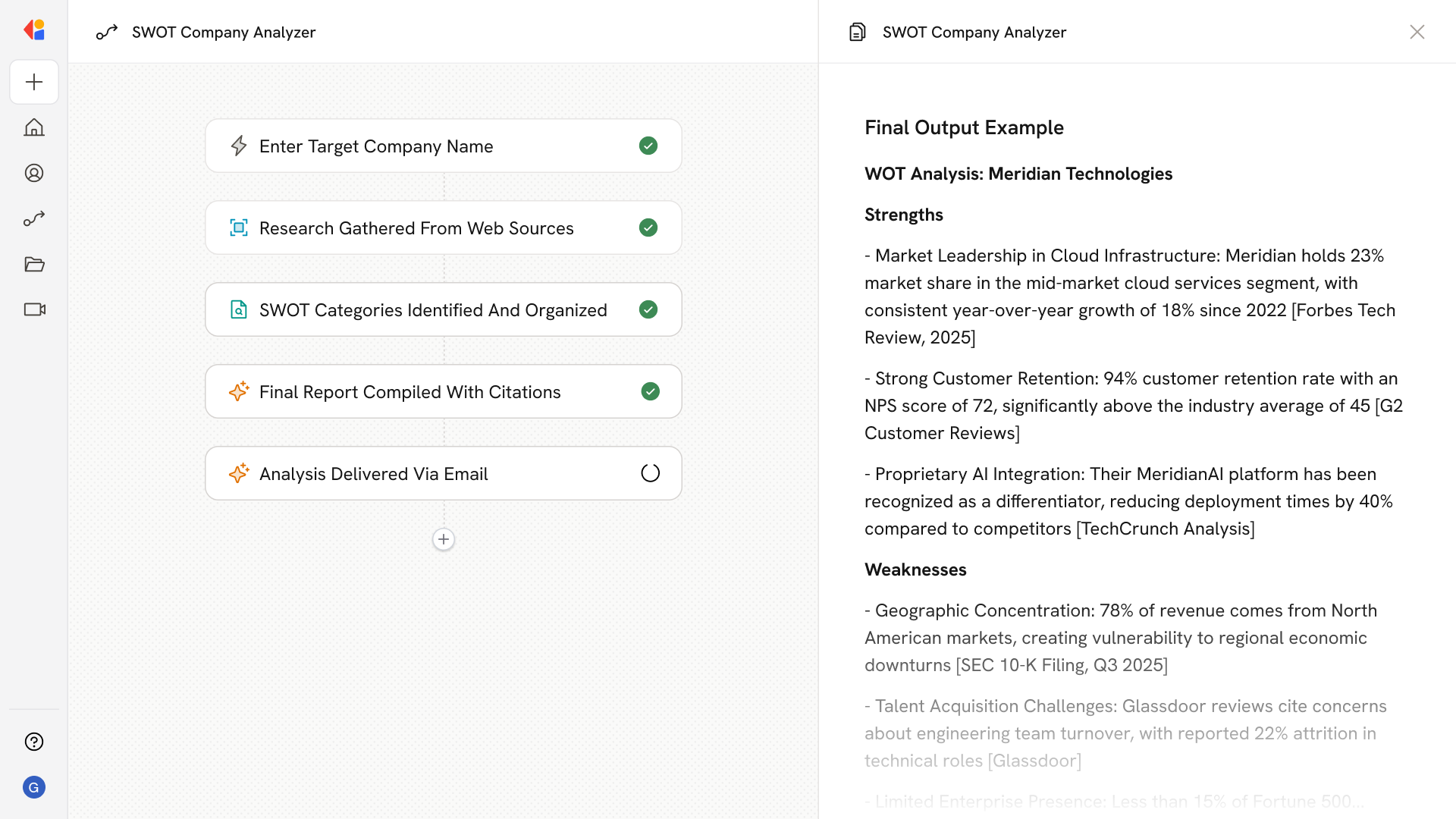
Autonomously researches a target company across credible news, filings, reviews, and product materials, then compiles an evidence‑backed SWOT with sourced strengths, weaknesses, opportunities, and threats, including quotes and inline citations.
## Workflow steps
The Workflow begins when you input the name of the company you want to analyze.
Cassidy's Research Agent searches the web for credible sources—news articles, SEC filings, customer reviews, and product materials—to gather comprehensive intelligence on the target company.
Using the research results, the Workflow generates a structured SWOT analysis, organizing evidence into Strengths, Weaknesses, Opportunities, and Threats with supporting quotes and inline citations.
The categorized findings are compiled into a polished, defensible SWOT document ready for planning sessions, strategy discussions, or stakeholder presentations.
The completed SWOT report is sent to you via email or exported as a Microsoft Word document for easy sharing and reference.
## Related
Create a custom Agent with tailored instructions and Knowledge Base access.
Add your company documents so Agents can reference them.
## What does this mean?
Provides a clear, defensible view of a company’s position that speeds planning, sharpens messaging, and informs strategy without manual research.
Autonomously researches a target company across credible news, filings, reviews, and product materials, then compiles an evidence‑backed SWOT with sourced strengths, weaknesses, opportunities, and threats, including quotes and inline citations.
## Workflow steps
The Workflow begins when you input the name of the company you want to analyze.
Cassidy's Research Agent searches the web for credible sources—news articles, SEC filings, customer reviews, and product materials—to gather comprehensive intelligence on the target company.
Using the research results, the Workflow generates a structured SWOT analysis, organizing evidence into Strengths, Weaknesses, Opportunities, and Threats with supporting quotes and inline citations.
The categorized findings are compiled into a polished, defensible SWOT document ready for planning sessions, strategy discussions, or stakeholder presentations.
The completed SWOT report is sent to you via email or exported as a Microsoft Word document for easy sharing and reference.
## Related
Create a custom Agent with tailored instructions and Knowledge Base access.
Add your company documents so Agents can reference them.