> ## Documentation Index
> Fetch the complete documentation index at: https://docs.cassidyai.com/llms.txt
> Use this file to discover all available pages before exploring further.
# Weekly Competitor News Brief
> Monitors a defined competitor set, aggregates notable updates from trusted sources each week, and delivers a concise brief to email and Slack.
 ## What does this mean?
Keeps teams aligned on rival moves without manual tracking, enabling faster responses, informed planning, and timely enablement.
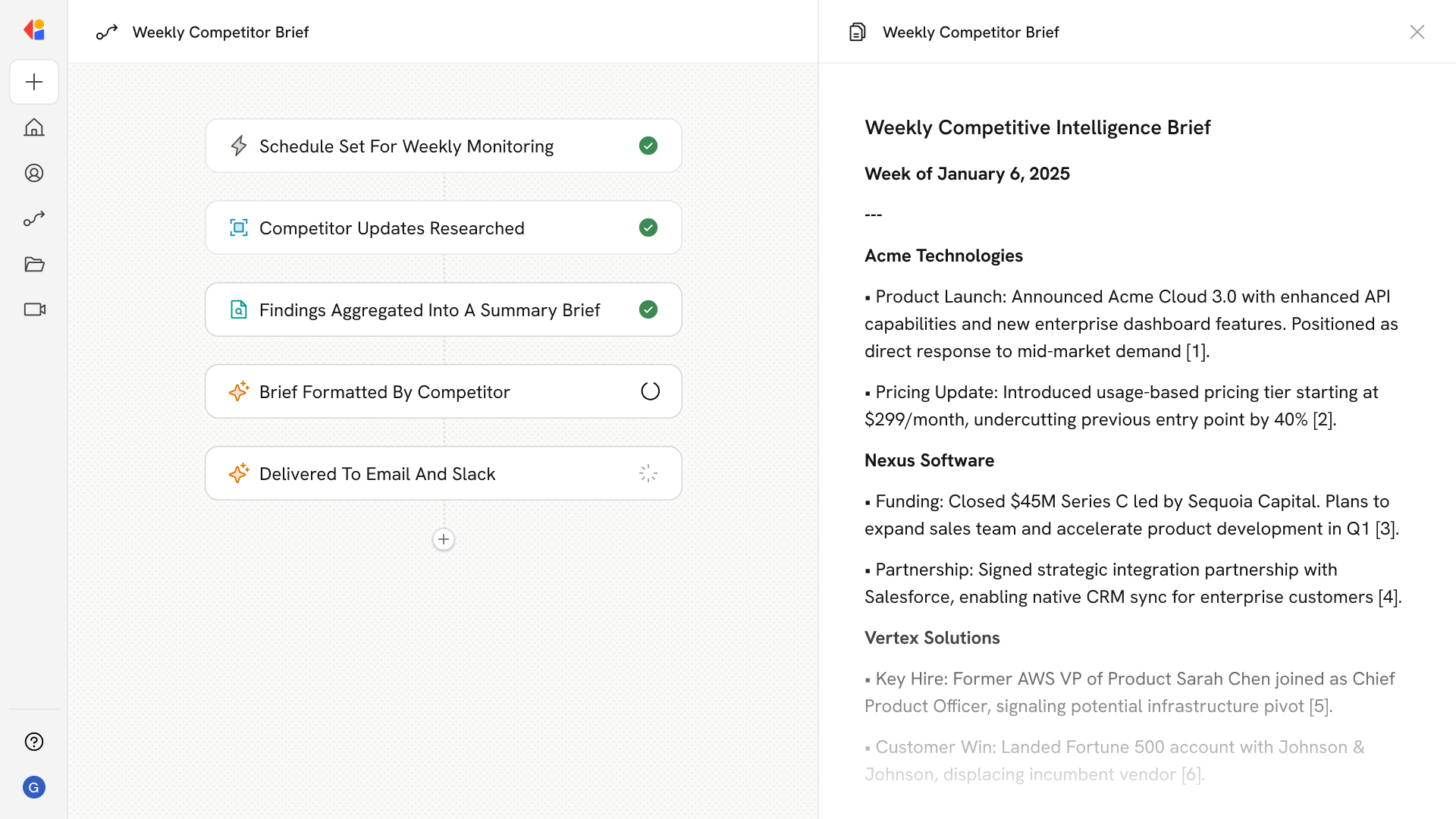
Monitors a defined competitor set, aggregates notable updates from trusted sources each week (product launches, pricing changes, funding, hires, partnerships, customer wins), and delivers a concise brief with summaries, links, and citations to email and Slack.
## Workflow steps
The Workflow activates automatically on a set schedule—weekly at a time you choose—so competitor monitoring happens consistently without anyone having to remember to run it.
Cassidy's Research Agent searches the web for each competitor in your defined set, looking for notable updates: product launches, pricing changes, funding announcements, key hires, partnerships, and customer wins.
The Workflow pulls together all the research into a concise brief—summarizing each update with context, links, and citations to the original sources.
Everything is structured into a clean, scannable format organized by competitor, making it easy for teams to quickly digest what matters.
The finished brief is sent automatically to your team's inbox and posted to a designated Slack channel, so everyone stays aligned on competitor moves without lifting a finger.
## Related
Create a custom Agent with tailored instructions and Knowledge Base access.
Add your company documents so Agents can reference them.
## What does this mean?
Keeps teams aligned on rival moves without manual tracking, enabling faster responses, informed planning, and timely enablement.
Monitors a defined competitor set, aggregates notable updates from trusted sources each week (product launches, pricing changes, funding, hires, partnerships, customer wins), and delivers a concise brief with summaries, links, and citations to email and Slack.
## Workflow steps
The Workflow activates automatically on a set schedule—weekly at a time you choose—so competitor monitoring happens consistently without anyone having to remember to run it.
Cassidy's Research Agent searches the web for each competitor in your defined set, looking for notable updates: product launches, pricing changes, funding announcements, key hires, partnerships, and customer wins.
The Workflow pulls together all the research into a concise brief—summarizing each update with context, links, and citations to the original sources.
Everything is structured into a clean, scannable format organized by competitor, making it easy for teams to quickly digest what matters.
The finished brief is sent automatically to your team's inbox and posted to a designated Slack channel, so everyone stays aligned on competitor moves without lifting a finger.
## Related
Create a custom Agent with tailored instructions and Knowledge Base access.
Add your company documents so Agents can reference them.