> ## Documentation Index
> Fetch the complete documentation index at: https://docs.cassidyai.com/llms.txt
> Use this file to discover all available pages before exploring further.
# RFP Requirement Extraction
> Quickly assess fit, plan responses, and ensure compliant, on-format submissions by parsing lengthy RFPs to extract key details and requirements.
 ## What does this mean?
Proposal teams quickly assess fit and plan responses without combing through 100-page documents, accelerating go/no-go, clarifying ownership, and ensuring compliant, on-format submissions.
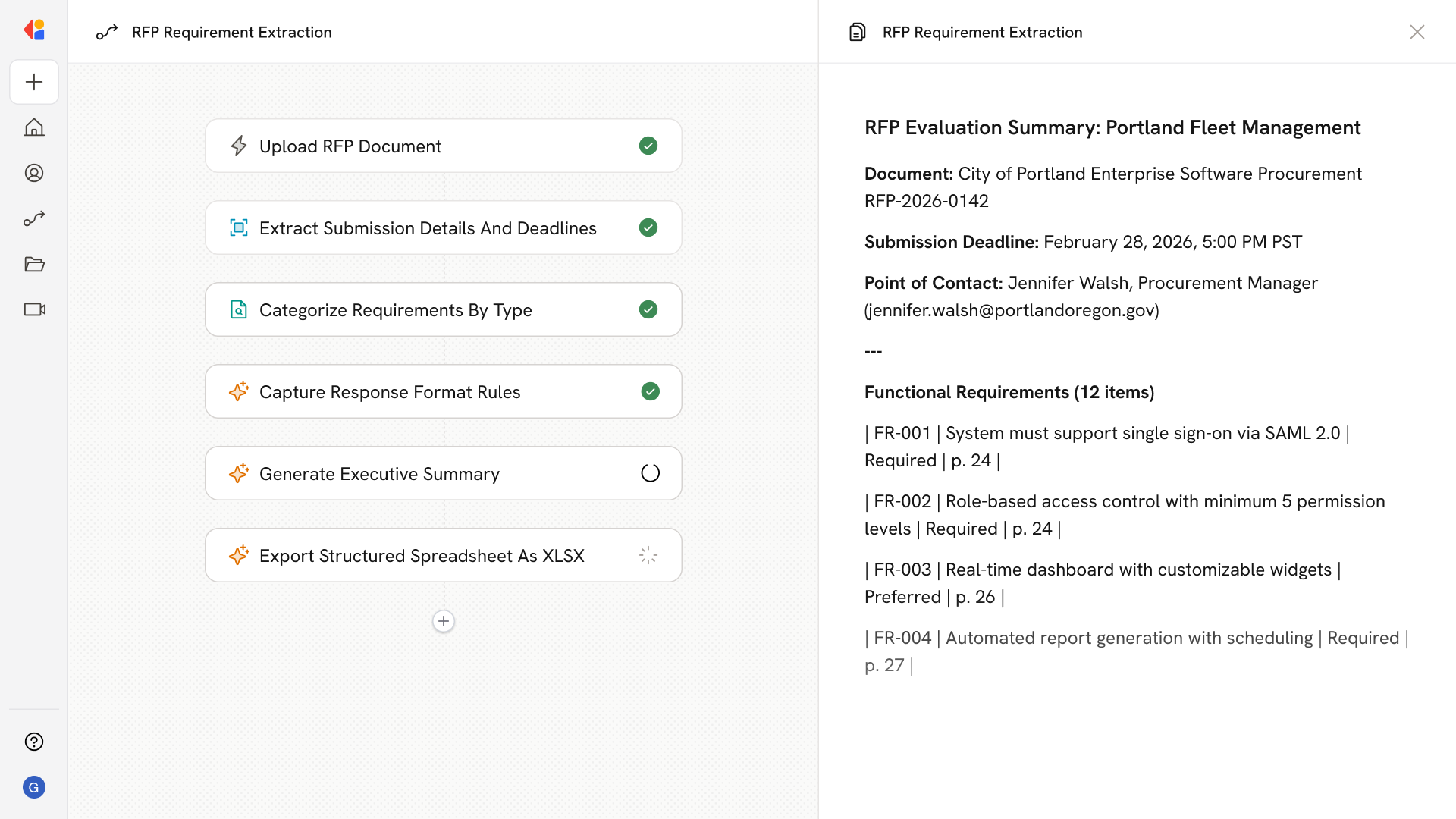
Parses lengthy RFPs to extract the essentials teams care about, including key details (deadlines, submission dates, contacts, delivery method), requirement types (functional, technical, security/compliance, service levels, integrations), response format expectations (questionnaires, matrices, page limits, attachments), and evaluation mechanics (scoring criteria, weighting, must-haves); then compiles a skimmable summary and structured spreadsheet with source references.
## Workflow steps
The Workflow starts when a team member uploads the RFP document—whether it's a 50-page PDF or a 200-page procurement package—and kicks off the extraction process.
Cassidy analyzes the full document to pull out essential logistics: submission deadlines, point-of-contact information, delivery method requirements, and any critical dates the team needs to track.
The Workflow categorizes requirements across functional, technical, security/compliance, service level, and integration categories—organizing what would otherwise take hours of manual review.
Cassidy extracts formatting rules including questionnaire structures, response matrices, page limits, and required attachments so the team knows exactly how to structure their submission.
The Workflow identifies how the RFP will be scored—pulling out weighting criteria, must-have requirements, and evaluation factors that help the team prioritize their response strategy.
Cassidy compiles a concise overview that lets stakeholders quickly assess fit and make go/no-go decisions without reading the entire document.
The Workflow outputs a formatted spreadsheet organizing all extracted requirements, details, and evaluation criteria—complete with source references back to the original document for verification and response planning.
## Related
Create a custom Agent with tailored instructions and Knowledge Base access.
Add your company documents so Agents can reference them.
## What does this mean?
Proposal teams quickly assess fit and plan responses without combing through 100-page documents, accelerating go/no-go, clarifying ownership, and ensuring compliant, on-format submissions.
Parses lengthy RFPs to extract the essentials teams care about, including key details (deadlines, submission dates, contacts, delivery method), requirement types (functional, technical, security/compliance, service levels, integrations), response format expectations (questionnaires, matrices, page limits, attachments), and evaluation mechanics (scoring criteria, weighting, must-haves); then compiles a skimmable summary and structured spreadsheet with source references.
## Workflow steps
The Workflow starts when a team member uploads the RFP document—whether it's a 50-page PDF or a 200-page procurement package—and kicks off the extraction process.
Cassidy analyzes the full document to pull out essential logistics: submission deadlines, point-of-contact information, delivery method requirements, and any critical dates the team needs to track.
The Workflow categorizes requirements across functional, technical, security/compliance, service level, and integration categories—organizing what would otherwise take hours of manual review.
Cassidy extracts formatting rules including questionnaire structures, response matrices, page limits, and required attachments so the team knows exactly how to structure their submission.
The Workflow identifies how the RFP will be scored—pulling out weighting criteria, must-have requirements, and evaluation factors that help the team prioritize their response strategy.
Cassidy compiles a concise overview that lets stakeholders quickly assess fit and make go/no-go decisions without reading the entire document.
The Workflow outputs a formatted spreadsheet organizing all extracted requirements, details, and evaluation criteria—complete with source references back to the original document for verification and response planning.
## Related
Create a custom Agent with tailored instructions and Knowledge Base access.
Add your company documents so Agents can reference them.