> ## Documentation Index
> Fetch the complete documentation index at: https://docs.cassidyai.com/llms.txt
> Use this file to discover all available pages before exploring further.
# RFP Response Grader
> Ingests and evaluates RFP responses against standards, providing a section-by-section scorecard.
 ## What does this mean?
Proposal teams submit higher-quality responses faster with clear, consistent guidance that reduces rework and improves win rates.
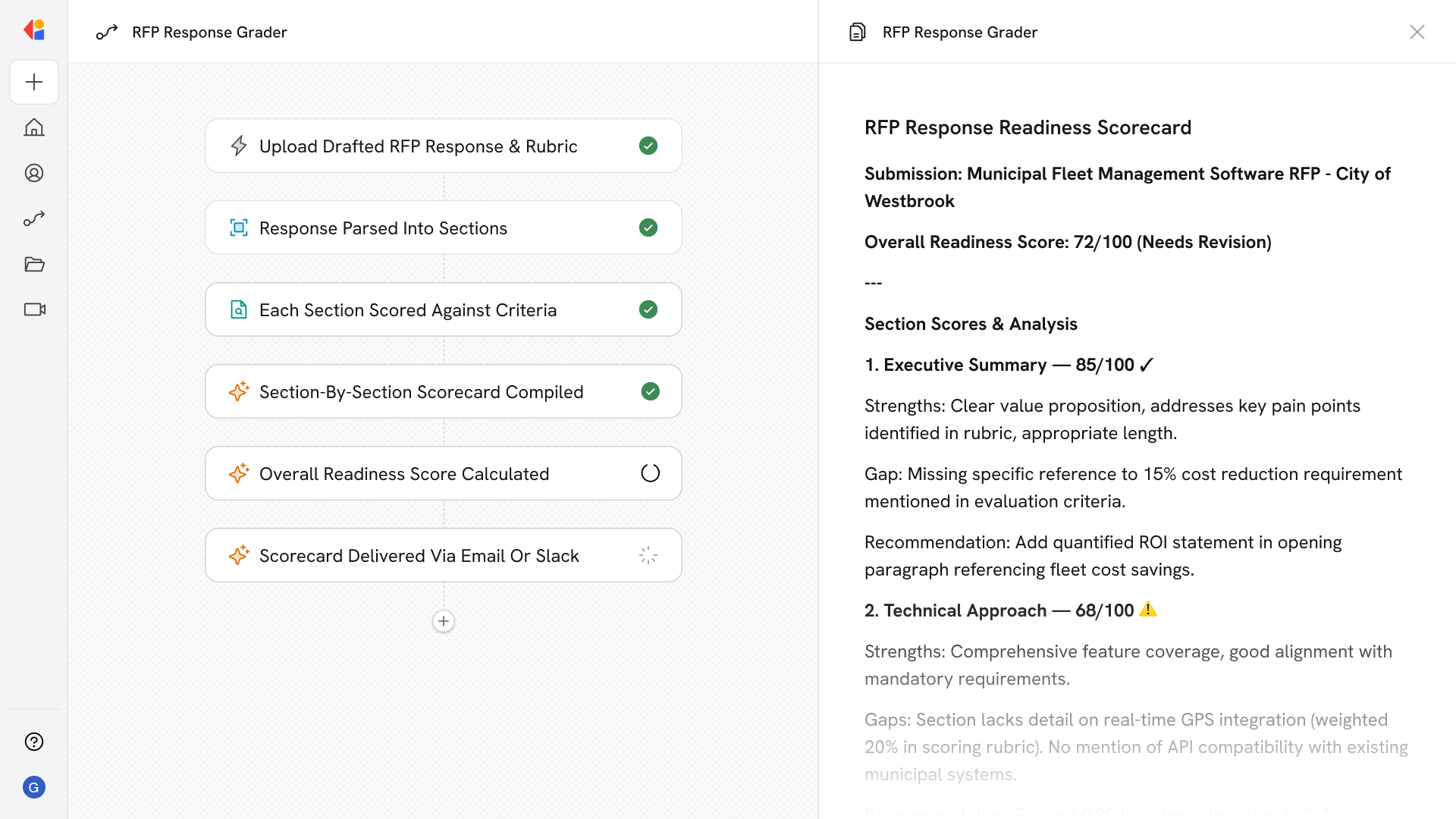
Ingests the drafted RFP response along with the defined scoring rubric and required criteria, evaluates each section against those standards, and outputs a section-by-section scorecard with gaps, required fixes, and a final readiness score.
## Workflow steps
The Workflow begins when a proposal team member uploads the drafted RFP response along with the scoring rubric and required criteria that define what a winning submission looks like.
Cassidy breaks down the RFP response into its individual sections, preparing each one for evaluation against the defined standards.
The Workflow scores each section against the rubric—identifying gaps, compliance issues, and areas that fall short of requirements.
Cassidy assembles findings into a detailed scorecard that highlights what's working, what needs fixing, and specific guidance for each section.
Cassidy aggregates the section scores into an overall readiness score, giving the team a clear signal on whether the response is ready to submit or needs more work.
The scorecard and recommendations are sent to the team via email or Slack, so reviewers can quickly address gaps and improve the response before the deadline.
## Related
Create a custom Agent with tailored instructions and Knowledge Base access.
Add your company documents so Agents can reference them.
## What does this mean?
Proposal teams submit higher-quality responses faster with clear, consistent guidance that reduces rework and improves win rates.
Ingests the drafted RFP response along with the defined scoring rubric and required criteria, evaluates each section against those standards, and outputs a section-by-section scorecard with gaps, required fixes, and a final readiness score.
## Workflow steps
The Workflow begins when a proposal team member uploads the drafted RFP response along with the scoring rubric and required criteria that define what a winning submission looks like.
Cassidy breaks down the RFP response into its individual sections, preparing each one for evaluation against the defined standards.
The Workflow scores each section against the rubric—identifying gaps, compliance issues, and areas that fall short of requirements.
Cassidy assembles findings into a detailed scorecard that highlights what's working, what needs fixing, and specific guidance for each section.
Cassidy aggregates the section scores into an overall readiness score, giving the team a clear signal on whether the response is ready to submit or needs more work.
The scorecard and recommendations are sent to the team via email or Slack, so reviewers can quickly address gaps and improve the response before the deadline.
## Related
Create a custom Agent with tailored instructions and Knowledge Base access.
Add your company documents so Agents can reference them.