> ## Documentation Index
> Fetch the complete documentation index at: https://docs.cassidyai.com/llms.txt
> Use this file to discover all available pages before exploring further.
# RFP Section Routing
> Extracts and categorizes RFP sections, requirements, and questions, routes each to the right stakeholder or SME for approval or input when information is missing.
 ## What does this mean?
Ensures compliant, rigorously approved submissions with clear ownership and fewer rework cycles, while continuously learning from reviewer input to speed up the next RFP.
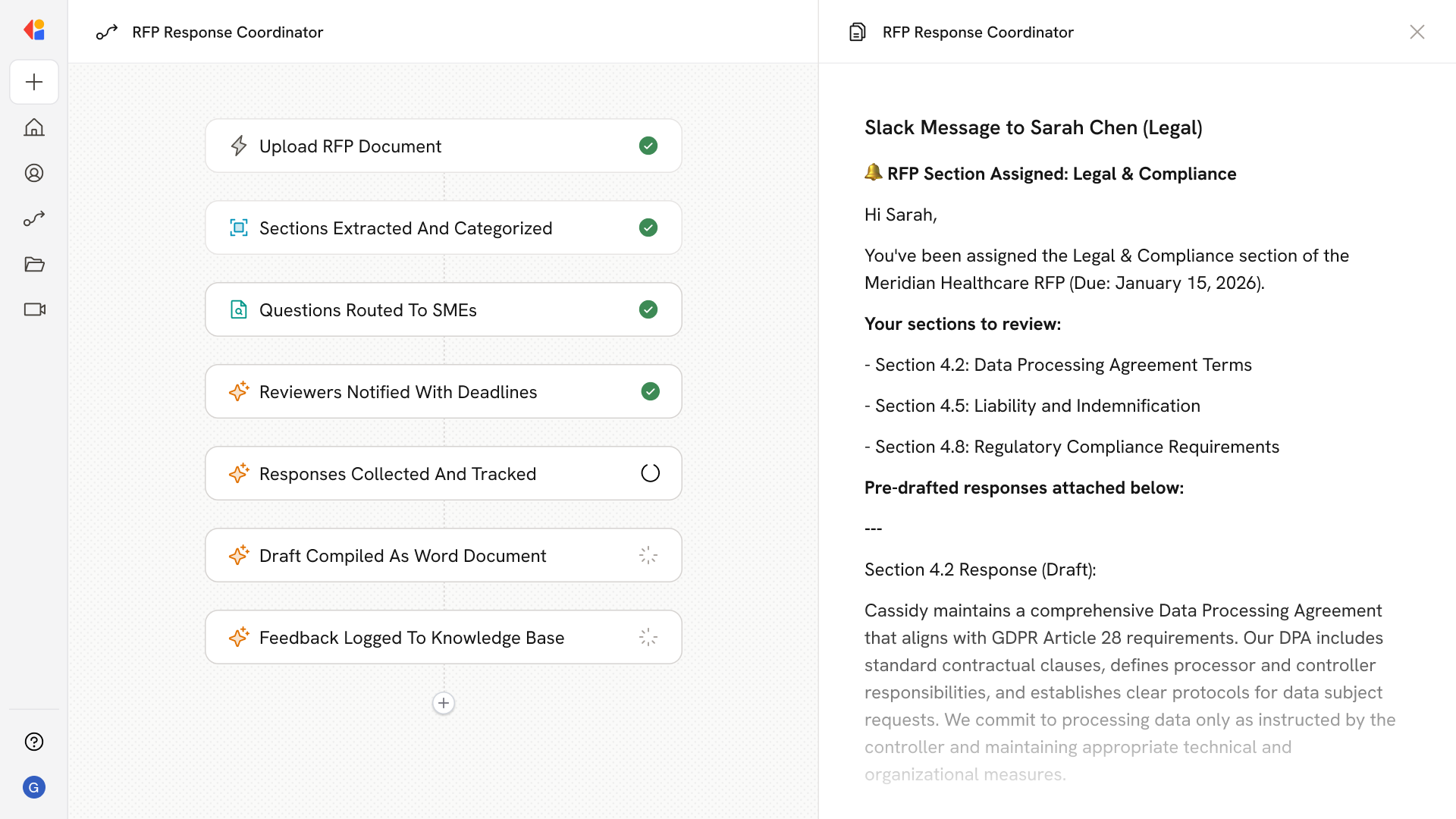
Extracts and categorizes RFP sections, requirements, and questions, routes each to the right stakeholder or SME for approval or input when information is missing, sends targeted email notifications, collects updates and sign-offs, and compiles a single version-controlled draft with a feedback loop that captures corrections to improve future responses.
## Workflow steps
The Workflow activates when a new RFP document is uploaded or received—triggered manually, via email, or through a connected system like SharePoint or Google Drive.
Cassidy parses the RFP to identify distinct sections, requirements, and questions, then categorizes each by topic area (technical, legal, pricing, security, etc.) to determine the right owner.
Using Paths, the Workflow routes each section to the appropriate SME or stakeholder for input. If information is missing or approval is needed, human-in-the-loop checkpoints collect responses directly from the right people.
The Workflow sends email notifications to each assigned reviewer with their specific sections, deadlines, and instructions—keeping ownership clear and reducing confusion.
As reviewers submit their input and approvals, Cassidy captures each response and tracks completion status, flagging any outstanding items that need follow-up.
Once all sections are approved, the Workflow compiles the responses into a single, unified RFP draft and exports it as a Microsoft Word document ready for final review.
Any corrections or reviewer input are logged back to the Knowledge Base, so Cassidy learns from each cycle—improving accuracy and speeding up responses for the next RFP.
## Related
Create a custom Agent with tailored instructions and Knowledge Base access.
Add your company documents so Agents can reference them.
## What does this mean?
Ensures compliant, rigorously approved submissions with clear ownership and fewer rework cycles, while continuously learning from reviewer input to speed up the next RFP.
Extracts and categorizes RFP sections, requirements, and questions, routes each to the right stakeholder or SME for approval or input when information is missing, sends targeted email notifications, collects updates and sign-offs, and compiles a single version-controlled draft with a feedback loop that captures corrections to improve future responses.
## Workflow steps
The Workflow activates when a new RFP document is uploaded or received—triggered manually, via email, or through a connected system like SharePoint or Google Drive.
Cassidy parses the RFP to identify distinct sections, requirements, and questions, then categorizes each by topic area (technical, legal, pricing, security, etc.) to determine the right owner.
Using Paths, the Workflow routes each section to the appropriate SME or stakeholder for input. If information is missing or approval is needed, human-in-the-loop checkpoints collect responses directly from the right people.
The Workflow sends email notifications to each assigned reviewer with their specific sections, deadlines, and instructions—keeping ownership clear and reducing confusion.
As reviewers submit their input and approvals, Cassidy captures each response and tracks completion status, flagging any outstanding items that need follow-up.
Once all sections are approved, the Workflow compiles the responses into a single, unified RFP draft and exports it as a Microsoft Word document ready for final review.
Any corrections or reviewer input are logged back to the Knowledge Base, so Cassidy learns from each cycle—improving accuracy and speeding up responses for the next RFP.
## Related
Create a custom Agent with tailored instructions and Knowledge Base access.
Add your company documents so Agents can reference them.