> ## Documentation Index
> Fetch the complete documentation index at: https://docs.cassidyai.com/llms.txt
> Use this file to discover all available pages before exploring further.
# Buyer Move Alerts
> Proactively re-engage trusted relationships at new accounts to drive pipeline generation and improve meeting creation.
 ## What does this mean?
Turns buyer moves into fresh pipeline by re-engaging trusted relationships at new accounts, improving meeting creation and sourced opportunities without manual tracking.
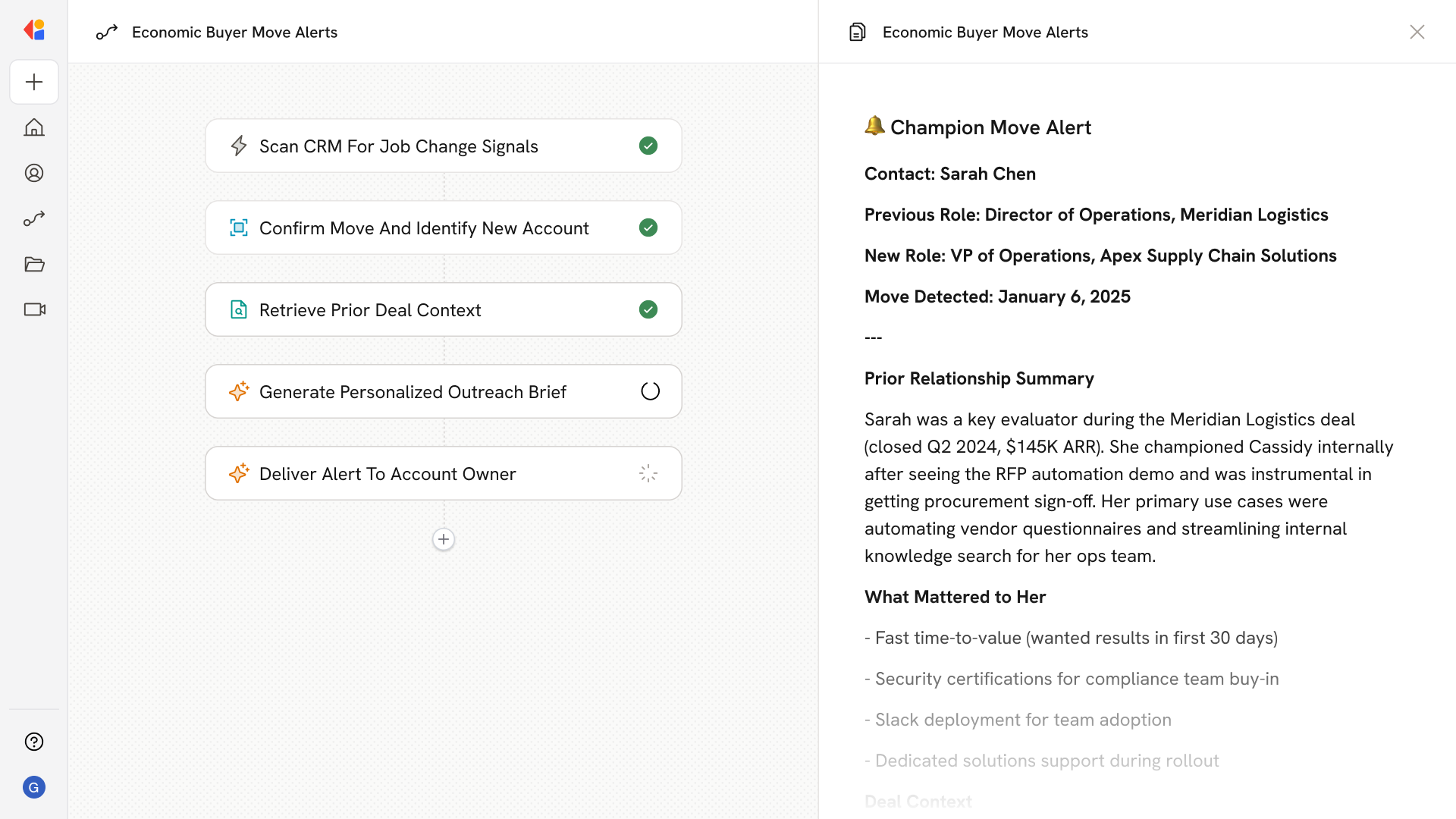
Monitors champions and evaluators in your CRM for job changes by detecting updated titles, companies, and LinkedIn signals, then sends the account owner a concise brief with context from prior deals and tailored outreach guidance to open a new conversation fast.
## Workflow steps
The Workflow runs on a scheduled trigger, scanning champions and evaluators in your CRM for signals like updated titles, new companies, or LinkedIn profile changes that indicate a buyer has moved.
Using the Research Agent, Cassidy cross-references CRM contact data with LinkedIn signals to confirm job changes and identify the new account where your trusted relationship has landed.
The Workflow uses a Cassidy Agent to search your Knowledge Base and CRM history, gathering relevant context from previous deals—what they evaluated, what mattered to them, and how the relationship developed.
Cassidy compiles the findings into a concise brief for the account owner, including the contact's new role and company, prior deal history, and tailored guidance for re-engaging the conversation.
The brief is delivered directly to the account owner via Slack or email, giving them everything they need to reach out quickly—no manual tracking required.
## Related
Create a custom Agent with tailored instructions and Knowledge Base access.
Add your company documents so Agents can reference them.
## What does this mean?
Turns buyer moves into fresh pipeline by re-engaging trusted relationships at new accounts, improving meeting creation and sourced opportunities without manual tracking.
Monitors champions and evaluators in your CRM for job changes by detecting updated titles, companies, and LinkedIn signals, then sends the account owner a concise brief with context from prior deals and tailored outreach guidance to open a new conversation fast.
## Workflow steps
The Workflow runs on a scheduled trigger, scanning champions and evaluators in your CRM for signals like updated titles, new companies, or LinkedIn profile changes that indicate a buyer has moved.
Using the Research Agent, Cassidy cross-references CRM contact data with LinkedIn signals to confirm job changes and identify the new account where your trusted relationship has landed.
The Workflow uses a Cassidy Agent to search your Knowledge Base and CRM history, gathering relevant context from previous deals—what they evaluated, what mattered to them, and how the relationship developed.
Cassidy compiles the findings into a concise brief for the account owner, including the contact's new role and company, prior deal history, and tailored guidance for re-engaging the conversation.
The brief is delivered directly to the account owner via Slack or email, giving them everything they need to reach out quickly—no manual tracking required.
## Related
Create a custom Agent with tailored instructions and Knowledge Base access.
Add your company documents so Agents can reference them.