> ## Documentation Index
> Fetch the complete documentation index at: https://docs.cassidyai.com/llms.txt
> Use this file to discover all available pages before exploring further.
# Census-to-Quote Template Converter
> This tool transforms messy employee census files into accurate, quote-ready submissions in minutes, eliminating manual cleanup and accelerating turnaround times across all benefit lines.
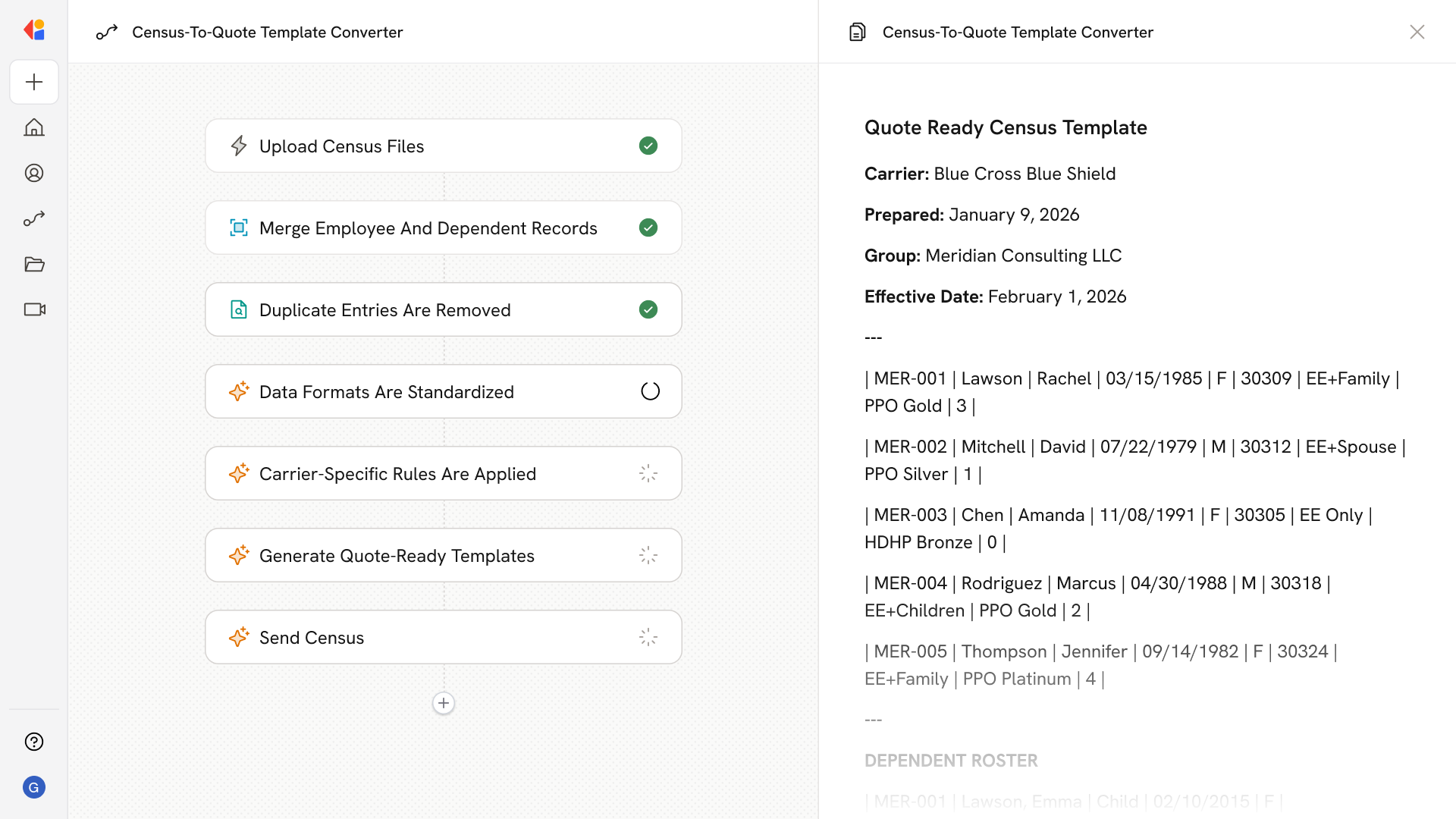 ## What does this mean?
Benefits and sales teams convert messy intake files into accurate, quote-ready submissions in minutes, cutting manual cleanup, reducing avoidable back-and-forth, and speeding quote turnaround across health, dental, vision, life, disability, and ancillary lines.
Accepts employee census files—spreadsheets listing employees, dependents, locations, and current benefits—from brokers, HR teams, and carriers in any format, merges employee and dependent records, deduplicates people across files, standardizes columns and status codes, applies carrier- and vendor-specific rules, and outputs clean data into the exact quote templates required by benefits carriers, TPAs, and marketplaces, while logging every step with role-based access controls.
## Workflow steps
The Workflow begins when a team member uploads employee census files—spreadsheets containing employees, dependents, locations, and current benefits—in any format from brokers, HR teams, or carriers.
Cassidy processes the uploaded files, extracting employee and dependent data and merging related records into a unified dataset.
The Workflow identifies and removes duplicate people across files, ensuring each employee and dependent appears only once in the final output.
Cassidy normalizes columns, status codes, and field values to match consistent formatting standards across all records.
The Workflow routes data through different formatting rules based on the target carrier, TPA, or marketplace—applying the exact specifications each vendor requires.
Cassidy outputs the clean, standardized data into the precise quote template format required by each benefits carrier, ready for immediate submission.
Every transformation step is logged with role-based access controls for auditability. The completed templates are delivered to the team member for review and submission.
## Related
Create a custom Agent with tailored instructions and Knowledge Base access.
Add your company documents so Agents can reference them.
## What does this mean?
Benefits and sales teams convert messy intake files into accurate, quote-ready submissions in minutes, cutting manual cleanup, reducing avoidable back-and-forth, and speeding quote turnaround across health, dental, vision, life, disability, and ancillary lines.
Accepts employee census files—spreadsheets listing employees, dependents, locations, and current benefits—from brokers, HR teams, and carriers in any format, merges employee and dependent records, deduplicates people across files, standardizes columns and status codes, applies carrier- and vendor-specific rules, and outputs clean data into the exact quote templates required by benefits carriers, TPAs, and marketplaces, while logging every step with role-based access controls.
## Workflow steps
The Workflow begins when a team member uploads employee census files—spreadsheets containing employees, dependents, locations, and current benefits—in any format from brokers, HR teams, or carriers.
Cassidy processes the uploaded files, extracting employee and dependent data and merging related records into a unified dataset.
The Workflow identifies and removes duplicate people across files, ensuring each employee and dependent appears only once in the final output.
Cassidy normalizes columns, status codes, and field values to match consistent formatting standards across all records.
The Workflow routes data through different formatting rules based on the target carrier, TPA, or marketplace—applying the exact specifications each vendor requires.
Cassidy outputs the clean, standardized data into the precise quote template format required by each benefits carrier, ready for immediate submission.
Every transformation step is logged with role-based access controls for auditability. The completed templates are delivered to the team member for review and submission.
## Related
Create a custom Agent with tailored instructions and Knowledge Base access.
Add your company documents so Agents can reference them.