> ## Documentation Index
> Fetch the complete documentation index at: https://docs.cassidyai.com/llms.txt
> Use this file to discover all available pages before exploring further.
# Financial Report Insight Extractor
> Accelerate research, inform account strategy, and power targeted outreach by extracting executive priorities, growth drivers, risks, and KPIs from financial filings.
 ## What does this mean?
Equips teams with a trusted, reusable summary of leadership priorities—accelerating research, informing account strategy, and powering targeted, high‑conversion outreach without manual document digging.
Finds and ingests target companies’ latest financial filings (e.g., 10‑K, 10‑Q) from public sources online, extracts executive priorities, growth drivers, risks, and KPIs from sections like MD\&A, Risk Factors, and Business Overview, outputs a structured brief with cited excerpts and metrics, and optionally converts the brief into role‑specific talk tracks and email openers with inline citations.
## Workflow steps
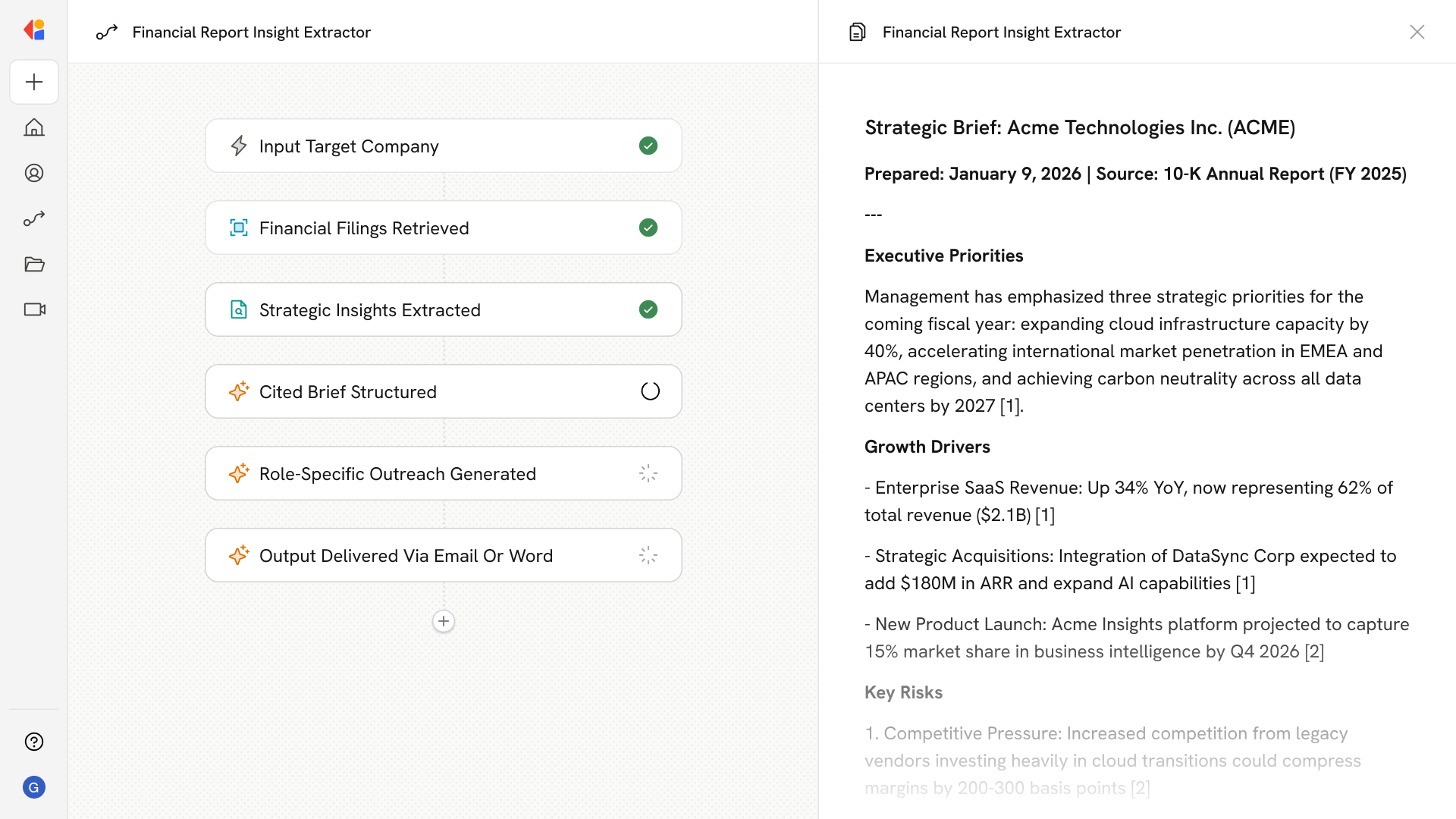
The Workflow starts with a manual trigger where a team member enters the target company name or ticker symbol to kick off the research process.
Cassidy's Research Agent searches public sources online to locate and ingest the company's latest financial filings—such as 10-K or 10-Q reports—bringing the full document into the Workflow.
Cassidy analyzes key sections like MD\&A, Risk Factors, and Business Overview to pull out executive priorities, growth drivers, risks, and KPIs.
The Workflow compiles the extracted insights into a structured brief, complete with cited excerpts and relevant metrics so every data point traces back to its source.
If enabled, the Workflow converts the brief into tailored talk tracks and email openers for sales or account teams—each with inline citations for credibility.
The final brief and any outreach materials are sent via email to the requesting team member or exported as a Microsoft Word document for easy sharing and collaboration.
## Related
Create a custom Agent with tailored instructions and Knowledge Base access.
Add your company documents so Agents can reference them.
## What does this mean?
Equips teams with a trusted, reusable summary of leadership priorities—accelerating research, informing account strategy, and powering targeted, high‑conversion outreach without manual document digging.
Finds and ingests target companies’ latest financial filings (e.g., 10‑K, 10‑Q) from public sources online, extracts executive priorities, growth drivers, risks, and KPIs from sections like MD\&A, Risk Factors, and Business Overview, outputs a structured brief with cited excerpts and metrics, and optionally converts the brief into role‑specific talk tracks and email openers with inline citations.
## Workflow steps
The Workflow starts with a manual trigger where a team member enters the target company name or ticker symbol to kick off the research process.
Cassidy's Research Agent searches public sources online to locate and ingest the company's latest financial filings—such as 10-K or 10-Q reports—bringing the full document into the Workflow.
Cassidy analyzes key sections like MD\&A, Risk Factors, and Business Overview to pull out executive priorities, growth drivers, risks, and KPIs.
The Workflow compiles the extracted insights into a structured brief, complete with cited excerpts and relevant metrics so every data point traces back to its source.
If enabled, the Workflow converts the brief into tailored talk tracks and email openers for sales or account teams—each with inline citations for credibility.
The final brief and any outreach materials are sent via email to the requesting team member or exported as a Microsoft Word document for easy sharing and collaboration.
## Related
Create a custom Agent with tailored instructions and Knowledge Base access.
Add your company documents so Agents can reference them.