> ## Documentation Index
> Fetch the complete documentation index at: https://docs.cassidyai.com/llms.txt
> Use this file to discover all available pages before exploring further.
# Personalized Meeting Follow-Ups
> Reps close loops faster, maintain consistent follow-through, and keep opportunities moving without extra admin work by converting call transcripts into buyer-specific recaps.
 ## What does this mean?
Reps close loops faster, maintain consistent follow-through, and keep opportunities moving without extra admin work.
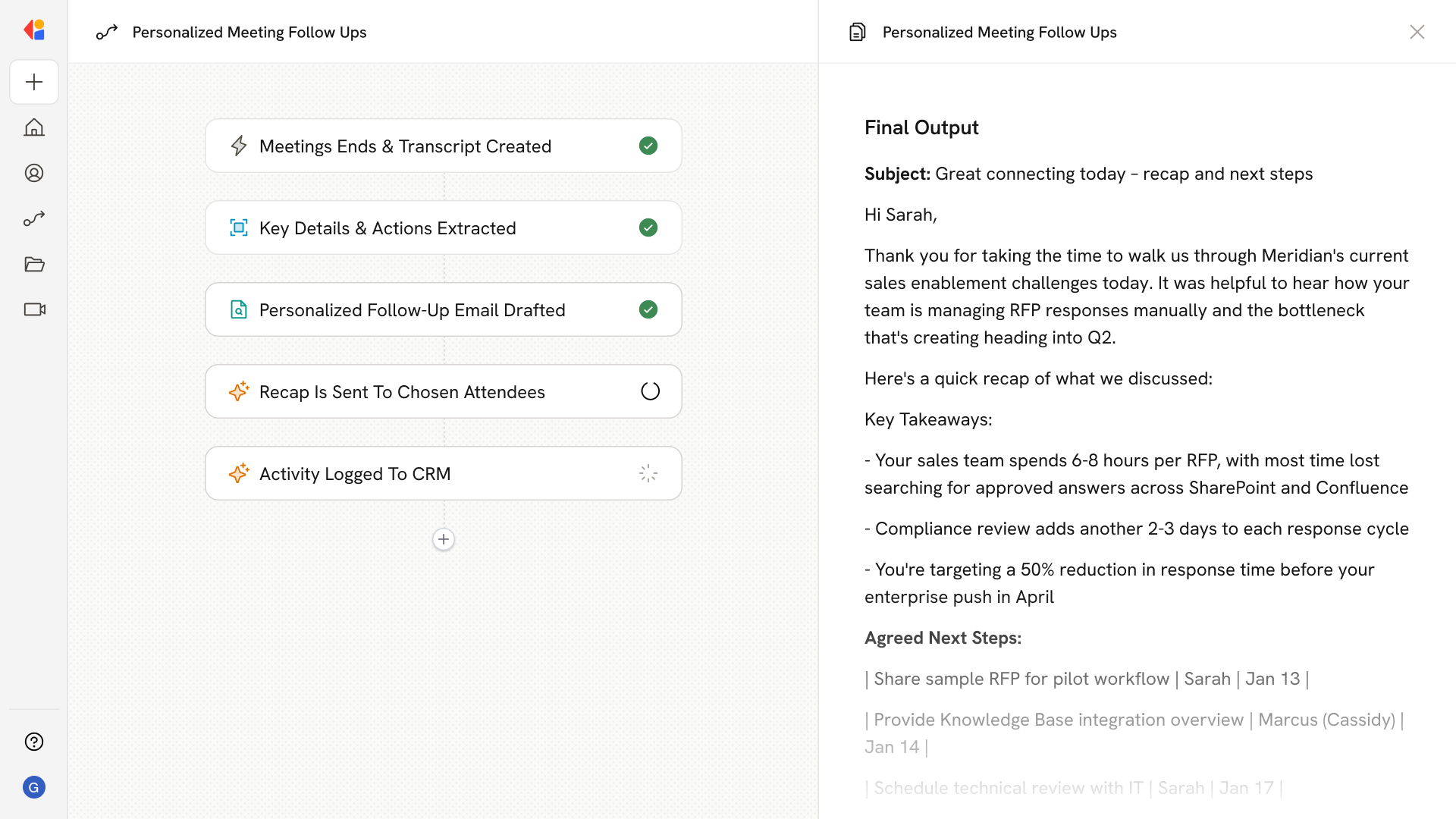
Converts each call’s transcript and meeting notes into a buyer-specific recap with cited decisions, assigned next steps, and due dates, then sends a tailored recap to attendees via email and logs it back to the CRM.
## Workflow steps
The Workflow activates automatically when a sales call wraps up, pulling in the transcript and any meeting notes captured during the conversation.
Using AI with access to your Knowledge Base, the Workflow analyzes the transcript to identify decisions made, action items discussed, owners for each next step, and any due dates mentioned.
The Workflow drafts a personalized follow-up email tailored to the attendees, citing specific moments from the call and clearly outlining agreed-upon next steps with assigned owners and timelines.
Once the recap is ready, the Workflow sends the tailored email directly to meeting participants, keeping everyone aligned without the rep lifting a finger.
The Workflow automatically logs the recap and key details back to your CRM, ensuring the opportunity stays updated and nothing falls through the cracks.
## Related
Create a custom Agent with tailored instructions and Knowledge Base access.
Add your company documents so Agents can reference them.
## What does this mean?
Reps close loops faster, maintain consistent follow-through, and keep opportunities moving without extra admin work.
Converts each call’s transcript and meeting notes into a buyer-specific recap with cited decisions, assigned next steps, and due dates, then sends a tailored recap to attendees via email and logs it back to the CRM.
## Workflow steps
The Workflow activates automatically when a sales call wraps up, pulling in the transcript and any meeting notes captured during the conversation.
Using AI with access to your Knowledge Base, the Workflow analyzes the transcript to identify decisions made, action items discussed, owners for each next step, and any due dates mentioned.
The Workflow drafts a personalized follow-up email tailored to the attendees, citing specific moments from the call and clearly outlining agreed-upon next steps with assigned owners and timelines.
Once the recap is ready, the Workflow sends the tailored email directly to meeting participants, keeping everyone aligned without the rep lifting a finger.
The Workflow automatically logs the recap and key details back to your CRM, ensuring the opportunity stays updated and nothing falls through the cracks.
## Related
Create a custom Agent with tailored instructions and Knowledge Base access.
Add your company documents so Agents can reference them.