> ## Documentation Index
> Fetch the complete documentation index at: https://docs.cassidyai.com/llms.txt
> Use this file to discover all available pages before exploring further.
# Pricing and Packaging Recommender
> Ingests buyer needs and recommends optimal tiers and add-ons with clear rationale.
 ## What does this mean?
Standardizes proposals and speeds time to quote—improving win rates, deal size, and consistency while reducing back-and-forth on pricing and approvals.
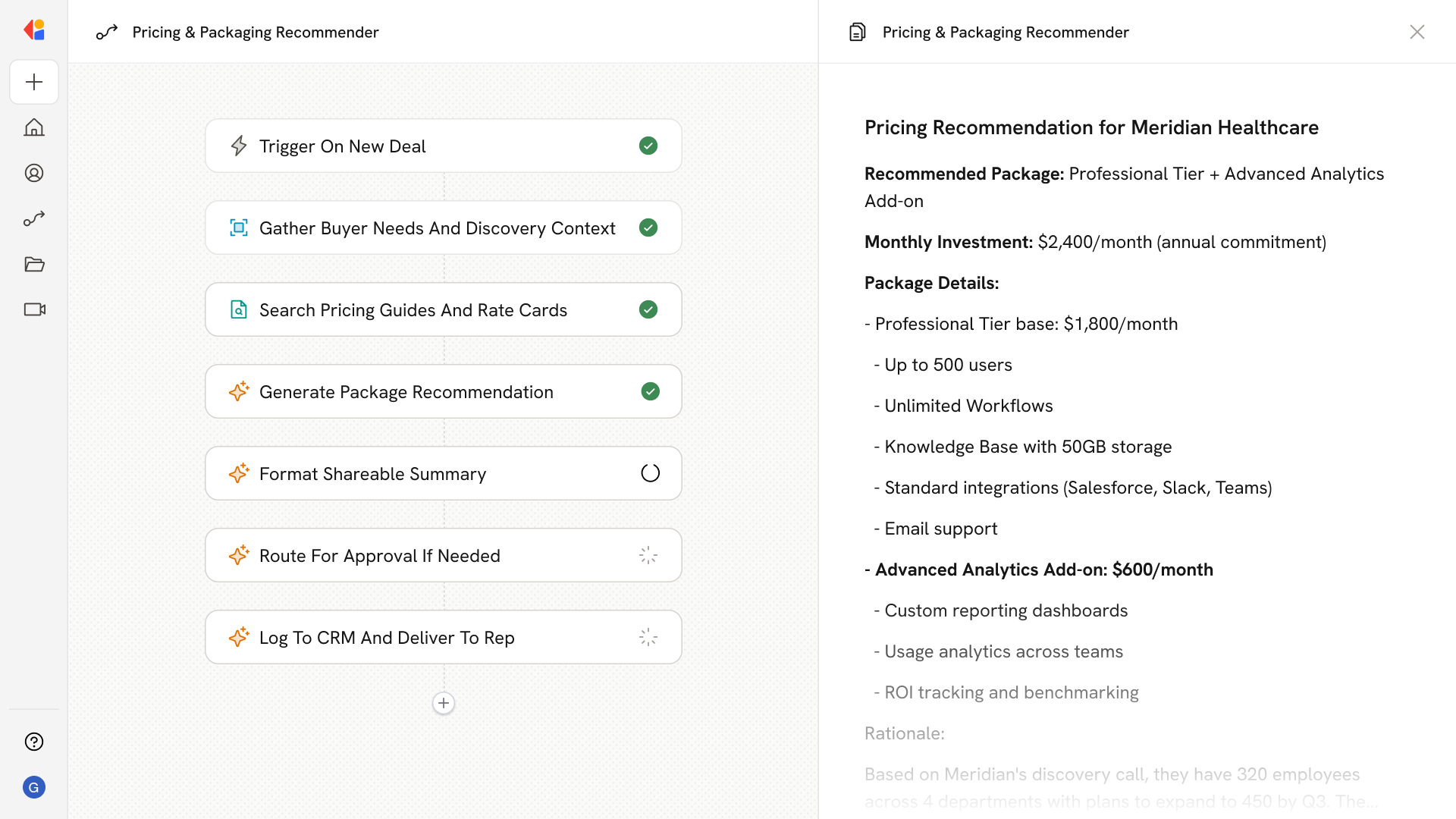
Ingests buyer needs from discovery notes and CRM fields, cross-references internal pricing guides, rate cards, and packaging sheets, and recommends the optimal tier and add-ons with clear rationale, guardrails, and a shareable summary for the rep.
## Workflow steps
The Workflow activates when a rep initiates a pricing request—either via a manual trigger with custom inputs or automatically through Salesforce or HubSpot when a deal reaches the quoting stage.
Cassidy gathers context from discovery notes, CRM fields, and deal details to understand the buyer's requirements, company size, use case, and any specific needs or constraints.
Using the Knowledge Base, the Workflow searches internal pricing guides, rate cards, and packaging sheets to identify relevant tiers, add-ons, and any applicable discounts or guardrails.
The Workflow produces a clear recommendation—optimal tier, suggested add-ons, and rationale—grounded in your pricing rules and the buyer's specific context. Guardrails flag any exceptions or approval requirements.
Cassidy compiles the recommendation, rationale, and any relevant notes into a polished summary the rep can share internally or use in proposals.
If the recommendation falls outside standard parameters, the Workflow routes it to a manager or pricing team for human-in-the-loop approval before the quote goes out.
Once finalized, the recommendation is logged back to the CRM and delivered to the rep via Slack, email, or directly in the deal record for immediate use.
## Related
Create a custom Agent with tailored instructions and Knowledge Base access.
Add your company documents so Agents can reference them.
## What does this mean?
Standardizes proposals and speeds time to quote—improving win rates, deal size, and consistency while reducing back-and-forth on pricing and approvals.
Ingests buyer needs from discovery notes and CRM fields, cross-references internal pricing guides, rate cards, and packaging sheets, and recommends the optimal tier and add-ons with clear rationale, guardrails, and a shareable summary for the rep.
## Workflow steps
The Workflow activates when a rep initiates a pricing request—either via a manual trigger with custom inputs or automatically through Salesforce or HubSpot when a deal reaches the quoting stage.
Cassidy gathers context from discovery notes, CRM fields, and deal details to understand the buyer's requirements, company size, use case, and any specific needs or constraints.
Using the Knowledge Base, the Workflow searches internal pricing guides, rate cards, and packaging sheets to identify relevant tiers, add-ons, and any applicable discounts or guardrails.
The Workflow produces a clear recommendation—optimal tier, suggested add-ons, and rationale—grounded in your pricing rules and the buyer's specific context. Guardrails flag any exceptions or approval requirements.
Cassidy compiles the recommendation, rationale, and any relevant notes into a polished summary the rep can share internally or use in proposals.
If the recommendation falls outside standard parameters, the Workflow routes it to a manager or pricing team for human-in-the-loop approval before the quote goes out.
Once finalized, the recommendation is logged back to the CRM and delivered to the rep via Slack, email, or directly in the deal record for immediate use.
## Related
Create a custom Agent with tailored instructions and Knowledge Base access.
Add your company documents so Agents can reference them.