> ## Documentation Index
> Fetch the complete documentation index at: https://docs.cassidyai.com/llms.txt
> Use this file to discover all available pages before exploring further.
# Sales Call Action Capture
> Extracts action items from calls, assigns owners and due dates, and integrates with team systems.
 ## What does this mean?
Reps and customers leave calls with clear next steps and nothing falls through the cracks, speeding follow‑ups and improving handoff consistency.
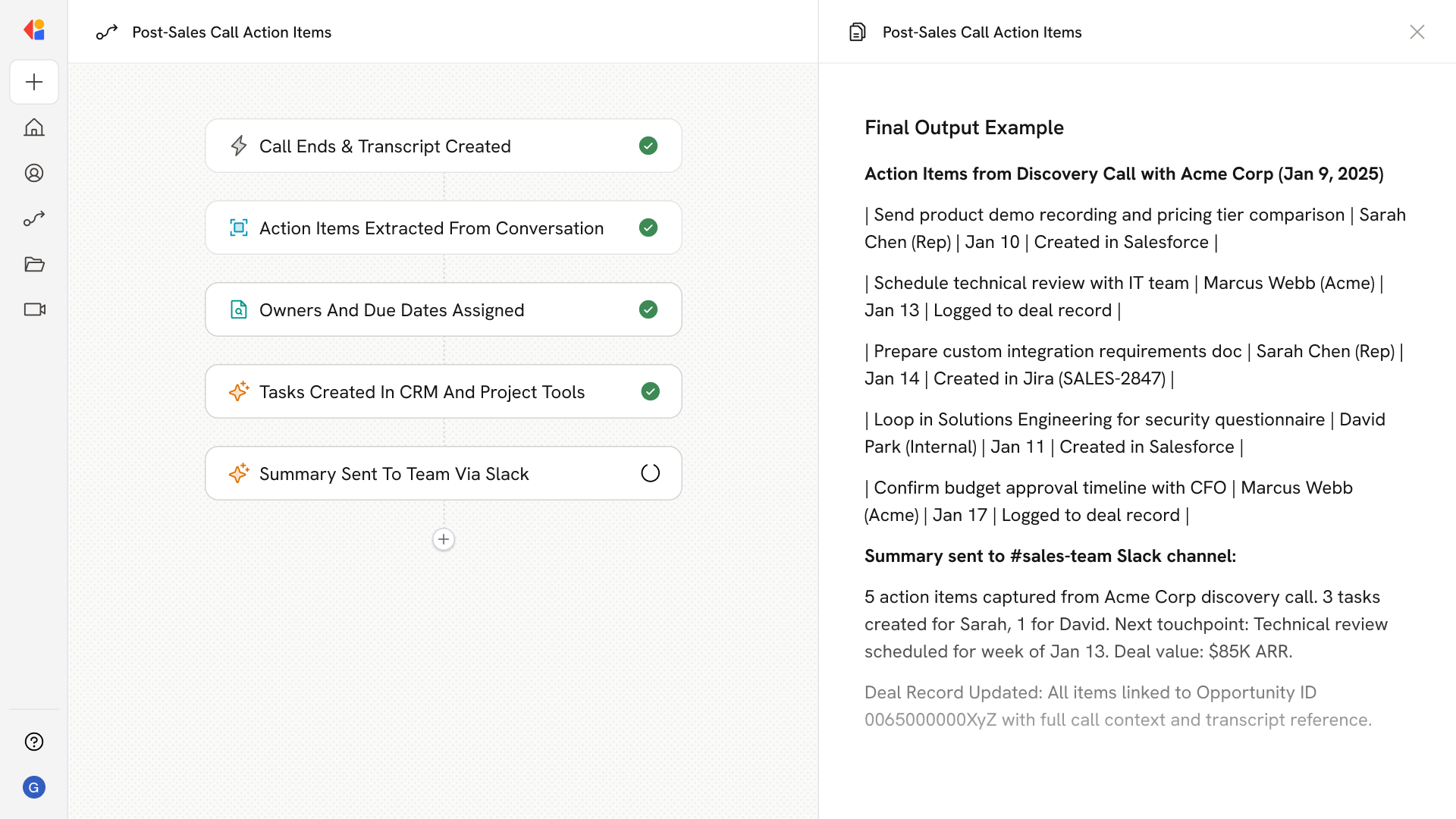
Extracts action items from call transcripts and notes, maps each to an owner and due date, and creates the tasks directly in the team’s systems (e.g., CRM, Jira) with status tracking.
## Workflow steps
The Workflow activates automatically when a sales call ends—whether via a Meeting Ended trigger, Gong, or similar integration—capturing the transcript and notes for processing.
Cassidy analyzes the call transcript using your company's context and terminology, identifying every commitment, follow-up, and next step mentioned during the conversation.
For each action item, the Workflow maps the responsible party (rep, customer, or internal teammate) and determines a due date based on context from the call.
The Workflow automatically creates tasks in your CRM (Salesforce, HubSpot) or project tools (Jira) with the assigned owner, due date, and relevant call context attached.
The Workflow logs all action items back to the deal record for visibility, and sends a summary via Slack or email so reps and stakeholders know exactly what's expected and when.
## Related
Create a custom Agent with tailored instructions and Knowledge Base access.
Add your company documents so Agents can reference them.
## What does this mean?
Reps and customers leave calls with clear next steps and nothing falls through the cracks, speeding follow‑ups and improving handoff consistency.
Extracts action items from call transcripts and notes, maps each to an owner and due date, and creates the tasks directly in the team’s systems (e.g., CRM, Jira) with status tracking.
## Workflow steps
The Workflow activates automatically when a sales call ends—whether via a Meeting Ended trigger, Gong, or similar integration—capturing the transcript and notes for processing.
Cassidy analyzes the call transcript using your company's context and terminology, identifying every commitment, follow-up, and next step mentioned during the conversation.
For each action item, the Workflow maps the responsible party (rep, customer, or internal teammate) and determines a due date based on context from the call.
The Workflow automatically creates tasks in your CRM (Salesforce, HubSpot) or project tools (Jira) with the assigned owner, due date, and relevant call context attached.
The Workflow logs all action items back to the deal record for visibility, and sends a summary via Slack or email so reps and stakeholders know exactly what's expected and when.
## Related
Create a custom Agent with tailored instructions and Knowledge Base access.
Add your company documents so Agents can reference them.