> ## Documentation Index
> Fetch the complete documentation index at: https://docs.cassidyai.com/llms.txt
> Use this file to discover all available pages before exploring further.
# Sales Call Coaching Analyzer
> Optimize sales coaching by automatically analyzing calls.
 ## What does this mean?
Managers focus coaching on the highest-impact calls, drive consistent rep development, and improve call quality without adding manual review time.
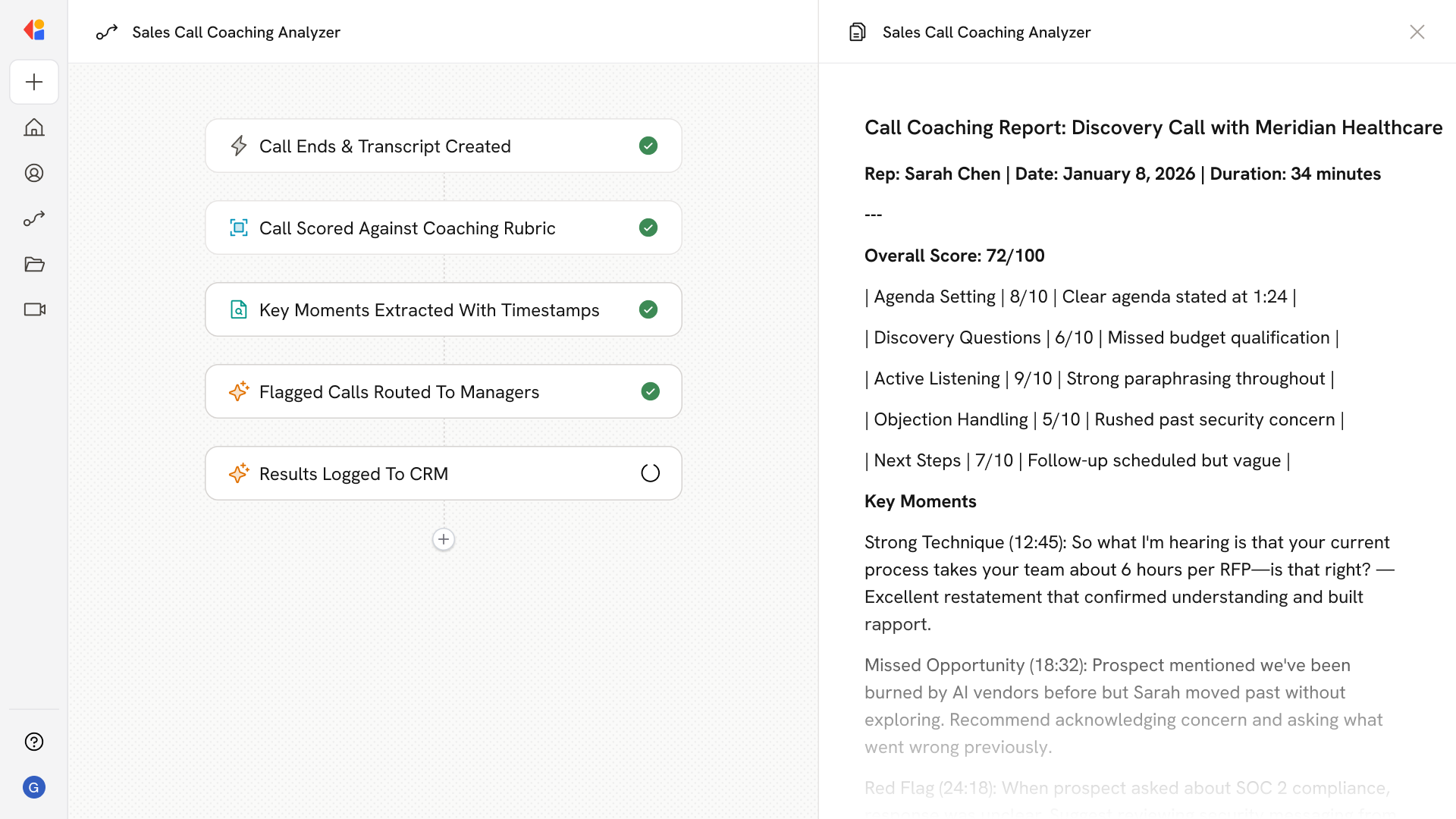
After each recorded sales call, pulls the transcript and metadata from the dialer, scores it against a defined rubric (e.g., agenda set, questions asked, next steps), highlights exact moments with timestamps, and flags calls that cross a threshold for manager review.
## Workflow steps
The Workflow activates automatically when a sales call ends, capturing the recording and metadata from your connected dialer.
Cassidy retrieves the full call transcript along with key metadata—rep name, prospect information, call duration, and timestamp—directly from your connected dialer.
Cassidy evaluates the call against your defined coaching criteria: Was an agenda set? Were discovery questions asked? Were clear next steps established? Each element receives a score based on your standards.
The Workflow identifies and extracts specific moments from the transcript—strong techniques, missed opportunities, or potential red flags—tagged with exact timestamps so managers can jump directly to what matters.
Calls that fall below your quality threshold are automatically flagged and sent to the appropriate manager via Slack or email, complete with scores, highlights, and a link to the recording.
The coaching analysis, scores, and key insights are logged back to the opportunity record in Salesforce or HubSpot, creating a searchable history of rep performance over time.
## Related
Create a custom Agent with tailored instructions and Knowledge Base access.
Add your company documents so Agents can reference them.
## What does this mean?
Managers focus coaching on the highest-impact calls, drive consistent rep development, and improve call quality without adding manual review time.
After each recorded sales call, pulls the transcript and metadata from the dialer, scores it against a defined rubric (e.g., agenda set, questions asked, next steps), highlights exact moments with timestamps, and flags calls that cross a threshold for manager review.
## Workflow steps
The Workflow activates automatically when a sales call ends, capturing the recording and metadata from your connected dialer.
Cassidy retrieves the full call transcript along with key metadata—rep name, prospect information, call duration, and timestamp—directly from your connected dialer.
Cassidy evaluates the call against your defined coaching criteria: Was an agenda set? Were discovery questions asked? Were clear next steps established? Each element receives a score based on your standards.
The Workflow identifies and extracts specific moments from the transcript—strong techniques, missed opportunities, or potential red flags—tagged with exact timestamps so managers can jump directly to what matters.
Calls that fall below your quality threshold are automatically flagged and sent to the appropriate manager via Slack or email, complete with scores, highlights, and a link to the recording.
The coaching analysis, scores, and key insights are logged back to the opportunity record in Salesforce or HubSpot, creating a searchable history of rep performance over time.
## Related
Create a custom Agent with tailored instructions and Knowledge Base access.
Add your company documents so Agents can reference them.