> ## Documentation Index
> Fetch the complete documentation index at: https://docs.cassidyai.com/llms.txt
> Use this file to discover all available pages before exploring further.
# Sales Call Competitor Research
> Detects competitor mentions on calls, then automatically researches those competitors and compiles concise counter-argument briefs, pushed to the CRM and meeting notes.
 ## What does this mean?
Arms reps with timely, consistent material that reduces prep, strengthens objection handling, and lifts win rates by keeping deals on track.
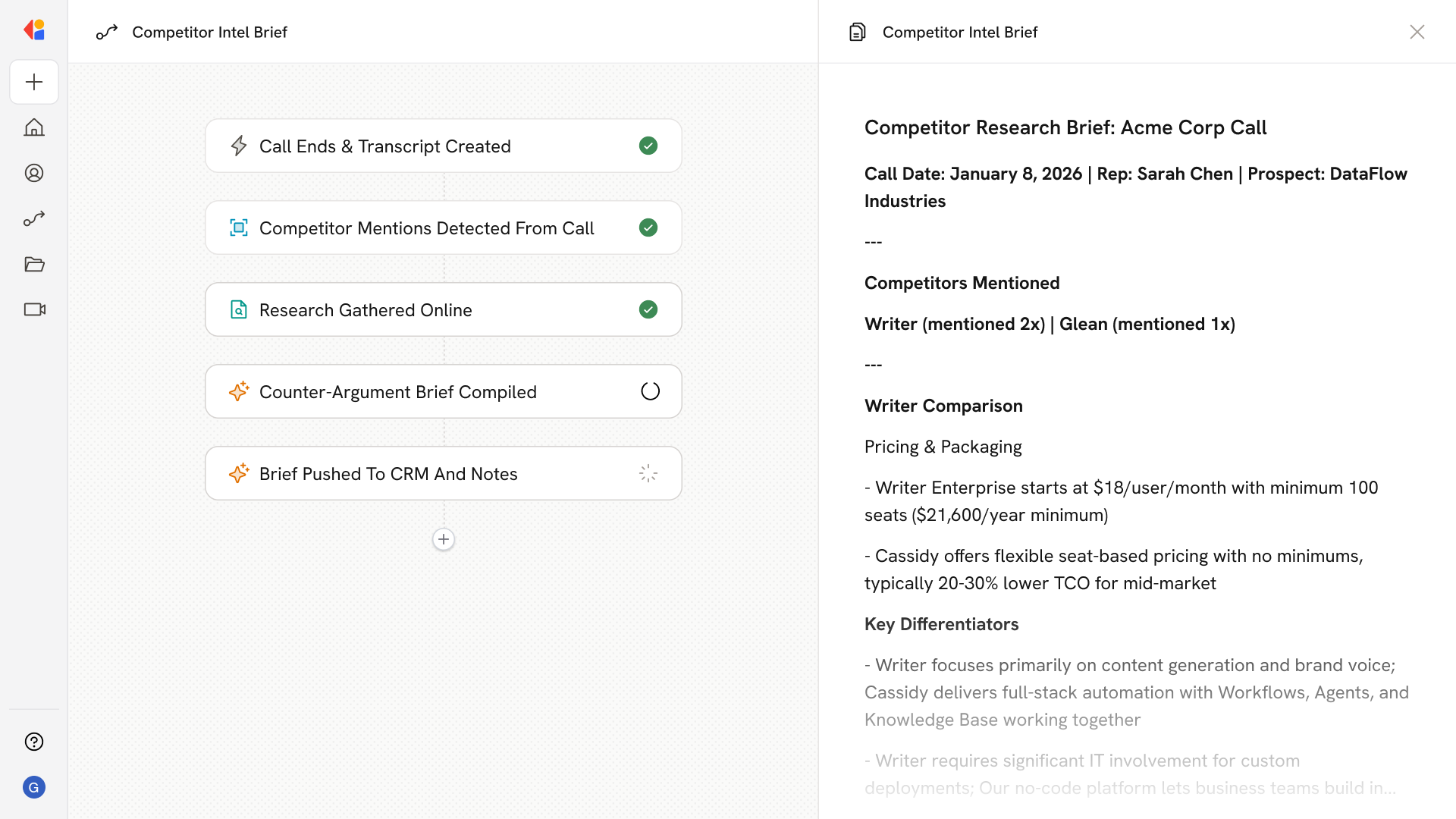
Detects competitor mentions on calls, then automatically researches those competitors across your Knowledge Base, approved battlecards, websites, and recent news to compile concise counter-argument briefs with pricing/feature comparisons, proof points, and talk tracks—pushed to the CRM and meeting notes.
## Workflow steps
The Workflow activates when a sales call ends in Gong. Cassidy scans the transcript to identify any competitor names mentioned during the conversation.
For each competitor detected, Cassidy pulls relevant information from your Knowledge Base, approved battlecards, and gathers the latest from competitor websites and recent news.
Cassidy generates a concise brief that includes pricing and feature comparisons, proof points, and talk tracks—all grounded in your company's approved messaging and positioning.
The completed brief is automatically logged to the associated deal record in your CRM and appended to the meeting notes, so reps have everything they need in one place for follow-up.
## Related
Create a custom Agent with tailored instructions and Knowledge Base access.
Add your company documents so Agents can reference them.
## What does this mean?
Arms reps with timely, consistent material that reduces prep, strengthens objection handling, and lifts win rates by keeping deals on track.
Detects competitor mentions on calls, then automatically researches those competitors across your Knowledge Base, approved battlecards, websites, and recent news to compile concise counter-argument briefs with pricing/feature comparisons, proof points, and talk tracks—pushed to the CRM and meeting notes.
## Workflow steps
The Workflow activates when a sales call ends in Gong. Cassidy scans the transcript to identify any competitor names mentioned during the conversation.
For each competitor detected, Cassidy pulls relevant information from your Knowledge Base, approved battlecards, and gathers the latest from competitor websites and recent news.
Cassidy generates a concise brief that includes pricing and feature comparisons, proof points, and talk tracks—all grounded in your company's approved messaging and positioning.
The completed brief is automatically logged to the associated deal record in your CRM and appended to the meeting notes, so reps have everything they need in one place for follow-up.
## Related
Create a custom Agent with tailored instructions and Knowledge Base access.
Add your company documents so Agents can reference them.