

If you’re looking for Data Analysis, it has moved into this setting. Data
analysis is one of the main things Code Execution & File Creation enables.
What it enables
When this setting is on, your Agent can:- Analyze CSVs, spreadsheets, and structured files
- Create charts, summaries, and calculations from data
- Generate downloadable documents, spreadsheets, presentations, and PDFs
- Read large Connector or Workflow results that would otherwise be cut off
- Work with files attached in Chat or referenced from the Knowledge Base
Check or change the setting
1
Open the Agent editor
Go to Agents, find the Agent you want to configure, click the ⋯ menu, and select Edit.
2
Open Advanced Settings
In the Customize section, expand Advanced Settings.
3
Turn Code Execution & File Creation on or off
Use the Code Execution & File Creation toggle.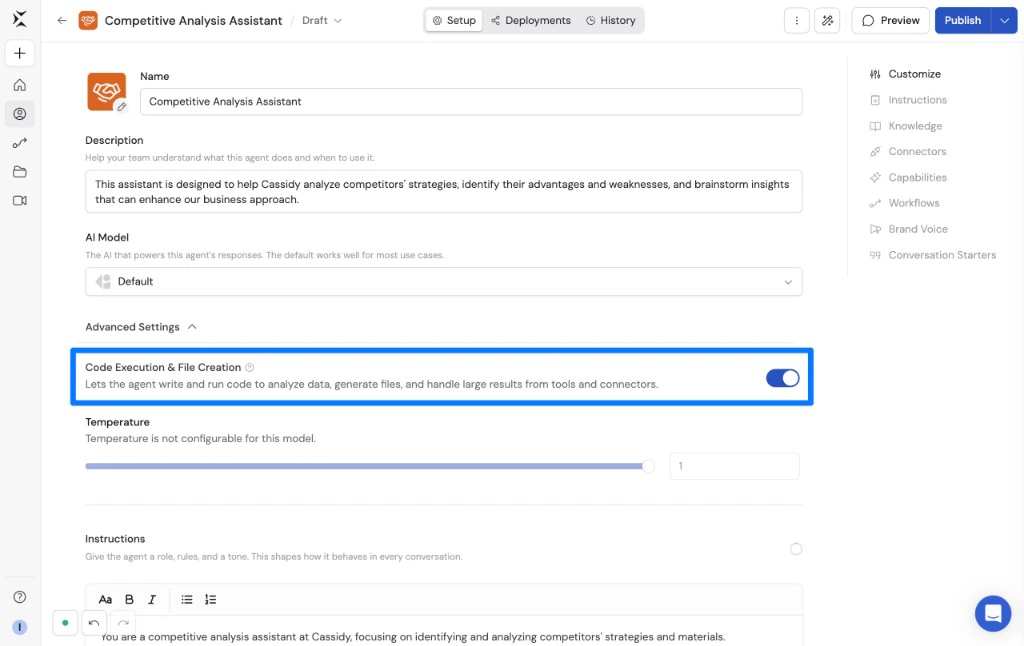
4
Publish your Agent
Click Publish to save the setting.
Internet access
Organization admins can also control whether code execution can access the internet while processing files or installing packages. See Control code execution and file creation internet access.Related
Analyze data with an Agent
Ask Agents to analyze spreadsheets, CSVs, and structured files.
Create files in Cassidy
Generate documents, spreadsheets, presentations, and reports.
Analyze data in Workflows
Use Code Execution & File Creation inside Generate Text actions.